
Microsoft Purview vs Policy Acknowledgment Software: What Each Tool Does (and Doesn’t) Do Microsoft ...
Standard Operating Procedures (SOPs): A Complete Guide to Writing and Managing Them
Standard operating procedures (SOPs) are written, step-by-step instructions that make routine work consistent, safe and auditable. This standard operating procedure guide covers the whole job: what SOPs are, which format to use, how to write one, how to build an operating procedure manual, and how to keep every SOP current once it is published.
Writing an SOP is only one part of success. The whole lifecycle needs planning, from defining purpose and scope through to training, distribution and review. This guide introduces each stage, and each stage has its own detailed post in our seven-part series. A knowledge governance framework sets who owns each SOP and when it must be reviewed.
You can also download this entire series as a free eBook.
What are standard operating procedures?
A standard operating procedure is a written set of instructions for a routine or repetitive task. The US Environmental Protection Agency defines it as "a set of written instructions that document a routine or repetitive activity followed by an organization" (EPA QA/G-6). Standard operating procedures (SOPs) are used in manufacturing, laboratories, healthcare, finance, IT and public services, wherever the same task has to be done the same way every time. For the full SOP meaning and a worked purpose and scope example, read what a standard operating procedure is.
Why standard operating procedures matter
- Consistency and quality. EPA's guidance says the development and use of SOPs "minimizes variation and promotes quality" (EPA QA/G-6, section 1.3).
- Compliance. Many regulators require written procedures. FDA rules for drug manufacturers, for example, require "written procedures for production and process control" (21 CFR 211.100(a)).
- Training. New starters learn one approved method rather than picking up habits. See the benefits of writing SOPs.
- Continuity. Know-how stays with the organization when people leave, rather than living in one person's head.
- Audit evidence. Auditors can see how work is meant to be done and who has been told.
Operating process vs operating procedure
The two terms are often mixed up. An operating process is the sequence of activities that turns an input into an output, such as order to cash or hire to onboard. An operating procedure explains how one part of that process is carried out, by which roles and in what order. One process usually needs several SOPs, and each SOP should trace back to a policy, a regulation or a clear business need.
| Document | Answers | Example |
|---|---|---|
| Policy | What is required, and why? | All new hires complete security training in their first week. |
| Operating process | What happens, end to end? | Hire to onboard: offer, contract, accounts, equipment, training. |
| Standard operating procedure | How is this task done, by whom and in what order? | How IT creates accounts and assigns training for a new starter. |
| Work instruction | How is one step done in one system? | How to add a user to a Microsoft Entra ID group. |
For more on how these layers fit together, read the differences between policies, processes and procedures.
Which SOP format should you use?
Penn State Extension's SOP writing guide describes four common formats. Choose the simplest one that fits the task:
| Format | Best for |
|---|---|
| Simple steps | Short, routine tasks with few decisions, written as a numbered list |
| Hierarchical steps | Longer tasks where main steps need sub-steps, detail or safety notes |
| Graphic procedures | Tasks where photos or diagrams explain the step better than words |
| Flowcharts | Tasks with decisions and branches, where the next step depends on an outcome |
Our guide to SOP format and writing style covers structure, wording and examples in detail.
The SOP lifecycle: seven stages from planning to review
To guide this series we created the "SOP pie", a diagram of the SOP lifecycle. No single guide can cover every scenario where SOPs are used, but every successful SOP passes through the same stages.
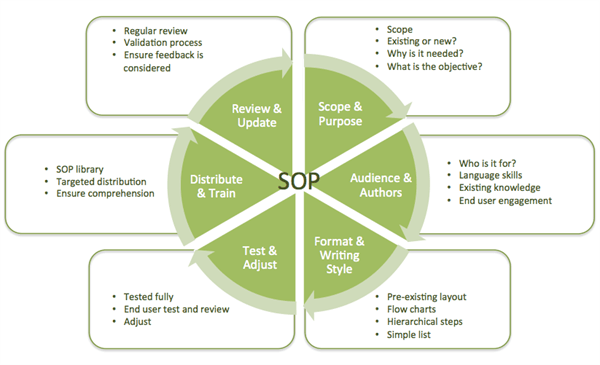
1. Introduction: plan your SOP program
Decide which processes need SOPs first. Start with tasks that carry safety, compliance or customer risk, tasks done rarely, and tasks done in several places that should give the same result. You're reading the introduction now.
2. Purpose and scope
Write one to three sentences on why the procedure exists and what a correct outcome looks like, then define who it applies to, where it starts and stops, and what it excludes. Read SOP purpose and scope.
3. Audience and authors
Write for the person who does the task. Involve the people who do the work today, and name an owner, reviewers and an approver. Read SOP audience and authors.
4. Format and writing style
Choose a format, use a consistent template and write short, active, numbered steps. Read SOP format and writing style, or start from our free SOP template pack.
5. Test and adjust
Ask someone who didn't write the SOP to follow it exactly, note where they hesitate or go wrong, and fix the document before approval. Read testing and adjusting SOPs.
6. Distribute and train
Publish one controlled version, send it to the people in scope, train them and keep a record that they have read the current version. Read distributing SOPs and training staff.
7. Review and update
Set a review date for every SOP, update it when the work, the system or the regulation changes, and re-issue the new version to the same people. Read reviewing and updating SOPs.
How to write an SOP: a quick checklist
- Pick the task and name the policy, regulation or business need behind it.
- Talk to the people who do the task now and write down the real steps, including workarounds.
- Write the purpose and scope before the steps.
- Choose a format: simple steps, hierarchical steps, graphics or a flowchart.
- Write numbered steps that start with a verb, one action per step.
- Add roles, safety warnings, required equipment or access, and the records to keep.
- Test the SOP with someone who didn't write it, then revise it.
- Get it reviewed and approved, give it a version number and an effective date, and publish one controlled copy.
- Train the people in scope and record who has read it.
- Set a review date.
For more detail, see our SOP best practices and the common problems with implementing SOPs.
Building an operating procedure manual
An operating procedure manual, or SOP manual, is the organized collection of all the SOPs for a team, site or organization. It gives staff one place to find the current approved procedure and gives auditors one place to check. A good operating procedure manual has:
- A short introduction explaining what the manual covers and who owns it.
- An index of every SOP with its ID, title, owner, version and review date.
- The SOPs themselves, grouped by department or process, all in the same template.
- Definitions and abbreviations used across the procedures.
- A revision log, so readers can see what changed and when.
Keep the manual as a controlled library rather than a single document that gets copied and emailed. Our guide to creating an SOP manual walks through the structure, and you can download the free standard operating procedures manual.
Managing standard operating procedures in SharePoint and Microsoft 365
Many organizations keep their SOPs in SharePoint. A document library gives you one controlled location, version history keeps each successive version, and content approval can keep drafts hidden from readers until they're approved (Microsoft Learn). What SharePoint doesn't do on its own is ask the right people to read a new or updated SOP, chase them, or record which version each person accepted.
DocRead SOP management software adds that inside SharePoint and Microsoft 365. It assigns each SOP to SharePoint or Microsoft Entra ID groups, sets a reading deadline, sends reminders, escalates overdue readers to managers and keeps a time-stamped acknowledgment of the exact version each person read. The DocSurvey add-on adds a quiz with a pass mark where you need proof of understanding. Read 10 steps for implementing successful SOPs with SharePoint, or book a demo to see DocRead with your own procedures. You can also start the 30-day SharePoint Server trial.
Standard operating procedures FAQ
What are standard operating procedures (SOPs)?
Standard operating procedures are written, step-by-step instructions for carrying out a routine task the same way every time, so the result is consistent, safe and compliant whoever does the work.
What should a standard operating procedure guide include?
It should cover the purpose and scope, roles and responsibilities, the format, numbered steps, safety warnings, records, references and a revision history, plus how the SOP is tested, approved, distributed and reviewed.
What is an operating procedure manual?
An operating procedure manual is an organized collection of all the SOPs for a team, site or organization, with an index, owners, versions and review dates, kept as one controlled source.
What is the difference between an operating process and an SOP?
An operating process is the end-to-end sequence of activities that produces an outcome. An SOP explains how one part of that process is carried out, by which roles and in what order.
Who should write an SOP?
The people who do the task should be involved, with a named owner responsible for the document and a reviewer and approver who check it before it's published.
How often should SOPs be reviewed?
On a set schedule that your organization or regulator defines, and whenever the task, system or regulation changes. Every SOP should carry a review date.
Get your free Standard Operating Procedures guide
Creating Standard Operating Procedures for your organisation doesn't have to be complicated. This guide will introduce you to the whole lifecycle from creation to training and distribution.
Other articles in the series:
You may also like:
How to Assign Required Policies with Microsoft Entra ID Dynamic Groups Not every employee ...
Published: November 9, 2026 A policy review is a scheduled check that a policy ...
Published: November 9, 2026 To write a policy, confirm a policy is needed, name ...
A HIPAA compliance audit checks whether a covered entity or business associate meets the ...
How Do You Migrate Legacy Policies into a Policy Management System? For a lot ...