
DocRead by Collaboris
Policy Management Software for SharePoint and Microsoft 365
Policy management software is a system for publishing policies and procedures, sending each one to the people it applies to, and proving they have read it. DocRead does this inside SharePoint and Microsoft 365: you assign a policy to SharePoint or Microsoft Entra ID groups, and DocRead reminds, escalates and records a time-stamped acknowledgment of the exact version read.
DocRead runs in SharePoint Online and SharePoint Server 2019 and 2016. Policies stay in the libraries your teams already use, so there is no second system to run.
Reviewed by Hugo Esperanca, Director and Co-Founder, Collaboris · Last reviewed October 19, 2026
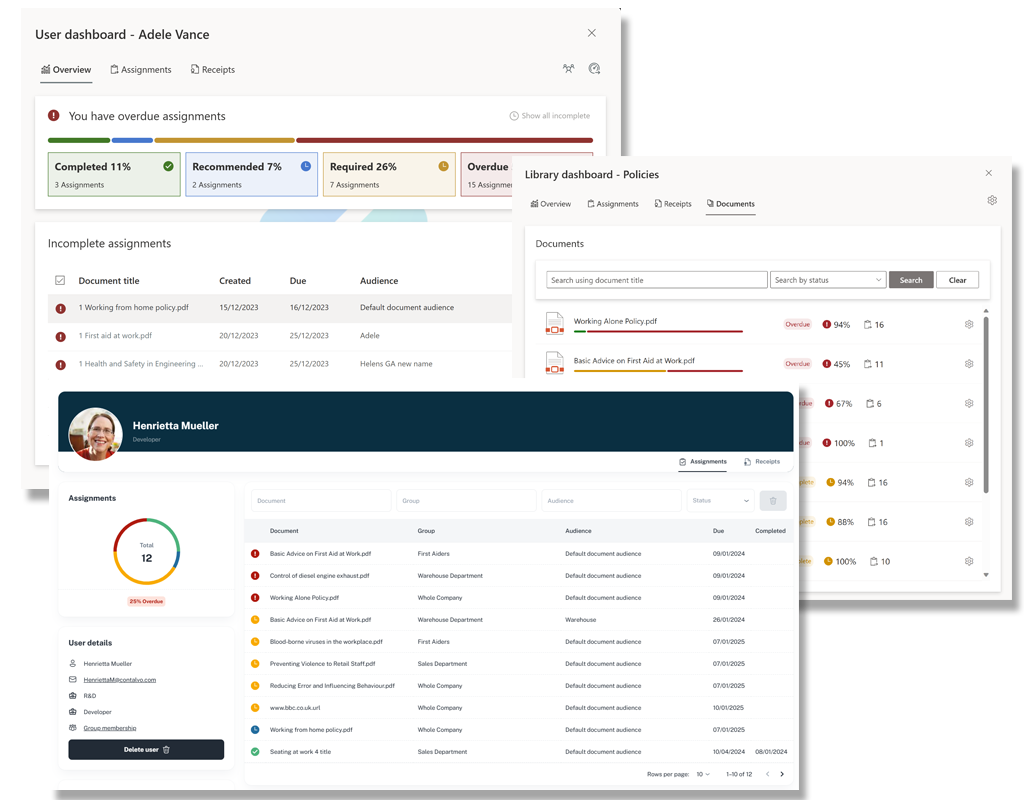
DocRead vs the alternatives at a glance
Most SharePoint and Microsoft 365 teams compare DocRead with ConvergePoint, Xoralia, PowerDMS or a do-it-yourself SharePoint build. The short version:
| Option | Where it runs | Best fit |
|---|---|---|
| DocRead | SharePoint Online (Microsoft 365) and SharePoint Server 2019 and 2016, on your existing libraries | Proving who read which version, without moving policies to a new repository |
| ConvergePoint (Ideagen Compliance) | An app installed on Microsoft 365 SharePoint Online | One product for drafting, approval, policy library and attestation |
| Xoralia | Inside your Microsoft 365 tenant, delivered through SharePoint, Teams and Outlook | Scheduled reviews, approvals and attestation in one Microsoft 365 suite |
| PowerDMS | A separate cloud-based platform | Public safety agencies that also need accreditation management |
| SharePoint-only build | SharePoint libraries plus your own Power Automate flows | Teams with the time to build and maintain their own assignment and tracking |
Based on each vendor's product pages, checked October 19, 2026. See the full comparison below.
What does policy management software do?
Policy management software takes a policy from “published” to “read, understood and on record.” Buyers also call it policy and procedure management software, a policy management tool or policy tracking software. Whatever the name, it should do these six jobs.
Distribute
Send each policy to the people who need it, by department, role, location or group membership.
Track acknowledgment
Record who confirmed which version, with the date and time.
Remind and escalate
Chase readers automatically and pass overdue tasks to managers or the compliance team.
Control versions
Keep a history of changes and make sure staff read the current, approved version.
Report for audits
Show live dashboards of who is complete and who is outstanding, and export the records. For deeper reporting, see Power BI compliance reporting.
Handle joiners
Give new starters, movers and contractors the right reading as soon as they join a group.
The policy lifecycle in SharePoint, stage by stage
A policy moves through five stages. SharePoint already handles drafting and approval. DocRead takes over at publishing, where most teams lose track of who has actually read the policy.
SharePoint
Draft
Write the policy in Word and save it in a SharePoint library. Version history keeps every change.
SharePoint
Approve
Turn on content approval so a draft stays hidden from readers until an approver publishes it.
DocRead
Publish and assign
Assign the approved version to SharePoint or Microsoft Entra ID groups and set a reading deadline.
DocRead
Acknowledge
Readers open the policy and confirm it. DocRead reminds, escalates overdue tasks and records a time-stamped receipt.
SharePoint and DocRead
Review
Review the policy on a set schedule. When you revise it, re-issue the new version to the same audience and collect fresh acknowledgments.
Regulated organizations often have to show this cycle. HIPAA, for example, requires covered entities to keep security policy documentation for six years, make it available to the people who carry out the procedures, and review it periodically. For a step-by-step setup, read the guide to managing policies in SharePoint.
Policy distribution and policy tracking inside SharePoint
Policy distribution starts from the SharePoint library where the policy already lives. Policy tracking runs from the same place, so the document, the reading task and the acknowledgment record never leave Microsoft 365. Acknowledgment is handled by DocRead, our policy acknowledgment software for SharePoint.
Target the right people
Choose a document in your SharePoint library and assign it to SharePoint groups or Microsoft Entra ID groups.
Set a deadline and let DocRead follow up
Readers get an email with a direct link and a due date. DocRead sends reminders and escalates overdue tasks to managers or the compliance team.
Check understanding
Readers must open the document before they can confirm it. Add a DocSurvey quiz with a pass mark when you need proof that people understood the policy.
Report
Live dashboards show who has acknowledged each policy and who is still outstanding. Every assignment and acknowledgment is time-stamped, and you can export the records for auditors.
Have you heard about DocRead Smart Move?
Smart Move detects when a user joins or leaves a group or audience, so people only ever receive the right policies and procedures. It suits onboarding, secondments, new project work and external contractors, and it cuts hours of manual administration. Tell me more about Smart Move
DocRead vs ConvergePoint, Xoralia, PowerDMS and a SharePoint-only build
All five can hold your policies. They differ in where they run, how much of the lifecycle they take over, and whether your documents have to move.
| DocRead | ConvergePoint (Ideagen Compliance) | Xoralia | PowerDMS | SharePoint-only build | |
|---|---|---|---|---|---|
| Where it runs | SharePoint Online and SharePoint Server 2019 and 2016 | App on Microsoft 365 SharePoint Online | Inside your Microsoft 365 tenant | Separate cloud platform | SharePoint plus Power Automate |
| Where policies live | Your existing libraries, no migration | A policy library in SharePoint | Your SharePoint document libraries | The PowerDMS repository | Your existing libraries |
| Drafting, review and approval | Uses SharePointWorks with SharePoint content approval and version history | Built inTemplates and predefined review and approval workflows | Built inScheduled reviews and routed approvals | Built inReview and approval workflows | PartlyContent approval and version history |
| Assign required reading and track acknowledgment | Built inTo SharePoint or Entra ID groups, with deadlines, reminders, manager escalation and version receipts | Built inRead-and-acknowledge assignments | Built inAttestation with reminders and manager dashboards | Built inDocumented acknowledgments with reminders | Not built inYou build it with flows and lists |
| Understanding checks | Optional quiz with a pass mark (DocSurvey) | Quizzes | AI quiz builder | Training and microlearning products | Build your own, for example with Forms |
| Best fit | Read-and-acknowledge evidence without leaving SharePoint, on cloud or on premises | Teams that want one SharePoint app for the whole lifecycle | Microsoft 365 teams that want lifecycle automation and Teams delivery | Public safety agencies and accreditation | Small teams with in-house Power Automate skills |
Sources: Microsoft Support, “Require approval of items in a list or library”; ConvergePoint, Xoralia and PowerDMS product pages, checked October 19, 2026. Confirm current features with each vendor.
Comparing two vendors in depth? Read DocRead vs PowerDMS or DocRead vs Xoralia vs ConvergePoint, or work through the policy management software buyer's checklist.
Policy management by sector
Regulators rarely ask whether a policy exists. They ask whether the right people had it, read it and followed it. These rules show why the acknowledgment record matters.
Healthcare
HIPAA requires security policy documentation to be kept for six years, made available to the people who implement it, and reviewed periodically. DocRead keeps a time-stamped record of who received and confirmed each version.
45 CFR 164.316(b)(2)
Life sciences and drug manufacturing
FDA rules require staff to be trained on the written procedures that apply to their work, on a continuing basis. DocRead assigns each SOP to the people who use it and adds a quiz where reading alone is not enough.
21 CFR 211.25(a)
Financial services
FINRA member firms must establish, maintain and enforce written supervisory procedures. DocRead sends each procedure to the people it covers and keeps the receipts when it changes.
FINRA Rule 3110(b)(1)
Manufacturing and operations
OSHA requires employers to review an emergency action plan with each covered employee when they start, when their duties change and when the plan changes. DocRead assigns the plan to new starters through their group and lets you re-issue it to everyone when the plan changes.
29 CFR 1910.38(f)
DocRead is also used by HR teams for handbooks and onboarding, by quality teams for SOP management software, and by security teams for ISO 27001 compliance with SharePoint. Customers include Colonial Pipeline, North Wales Police, Fiji Airways, Wipro, Enstar Group and Age Partnership. See our customers.
“DocRead has enabled us to see a massive efficiency improvement… we are now saving 2 to 3 weeks per policy on administration alone.”Nick Ferguson, Peregrine Pharmaceuticals (feedback on the on-premises version). Read the case studies
Which DocRead edition fits your SharePoint?
DocRead runs in the SharePoint you already have. Choose the edition that matches where it lives.
DocRead for Microsoft 365
Runs in SharePoint Online in your Microsoft 365 tenant. Policies stay in your existing document libraries, with the permissions and version control you already have.
DocRead for SharePoint Server
For organizations that run SharePoint Server 2019 (classic and modern) or 2016. Try it free for 30 days with 50 user licenses.
Explore DocRead for SharePoint Server · Download the free trial
How much does a policy management tool like DocRead cost?
Like most policy management tools, DocRead is licensed per user. What sets it apart is who counts: only the people who receive policies, not everyone in your SharePoint farm or tenant. One person needs one license however many policies they receive, and there is no limit on how many people can publish. SharePoint Server editions are Team, Standard, Professional and Enterprise.
Registered charities and education organizations can ask about a discount. For Microsoft 365 pricing, request a quote and the team will reply with pricing.
Policy management software FAQ
What is policy management software?
Policy management software is a centralized tool for creating, distributing, tracking and updating policies and procedures. Instead of email or shared folders, it makes sure each employee receives the right documents, confirms they have read them and can find the current version. Managers and auditors get a record of who accepted what, and when.
What is the difference between policy management software and policy and procedure management software?
Nothing in practice. Buyers use both names for the same kind of tool: one that publishes policies and procedures, sends them to the right people and records who read them. DocRead handles policies, procedures, SOPs and handbooks the same way.
How does policy management work in SharePoint?
In SharePoint, policies live in document libraries with permissions and version history, and content approval can hold drafts until an approver publishes them. DocRead adds a layer on top. You pick a document, assign it to SharePoint groups or Microsoft Entra ID groups, set a deadline, and DocRead sends reminders and records acknowledgments.
How does DocRead compare with ConvergePoint, Xoralia and PowerDMS?
ConvergePoint and Xoralia are SharePoint and Microsoft 365 suites with their own drafting, review and approval workflows. PowerDMS is a separate cloud platform built for public safety agencies. DocRead focuses on assignment, reminders, escalation and version-specific acknowledgment records on the SharePoint libraries you already have, in SharePoint Online or SharePoint Server.
How does policy management software support compliance audits?
DocRead logs every assignment and acknowledgment with a date and time. Dashboards show who has acknowledged each policy and who is still outstanding, and you can export the records for auditors.
Can policies be assigned by role or department?
Yes. Assign policies to SharePoint groups or Microsoft Entra ID groups, so people receive only the policies that apply to them. When someone is added to a group that DocRead tracks, DocRead assigns them every required document for that group.
What is version control in documents?
Version control keeps a history of each change and shows which version is current. SharePoint libraries provide version history, and DocRead records who read which version, so you can show that staff accepted the current policy rather than an old one.
How is DocRead different from a SharePoint document library?
A library stores and versions your policies. DocRead adds assignments, deadlines, reminders, escalation, quizzes and acknowledgment reports on top of that library. Your documents stay where they are.
Does DocRead work with SharePoint Online and SharePoint Server?
Yes. DocRead for Microsoft 365 runs in SharePoint Online. DocRead for SharePoint Server supports SharePoint Server 2019 (classic and modern) and 2016.
How is DocRead priced?
DocRead is licensed per user, and only people who receive reading assignments count. One person needs one license however many policies they receive, and there is no limit on how many people can publish. DocRead for SharePoint Server comes in Team, Standard, Professional and Enterprise editions. For Microsoft 365, request a quote. Registered charities and education organizations can ask about a discount.
What audit evidence does DocRead keep?
DocRead time-stamps every assignment and acknowledgment, records which version each person confirmed, and keeps leavers' records until an administrator archives them. This matters because Microsoft Purview Audit (Standard) keeps activity records for 180 days by default, while HIPAA requires security policy documentation to be kept for six years.
See DocRead in your own SharePoint
Book a demo and we will show you how DocRead would handle your policies, groups and reporting. Prefer to test it yourself? Download the 30-day trial for SharePoint Server.