
Automate Employee Onboarding in SharePoint with DocRead
First days matter. But too often, onboarding is a patchwork of welcome emails, scattered attachments, and manual reminders that leave HR guessing who actually read what. When you automate employee onboarding inside SharePoint, everything changes. With structured SharePoint onboarding automation, essential policies, training materials, and company communications are assigned automatically to new hires the moment they join—no chasing, no spreadsheets, no uncertainty. Built-in onboarding document tracking ensures every assignment is visible, measurable, and fully accountable from day one.
The DocRead onboarding solution transforms SharePoint into a controlled, compliance-driven onboarding environment. Every document is targeted accurately, every acknowledgment is recorded, and every action is audit-ready. Whether you're onboarding one employee or scaling across multiple departments, the process stays consistent, secure, and efficient—giving new hires clarity and confidence while giving administrators complete oversight.
Automate Your Employee Onboarding With DocRead In 3 Simple Steps
Target any onboarding content stored in SharePoint or on the web to new employees or dedicated groups. DocRead automatically creates assignments, requiring users to read and confirm they have reviewed essential policies, training materials, and company information as soon as they join.
1 - Target
Target any onboarding content stored in SharePoint or on the web to new employees or dedicated groups. DocRead automatically creates assignments, requiring users to read and confirm they have reviewed the content.
This structured targeting ensures that essential policies, training materials, onboarding guides, and company announcements reach the right people at the right time, creating a consistent and compliant onboarding experience.
By embedding onboarding communications directly within SharePoint, DocRead eliminates uncertainty from the distribution process. Whether you are sharing essential compliance documents, assigning required training, or delivering structured onboarding materials for managers, targeting stays accurate, secure, and completely auditable from day one.
2 - Acknowledge
Email alerts are automatically sent when new onboarding assignments are created, completed, or become overdue. New employees can complete their assigned documents directly from the email notification or access them within SharePoint, making the process simple from day one.
This functionality transforms traditional internal communications by introducing confirmation, traceability, and full auditability. Rather than guessing whether onboarding policies, training materials, or welcome communications have been reviewed, administrators gain clear, trackable acknowledgment records that support compliance and governance requirements.
Completing the Assignment from the Email
Users receive automated notifications prompting them to review assigned onboarding content as soon as it becomes available. From within the email message itself, they can open the document, confirm they have reviewed it, and complete the task in just a few steps. This streamlined process allows new employees to stay compliant and informed without leaving their inbox or interrupting their workflow.
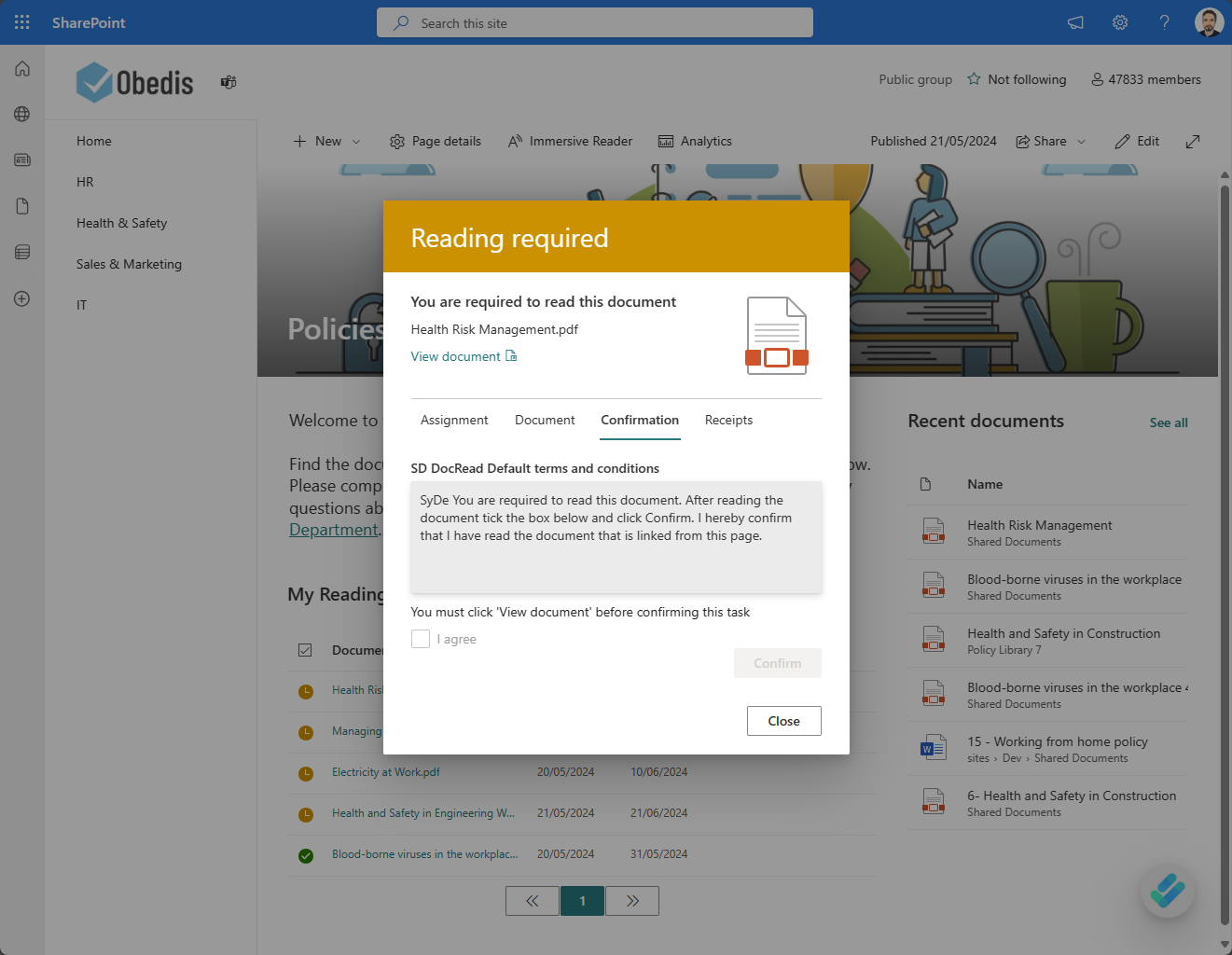
Completing The Assignment From The DocRead User Dashboard In SharePoint
Users receive automated notifications prompting them to review assigned onboarding content as soon as it becomes available. From within the email message itself, they can open the document, confirm they have reviewed it, and complete the task in just a few steps. This streamlined process allows new employees to stay compliant and informed without leaving their inbox or interrupting their workflow.
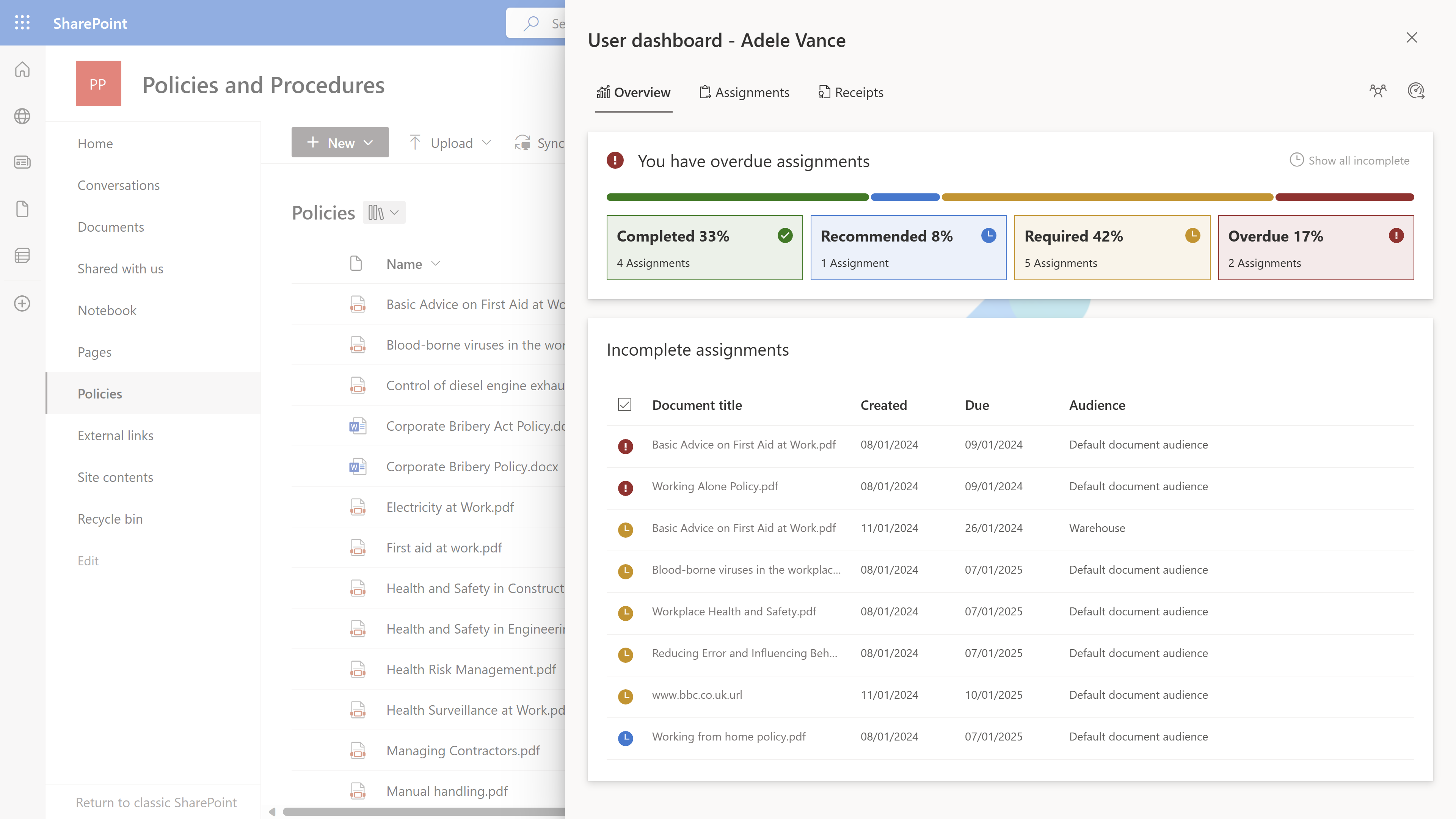
For organisations that rely on structured onboarding communications or formal induction workflows, this approach ensures every document is delivered, acknowledged, and tracked. Critical policies, training materials, and essential onboarding communications are never overlooked or left unconfirmed.
3 - Track
DocRead dashboards provide administrators with quick and easy tracking of onboarding progress. They deliver comprehensive statistical insight into document assignments, including detailed drill-down views for specific documents, employees, audiences, libraries, and groups. This transforms onboarding communication within SharePoint from a simple distribution process into a measurable, compliance-driven solution.
Streamlined onboarding dashboards eliminate guesswork and provide dependable, data-driven reporting that supports HR governance, strengthens compliance monitoring, and delivers complete visibility into document completion, training progress, and employee accountability from day one.
Why Businesses Choose Automated Onboarding Communications
Modern workforces require consistent, trackable onboarding processes across hybrid and remote environments. Simply sending welcome emails or sharing policy documents is no longer sufficient. Organisations must ensure that onboarding materials are delivered, read, and acknowledged.
DocRead supports this need by enabling organisations to:
By embedding automation directly into SharePoint, organisations streamline employee onboarding, reduce manual administrative effort, and improve accountability—without introducing additional systems, disrupting existing workflows, or creating unnecessary complexity for employees or administrators.
Technologies That Power DocRead for SharePoint Onboarding
Microsoft SharePoint & Microsoft 365
DocRead operates directly within SharePoint, ensuring seamless onboarding automation without disrupting user workflows. New employees continue using familiar tools while benefiting from structured, trackable onboarding assignments inside Microsoft 365.
Email & Notification Automation
Automated alerts ensure onboarding assignments are acknowledged, completed, or escalated when overdue. This strengthens traditional email-based onboarding by embedding accountability and confirmation tracking into every required document or training notification.
Dashboards & Reporting
Administrators gain full visibility into onboarding progress, compliance status, and engagement levels. Detailed dashboards support auditing of document acknowledgements, tracking of training completion, and monitoring of time-sensitive onboarding requirements.
Secure, Permission-Based Access
Assignments respect SharePoint permissions, ensuring secure and accurate targeting. Only the intended new employee groups receive specific onboarding documents, aligning with governance policies and organisational data security standards.
FAQ – Automated Employee Onboarding in SharePoint
Automated employee onboarding is the process of delivering, assigning, and tracking onboarding materials without relying on manual emails or spreadsheets. Instead of sending documents individually and hoping for confirmation, automation ensures new hires are systematically assigned the policies, training materials, and company communications they need from day one. Each assignment is structured, time-bound, and trackable, giving HR and compliance teams clear visibility into completion status while reducing administrative workload.
Onboarding automation within SharePoint works by assigning documents, policies, and training content directly to specific users or groups. When a new employee joins, predefined rules automatically trigger assignments. Notifications are sent, and employees can review and confirm completion either from email alerts or within SharePoint itself. This transforms SharePoint from a simple document repository into a structured onboarding workflow system with measurable accountability and built-in confirmation tracking.
DocRead tracks onboarding compliance through structured document assignments and acknowledgment monitoring. Every time a document is assigned, the system records when it was opened, reviewed, and confirmed. Dashboards provide real-time visibility into completion rates, overdue items, and audience-level progress. Administrators can generate audit-ready reports that demonstrate who received required onboarding materials and whether they completed them within the required timeframe.
Yes. Onboarding documents can be targeted to specific departments, roles, locations, or custom SharePoint groups. This ensures employees only receive relevant content aligned with their responsibilities. For example, managers may receive leadership policies, while finance staff receive regulatory documentation. Automated targeting maintains accuracy and reduces the risk of distributing irrelevant or sensitive information to unintended audiences.
Yes. When onboarding acknowledgments are captured through a structured system, they create verifiable records that support compliance and governance requirements. Each confirmation is logged with user and timestamp data, providing traceable proof that required documents were delivered and reviewed. These records can be used during audits, internal reviews, or regulatory assessments to demonstrate due diligence and policy communication control.
See how DocRead can help
Discover how DocRead can automate your onboarding communications by booking a personalized discovery session and demo with one of our experts. During the call, they will discuss your specific requirements, answer any questions and show how DocRead can help.
DocRead has enabled us to see a massive efficiency improvement... we are now saving 2 to 3 weeks per policy on administration alone.
Nick Ferguson
Peregrine Pharmaceuticals
Feedback for the on-premises version of DocRead.