
How to Assign Required Policies with Microsoft Entra ID Dynamic Groups Not every employee ...
A SOC 2 Policy Management Checklist for Microsoft 365 Teams
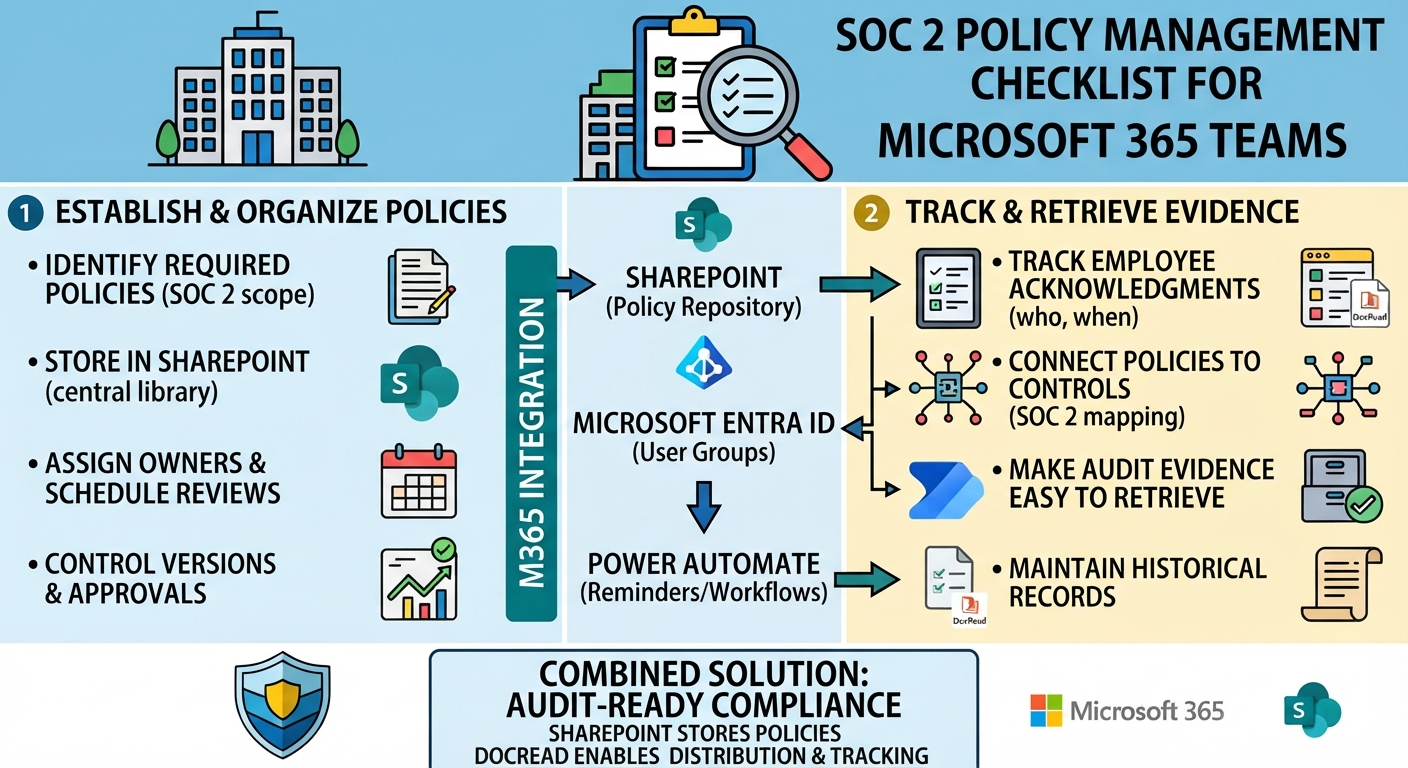
For SaaS companies and other technology-driven organizations, preparing for a SOC 2 audit involves more than implementing security controls. You also need documented policies, clear responsibilities, and evidence that employees have been informed of the requirements that apply to them.
Microsoft 365 provides a useful foundation for managing this information. SharePoint can store policies and supporting documents, while other Microsoft tools can help organizations manage access, communication, and workflows.
The challenge is keeping everything organized, up to date, and ready for an auditor to review.
A practical SOC 2 policies checklist helps Microsoft 365 teams identify gaps before an audit, establish consistent processes, and make policy compliance easier to demonstrate.
Tired of reminding staff to read your company policies?
DocRead makes compliance simple
1. Identify the Policies Your Organization Needs
Start by reviewing the policies that support your SOC 2 control environment.
The exact documentation required will depend on your services, risks, systems, and the Trust Services Criteria relevant to your examination. Common policy areas include:
- Information security and acceptable use
- Access control and identity management
- Incident response and security event reporting
- Risk assessment and management
- Change management and software development
- Data classification, handling, and protection
- Vendor and third-party risk management
- Business continuity and disaster recovery
- Employee onboarding and offboarding
- Security awareness and training
This list is a starting point, not a universal set of mandatory documents. Organizations should map their policies to the controls and commitments applicable to their own SOC 2 scope.
Using SOC 2 policy templates can help establish consistent structures, but templates should be adapted to reflect how your organization actually operates.
2. Keep Policy Documents Organized in SharePoint
Once you've identified the relevant policies, make sure employees and administrators can find the correct versions.
SharePoint provides a central location for SOC 2 compliance documentation, including approved policies, supporting procedures, and related records.
Rather than relying on inconsistent folder structures, organize documents using clear naming conventions and metadata. Useful fields include policy owner, approval date, version, review date, department, and classification.
Permissions should also be reviewed to ensure that only authorized individuals can modify approved policies while employees can access the documents relevant to their roles.
A well-organized policy library makes it easier to maintain a single source of truth and retrieve documentation during an audit.
3. Assign Owners and Schedule Regular Reviews
Policies can quickly become outdated as products, infrastructure, regulations, and business processes change.
Each policy should have a designated owner responsible for reviewing its accuracy and coordinating updates when necessary.
Establish a review schedule based on your internal governance requirements and the policy's risk level. Also define what happens when a significant change occurs between scheduled reviews.
For example, changes to cloud infrastructure or authentication requirements may trigger a review of information security or access control policies.
Automated reminders can help policy owners meet deadlines and prevent important documents from remaining unchanged simply because nobody realized a review was due.
4. Control Policy Versions and Approvals
An auditor may need to understand which policy was in effect during a particular period, not just see the latest document.
Your process should record how policies are reviewed, approved, updated, and published. Previous versions may also need to be retained according to your documentation and retention requirements.
SharePoint version history can support document change tracking, while a defined approval process helps ensure that unapproved changes don't become the organization's official guidance.
This is an important part of SOC 2 controls documentation: the written policy should accurately reflect the control the organization intends to operate.
5. Track Employee Acknowledgments
Publishing a security policy doesn't necessarily mean employees have read it.
For policies that require employee acknowledgment, organizations need a reliable way to track who received the document, who completed the acknowledgment, and who still needs to respond.
This is particularly relevant for acceptable use, information security, data protection, and incident reporting policies.
A structured SOC 2 employee acknowledgment process can help demonstrate that employees were asked to review the relevant requirements.
Keep in mind that an acknowledgment is evidence of a recorded confirmation, not automatic proof that an employee understands or consistently follows the policy. Additional training, assessments, and operational evidence may be necessary depending on the control.
Are your policies read on time and by the right people?
DocRead makes compliance simple
6. Make Audit Evidence Easy to Retrieve
One of the most time-consuming parts of an audit can be gathering evidence from different systems and teams.
Your SOC 2 evidence collection process should identify what records need to be retained, where they are stored, who is responsible for them, and how they can be retrieved.
Depending on the controls being examined, evidence may include:
- Approved policy documents and historical versions
- Policy review and approval records
- Employee distribution and acknowledgment reports
- Security training completion records
- Access reviews and change approvals
- Incident response records and remediation activities
Keep policy evidence separate from other operational evidence where appropriate, while ensuring both can be connected to the relevant control.
For example, an approved access control policy documents the organization's expectations. Access review records help demonstrate how the relevant control operates in practice.
Both can be important, but they serve different purposes.
7. Connect Policies to Your SOC 2 Controls
A policy library becomes more useful when the organization understands which controls each document supports.
Create a mapping between relevant policies, internal control identifiers, responsible owners, and the evidence used to demonstrate implementation.
This makes it easier to identify gaps. If a control has no supporting policy where one is needed, the team can address the issue before the audit. If a policy has changed, the owner can identify which controls and supporting records may need to be reviewed.
This mapping also helps avoid producing large volumes of documentation that aren't clearly connected to the organization's actual control environment.
8. Use Microsoft 365 to Strengthen Policy Management
Microsoft 365 includes tools that can support several parts of the policy management process.
SharePoint can store approved policies and maintain document versions. Microsoft Entra ID can help target communications to appropriate user groups, while Power Automate can support review reminders and approval workflows.
However, these capabilities may need to be configured and connected to create a consistent end-to-end process.
For teams working toward Microsoft 365 SOC 2 compliance, the objective is to use existing infrastructure effectively while ensuring that policy distribution, acknowledgments, reviews, and evidence retention are properly managed.
Dedicated policy management software can help fill gaps that document storage alone doesn't address.
How DocRead Can Help
DocRead is designed specifically for SharePoint and Microsoft 365, adding policy distribution, employee acknowledgments, compliance monitoring, and reporting capabilities.
Policies remain in SharePoint, while DocRead helps organizations assign documents to relevant employees, request acknowledgments, send reminders, and monitor completion.
For organizations preparing for a SOC 2 examination, these capabilities can support the policy communication and acknowledgment processes that form part of their broader control environment.
DocRead does not replace the need for appropriate security controls, risk assessments, access reviews, or other audit evidence. Instead, it can help make policy administration more consistent and provide records that support the organization's compliance activities.
Your SOC 2 Policy Management Checklist
Before your next audit, use this checklist to assess whether your policy management process is ready.
- Relevant policies have been identified against the applicable SOC 2 criteria and controls.
- Approved documents are stored in a centralized SharePoint location.
- Each policy has an assigned owner and review schedule.
- Version history and approval processes are maintained.
- Employees receive policies relevant to their roles.
- Required acknowledgments are tracked, with outstanding responses followed up.
- Historical policy and acknowledgment records are retained appropriately.
- Policies are mapped to relevant controls and supporting evidence.
- Audit records can be retrieved without extensive manual searching.
- Gaps in documentation and policy communication are reviewed and addressed.
This compliance checklist for SaaS companies can serve as a starting point for an internal review. Your final requirements should reflect your SOC 2 scope, applicable criteria, and auditor expectations.
Making SOC 2 Audit Readiness an Ongoing Process
Preparing for an audit is much easier when policy management is part of everyday operations rather than a last-minute exercise.
Keeping documents current, assigning clear ownership, tracking employee acknowledgments, and maintaining accessible records helps organizations build stronger governance over time.
For Microsoft 365 teams, SharePoint provides the foundation for organizing policy documentation. When combined with dedicated policy management capabilities such as DocRead, it can also support more consistent distribution, acknowledgment tracking, and reporting.
Ultimately, SOC 2 audit readiness isn't just about having policies in place. It's about maintaining the documentation, communication records, and operational evidence needed to demonstrate how your organization manages its controls.
Get your free Standard Operating Procedures guide
Creating Standard Operating Procedures for your organisation doesn't have to be complicated. This guide will introduce you to the whole lifecycle from creation to training and distribution.
You may also like:
November 13, 2026
November 9, 2026
Published: November 9, 2026 A policy review is a scheduled check that a policy ...
November 9, 2026
Published: November 9, 2026 To write a policy, confirm a policy is needed, name ...
November 9, 2026
A HIPAA compliance audit checks whether a covered entity or business associate meets the ...
November 6, 2026
How Do You Migrate Legacy Policies into a Policy Management System? For a lot ...
November 2, 2026
A policy and procedure manual is one controlled set of documents that holds an ...