
How Do You Migrate Legacy Policies into a Policy Management System? For a lot ...
SharePoint Server to Microsoft 365: How to Preserve Policy Compliance Records During Migration
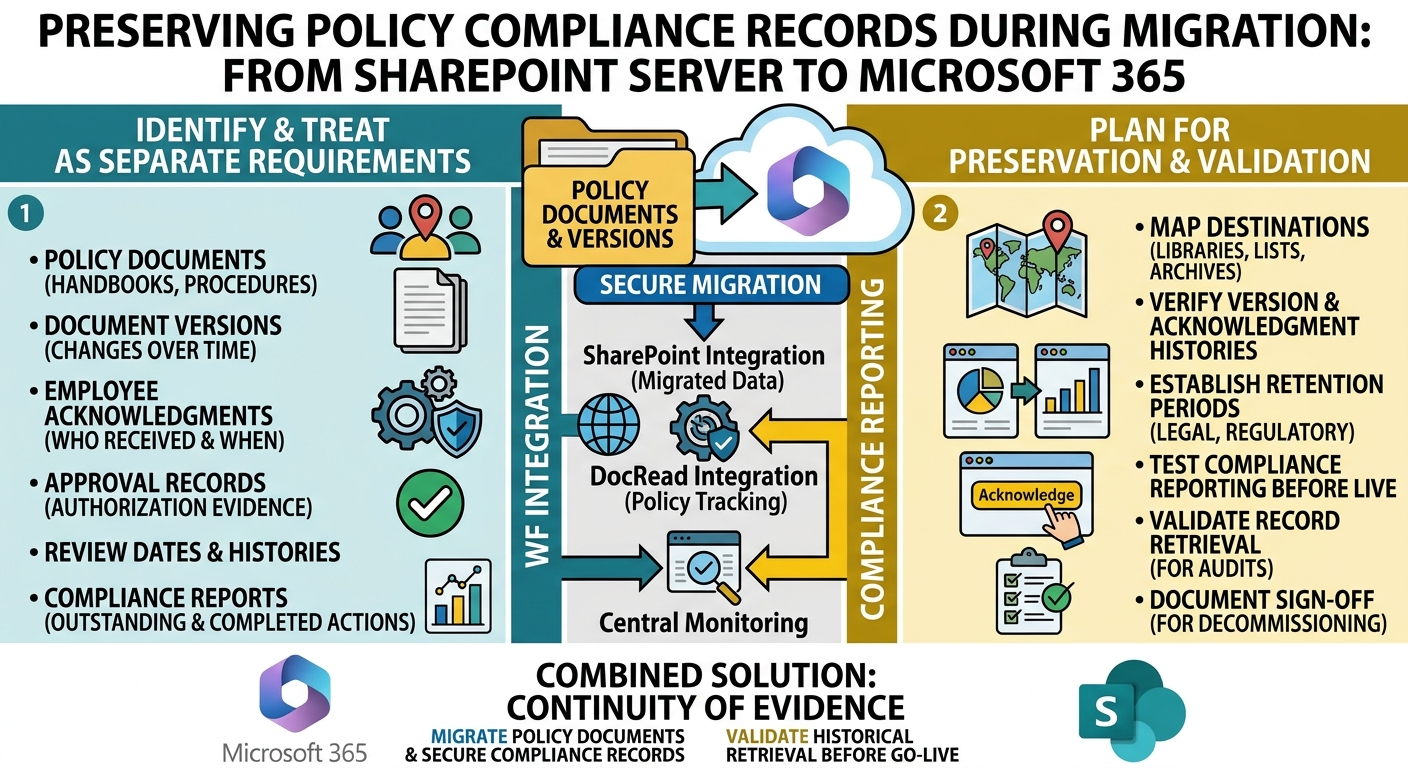
Moving from SharePoint Server to Microsoft 365 is an opportunity to modernize how an organization stores, distributes, and manages its policies.
But while much of the migration planning focuses on documents, permissions, and site structures, another consideration deserves equal attention: the compliance records attached to those policies.
Over the years, organizations may have accumulated records showing who received a policy, which version was distributed, when employees acknowledged it, and whether required actions were completed.
These records can be essential when responding to an audit, investigating a compliance issue, or demonstrating that employees were informed of their responsibilities.
The challenge is ensuring this evidence remains accessible and reliable after the migration. Moving policy documents into SharePoint Online doesn't automatically mean every associated compliance record will move with them.
Start by Identifying What Needs to Be Preserved
Before migrating content, take an inventory of the records your organization relies on to demonstrate policy compliance.
These may include employee acknowledgements, policy distribution histories, approval records, review dates, document versions, and reports showing outstanding or completed acknowledgements.
It's also worth identifying how these records are currently stored. Some may be maintained in SharePoint lists or document libraries, while others may exist in a separate policy management application, spreadsheets, email archives, or reporting systems.
The goal is to establish what evidence exists, where it lives, and how long it needs to be retained.
Without this initial assessment, organizations risk completing the technical migration successfully while overlooking records that are important for governance and audit purposes.
Separate Policy Documents From Compliance Evidence
A policy document and its associated compliance records serve different purposes.
The document establishes the requirements employees are expected to follow. The compliance evidence helps demonstrate how those requirements were communicated and acknowledged.
For example, migrating an employee handbook from an on-premises SharePoint library to SharePoint Online preserves the document itself. However, that alone may not preserve the history showing which employees acknowledged the handbook's previous versions.
This distinction matters because compliance often depends on more than having the correct document available. Organizations may need to demonstrate what was communicated, to whom, and when.
Treat policy documents and their associated records as separate migration requirements, even when they are linked within the same SharePoint environment.
Map Existing Records to the New Microsoft 365 Environment
Once you've identified the records that need to be retained, determine where each type of information will live after migration.
SharePoint Online can continue to serve as the central repository for policy documents, supporting files, and relevant metadata. Existing site structures, libraries, and permissions may need to be reviewed or redesigned to fit the new environment.
For compliance records, the migration plan should establish how historical acknowledgements, policy versions, approval evidence, and reporting data will be preserved.
This may involve migrating supported data structures, retaining historical records in a controlled archive, or maintaining access to an existing system for a defined period.
Not every record needs to be handled in the same way. The important thing is to make deliberate decisions about preservation, accessibility, and retention before the old environment is decommissioned.
Tired of reminding staff to read your company policies?
DocRead makes compliance simple
Don't Assume Version History Tells the Whole Story
SharePoint version history is valuable because it helps organizations track changes to documents over time. However, document version history and employee acknowledgement history are not interchangeable.
Knowing that a policy changed on a particular date doesn't necessarily establish which employees received the updated version or whether they acknowledged it.
Organizations should therefore verify that their migration plan accounts for both document history and the separate evidence associated with policy distribution and acknowledgement.
Where acknowledgements are managed through a dedicated policy management solution, check how that solution stores historical records and whether its migration or upgrade process preserves the information required for audits.
Testing these scenarios before moving the entire policy library can help identify gaps while the original environment is still available.
Plan for Retention and Audit Requirements
Not all policy records need to be retained indefinitely, but retention decisions should reflect the organization's legal obligations, regulatory requirements, contractual commitments, and internal governance policies.
Before migrating, determine which records must remain available, the applicable retention periods, and who should be able to access them.
Microsoft 365 provides retention and records-management capabilities that may support these requirements, depending on the organization's licensing, configuration, and compliance needs.
However, retention policies should not be treated as a substitute for migration validation. Preserving a record for the required period is only part of the task; the organization must also ensure that the record remains usable and can be retrieved when needed.
For regulated organizations, involve the relevant compliance, legal, and records-management teams in defining these requirements.
Test Compliance Reporting Before Going Live
A migration should not be considered complete simply because the documents appear in the new SharePoint environment.
Administrators should also test whether the organization can retrieve the evidence it expects to produce during an audit.
For example, can you identify the version of a policy that was in effect at a particular time? Can you retrieve historical acknowledgement records? Can you determine which employees completed a required acknowledgement and which records remain outstanding?
Where historical reports are required, compare sample reports from the existing environment with the corresponding records available after migration.
Document any limitations, missing information, or differences in reporting. This provides a clearer understanding of what has been preserved and helps prevent unpleasant surprises when an auditor requests historical evidence.
A Practical Migration Checklist
A structured migration process can help ensure compliance records receive the same attention as policy documents.
- Inventory existing policies and records. Identify policy documents, historical versions, acknowledgements, approvals, and compliance reports.
- Confirm retention requirements. Establish which records must be preserved, for how long, and under what access controls.
- Map the destination. Determine where documents, metadata, and historical compliance evidence will reside in Microsoft 365.
- Validate the migration method. Confirm that the selected tools and applications support the required data and historical records.
- Run a pilot migration. Test representative policies and their associated records before migrating the full library.
- Verify reporting and retrieval. Check that administrators can access the evidence required for audits and investigations.
- Document sign-off. Record migration results, identified limitations, and approval to retire the legacy environment.
The final step is particularly important. Keeping a record of what was migrated, what was retained elsewhere, and what could not be transferred establishes a clear account of the migration itself.
Where DocRead Fits Into the Migration
For organizations using DocRead to manage policies in SharePoint, migration planning should account for both the policy documents and the compliance information associated with them.
DocRead is designed to extend SharePoint and Microsoft 365 with policy distribution, employee acknowledgements, compliance monitoring, and reporting capabilities. This allows organizations to manage policy governance within their existing Microsoft environment rather than relying entirely on manual tracking.
When moving from SharePoint Server to Microsoft 365, organizations should review their existing DocRead deployment, identify the historical records they need to retain, and confirm the supported migration path with their solution provider.
The key consideration is that moving a policy library and transferring its associated acknowledgement history are separate tasks. The appropriate migration method will depend on the existing DocRead version, the destination configuration, and the records that need to be preserved.
Once the new environment is configured, test policy distribution, acknowledgement capture, reporting, and access to any retained historical evidence before completing the transition.
This helps establish continuity between the organization's previous policy management processes and its new Microsoft 365 environment.
Migration Is More Than Moving Documents
Moving from SharePoint Server to Microsoft 365 can simplify collaboration and provide a more modern foundation for policy management. But the transition should not create a gap in the evidence organizations depend on to demonstrate compliance.
A successful migration considers the complete policy lifecycle: the documents themselves, their version histories, the employees expected to acknowledge them, and the records that demonstrate what happened.
By auditing existing records, defining retention requirements, testing historical reporting, and confirming how policy management applications handle migration, organizations can reduce the risk of losing valuable compliance evidence.
For organizations already using SharePoint, solutions such as DocRead can continue to support policy distribution and acknowledgement tracking within Microsoft 365. The priority during migration is to ensure that the move forward doesn't leave important parts of the compliance history behind.
Are your policies read on time and by the right people?
DocRead makes compliance simple
Get your free Standard Operating Procedures guide
Creating Standard Operating Procedures for your organisation doesn't have to be complicated. This guide will introduce you to the whole lifecycle from creation to training and distribution.
You may also like:
November 6, 2026
November 2, 2026
A policy and procedure manual is one controlled set of documents that holds an ...
October 30, 2026
Which Departments Benefit from Policy Management Software in Microsoft 365? Many organizations view policy ...
October 23, 2026
Which Departments Benefit from Policy Management Software in Microsoft 365? Many organizations view policy ...
October 16, 2026
The Equifax Catastrophe: How One Missed Update Became a $700M Fine In most workplaces, ...
October 9, 2026
The Equifax Catastrophe: How One Missed Update Became a $700M Fine In most workplaces, ...