
The Equifax Catastrophe: How One Missed Update Became a $700M Fine In most workplaces, ...
How Long Does It Take to Implement Policy Management Software in Microsoft 365?
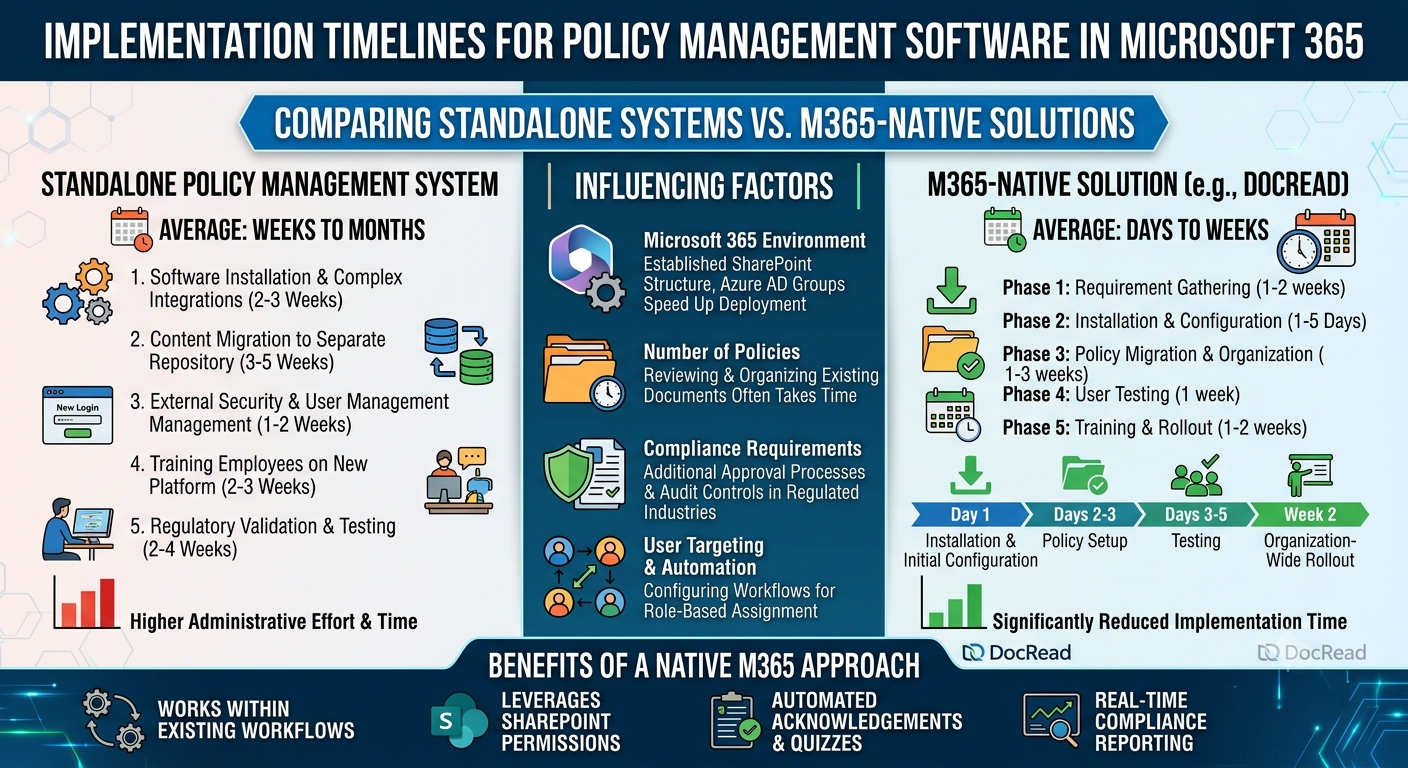
When organizations consider implementing policy management software, many assume they're facing a lengthy project filled with complex integrations, extensive training, and significant changes to existing workflows.
In practice, implementation timelines are often much shorter—especially for organizations already using Microsoft 365 and SharePoint Online. The biggest factors are the solution you choose and how prepared your existing environment is.
Platforms built specifically for Microsoft 365, such as DocRead, can be deployed far more quickly than standalone policy management systems because they work within the tools employees already use every day.
What Affects Implementation Time?
While no two organizations are exactly alike, several factors typically influence how long a deployment will take, such as:
Existing Microsoft 365 Environment
Organizations with an established SharePoint structure, well-managed Microsoft Entra ID groups, and documented policies are often able to get up and running much faster. Since the foundation is already in place, the focus shifts to configuring policy distribution, acknowledgements, and reporting. That is one reason to choose policy management software for SharePoint that works with the libraries and groups you already have.
Number of Policies Being Managed
Managing a few dozen policies is very different from managing hundreds across multiple departments. In many cases, reviewing, updating, and organizing existing documents takes longer than the technical setup itself.
Compliance and Regulatory Requirements
Industries such as healthcare, finance, manufacturing, and energy may require additional approval processes, audit controls, and validation before rolling out a new policy management solution.
User Targeting and Automation
Organizations that want policies automatically assigned based on department, role, location, or security group may need additional time to configure workflows and notification rules.
Deployment Timeline
When deploying policy management via Microsoft 365, the standard timeline should look like this:
PHASE 1: Requirement gathering for 1-2 weeks.
PHASE 2: Software installation and configuration for 1-5 days.
PHASE 3: Policy migration and organization for 1-3 weeks.
PHASE 4: User testing for 1 week.
PHASE 5: Training and rollout for 1-2 weeks.
Take note: Larger enterprises with multiple business units, strict regulatory requirements, or extensive policy libraries may require additional time.
However, solutions built specifically for Microsoft 365 typically shorten implementation significantly by leveraging existing SharePoint infrastructure rather than introducing an entirely separate platform.
Tired of reminding staff to read your company policies?
DocRead makes compliance simple
How Long Does It Take to Implement DocRead?
Because DocRead is built specifically for SharePoint and Microsoft 365, implementation is generally faster than with traditional policy management platforms.
There is no need to migrate documents into a separate repository or train employees on an entirely new system. Policies remain in SharePoint, while DocRead adds the governance, tracking, and compliance capabilities organizations need.
A typical deployment might look like this:
Day 1: Installation and Initial Configuration
Administrators install DocRead within Microsoft 365 and connect it to existing SharePoint libraries. User groups and permissions are identified.
Days 2–3: Policy Setup
Existing policies are designated for tracking, acknowledgement requirements are configured, and notification schedules are established.
Days 3–5: Testing
Pilot users receive policies, complete acknowledgements, and administrators verify reporting and audit trails.
Week 2: Organization-Wide Rollout
Policies are distributed to the wider organization, and compliance tracking begins.
More often than not, the technology itself is rarely the biggest challenge. For many organizations, the most time-consuming part of the project is reviewing, updating, and organizing existing policies before distribution.
DocRead and How It’s Used
DocRead extends SharePoint Online and Microsoft 365 with dedicated policy management capabilities, including policy distribution, employee acknowledgements, compliance monitoring, and audit reporting.
Instead of introducing another application or document repository, it works directly within SharePoint. This allows organizations to manage policies where they are already stored while gaining visibility into who has received, read, and acknowledged each document.
This addresses a common compliance gap: uploading a policy to SharePoint does not prove employees have actually read or understood it.
It can be used for:
- Policy Distribution: Automatically deliver policies to the right employees based on department, role, location, or security group membership.
- Employee Acknowledgments: Require employees to confirm they have read and understood a policy, creating a clear audit trail.
- Employee Onboarding: Assign mandatory policies to new hires automatically as part of the onboarding process.
- Regulatory Compliance: Maintain verifiable records showing who received, reviewed, and acknowledged each version of a policy.
- Knowledge Verification: Use quizzes and assessments to confirm understanding of critical policies and procedures.
With DocRead, the company is able to benefit from:
- Native integration with Microsoft 365 and SharePoint
- Automated reminders for outstanding acknowledgements
- Real-time compliance reporting
- Audit-ready evidence for regulators and auditors
- Role-based policy targeting
- Reduced administrative effort through automation
Implementing policy management software doesn't have to be a lengthy or disruptive undertaking. For organizations already invested in Microsoft 365, deployment can often be completed far more quickly than expected.
DocRead is a good example of this approach. Because it works directly within SharePoint, organizations can strengthen policy governance, improve compliance visibility, and automate acknowledgements without introducing yet another standalone system.
In many cases, the technology can be deployed within days. The real work lies in ensuring policies are current, organized, and ready to be distributed, something that benefits the organization regardless of which policy management solution it ultimately chooses.
Are your policies read on time and by the right people?
DocRead makes compliance simple
Get your free Standard Operating Procedures guide
Creating Standard Operating Procedures for your organisation doesn't have to be complicated. This guide will introduce you to the whole lifecycle from creation to training and distribution.
You may also like:
October 16, 2026
October 9, 2026
The Equifax Catastrophe: How One Missed Update Became a $700M Fine In most workplaces, ...
October 2, 2026
The Equifax Catastrophe: How One Missed Update Became a $700M Fine In most workplaces, ...
September 18, 2026
How to Manage Policy Exceptions in Microsoft 365 Without Losing Audit ControlPolicies are designed ...
September 11, 2026
Contractor Policy Acknowledgment: How to Track Compliance for Third PartiesOrganizations often rely on contractors, ...
August 28, 2026
How Do You Migrate Legacy Policies into a Policy Management System?For a lot of ...