
Which Departments Benefit from Policy Management Software in Microsoft 365? Many organizations view policy ...
How Do You Migrate Legacy Policies into a Policy Management System?
For a lot of organizations, policy migration sounds like a daunting task; years of policies scattered across different websites, folders, devices… the list goes on and on. It’s no wonder that people think that bringing everything together into a modern policy management system will require months of work and significant disruption.
In reality, migrating legacy policies is often less about moving documents and more about improving their management.
Organizations already using Microsoft 365 and SharePoint Online have an advantage because, instead of starting from scratch, they can build on a platform employees already know while strengthening governance and compliance.
What to Do Before Migrating Policies
Before moving any documents, it's worth taking the time to review your existing policy library.
Many organizations discover they have multiple versions of the same document, outdated policies that are no longer relevant, inconsistent naming conventions, or policies with no clear owner. Migrating everything into a new system simply transfers these problems into a new environment.
A policy audit helps determine which documents should be retained, updated, archived, or retired. In many cases, this review takes longer than the technical migration itself, but it creates a much cleaner and more reliable policy repository.
READ: What are Policies and Why They Are Important
SharePoint as the Foundation
If your organization already stores documents in SharePoint, there's no need to move policies into a completely separate repository.
SharePoint provides a central location for storing and organizing policies, along with features such as document versioning, permissions, metadata, and search. Instead of relying on complex folder structures, policies can be categorized by department, business function, policy type, owner, or review date, making them much easier to find and manage.
Since your employees are already familiar with SharePoint, organizations can also reduce the amount of training required during migration.
Preparing Policies for Migration
Once you've identified which policies to keep, the next step is standardizing them. This typically includes reviewing document templates, confirming the latest approved version, assigning policy owners, and ensuring each policy has the appropriate metadata and review schedule.
Taking the time to organize policies before migration helps create a structured repository that will be much easier to maintain over time.
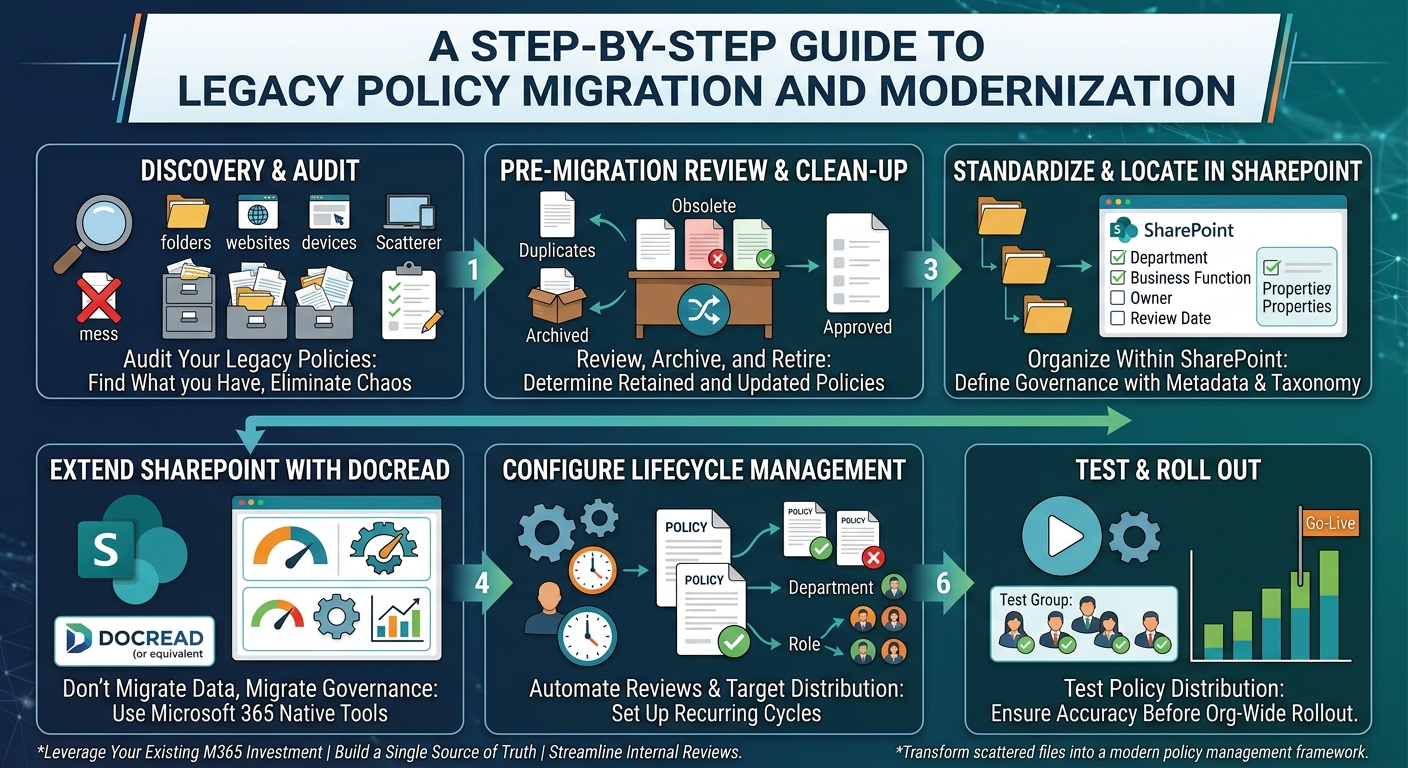
Typical Policy Migration Process
Although every organization is different, most policy migrations follow a similar process:
- Audit and review existing policies.
- Remove duplicates, archive obsolete documents, and identify approved versions.
- Organize policies within SharePoint using consistent metadata and document structures.
- Import policies into the policy management system and configure governance settings.
- Test policy distribution before rolling out organization-wide.
For organizations with many policies or strict regulatory requirements, the preparation stage may require more time than the technical implementation.
Extending SharePoint with Policy Management
While SharePoint is an excellent platform for storing documents, policy management involves much more than document storage.
Organizations also need to distribute policies, collect employee acknowledgements, schedule reviews, monitor compliance, and produce audit-ready reports. These processes are often managed manually through spreadsheets, Outlook reminders, or email, adding administrative effort and increasing the risk of missed reviews.
Solutions built specifically for Microsoft 365, such as DocRead, extend SharePoint with dedicated policy management capabilities while allowing policies to remain exactly where they are.
Instead of replacing SharePoint, they enhance it by adding automated workflows, acknowledgement tracking, compliance reporting, and policy lifecycle management.
READ: Essential information all policies should include
How DocRead Simplifies Policy Migration
Because DocRead is designed specifically for SharePoint and Microsoft 365, organizations don't need to migrate policies into another application or maintain multiple repositories.
Existing SharePoint libraries remain the central source of truth, while DocRead adds the governance features needed to manage policies effectively.
Once policies have been reviewed and organized, administrators can configure acknowledgements, automate review schedules, assign policies to specific users or departments, and monitor compliance through centralized reporting.
This approach allows organizations to modernize policy management without changing the way employees access documents.
Migration Is an Opportunity to Improve Governance
Migrating legacy policies shouldn't be viewed as simply transferring files from one location to another.
It's an opportunity to eliminate outdated documents, establish consistent governance, automate manual processes, and create a single source of truth for the entire organization.
For organizations already invested in Microsoft 365, SharePoint provides the ideal foundation.
When combined with a dedicated policy management solution like DocRead, organizations can streamline policy migration while improving compliance, reducing administrative effort, and giving employees confidence they're always working from the latest approved policy.
The technology itself can often be deployed quickly. The real value, however, comes from using the migration process to build a policy management framework that's easier to maintain, easier to audit, and better equipped to support the organization well into the future.
Tired of reminding staff to read your company policies?
DocRead makes compliance simple
Are your policies read on time and by the right people?
DocRead makes compliance simple
Get your free Standard Operating Procedures guide
Creating Standard Operating Procedures for your organisation doesn't have to be complicated. This guide will introduce you to the whole lifecycle from creation to training and distribution.
You may also like:
October 23, 2026
October 16, 2026
The Equifax Catastrophe: How One Missed Update Became a $700M Fine In most workplaces, ...
October 9, 2026
The Equifax Catastrophe: How One Missed Update Became a $700M Fine In most workplaces, ...
October 2, 2026
The Equifax Catastrophe: How One Missed Update Became a $700M Fine In most workplaces, ...
September 18, 2026
How to Manage Policy Exceptions in Microsoft 365 Without Losing Audit ControlPolicies are designed ...
September 11, 2026
Contractor Policy Acknowledgment: How to Track Compliance for Third PartiesOrganizations often rely on contractors, ...