
How to Assign Required Policies with Microsoft Entra ID Dynamic Groups Not every employee ...
Free Policy and Procedure Template for Microsoft Word
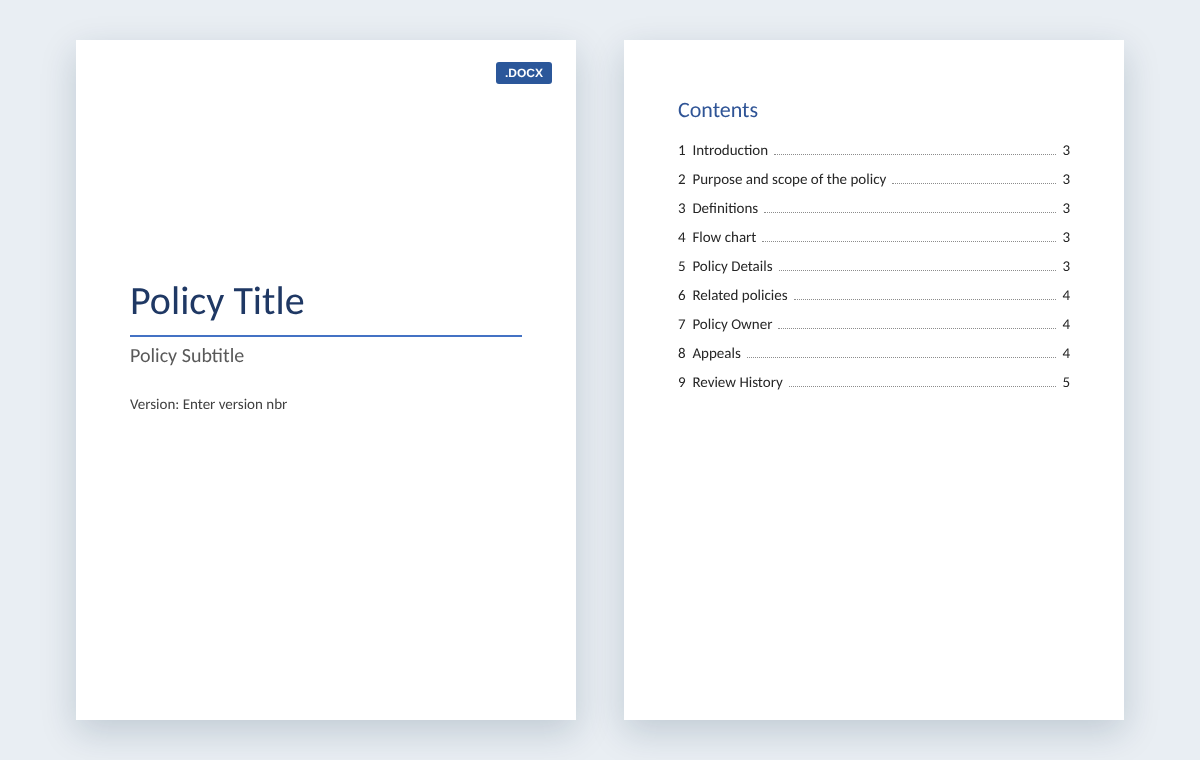
This free policy template for Microsoft Word is a 34 KB .docx file with a title page and version number, a table of contents and nine sections, each with a guidance note to replace. Download it with no sign-up, write your policy or procedure, then publish it in SharePoint and track who has read it.
By Hugo Esperanca, Director and Co-Founder, Collaboris · Updated November 2, 2026
Download the free policy template
Microsoft Word (.docx), 34 KB. No sign-up or email address needed. Prefer to start from a finished sample? Download the HR absence policy written with the same template. Not sure what to put in each section? Read our guide on how to write policies and procedures, with a worked example.
Download the policy template (.docx) Download the HR policy sample (.docx)
What is a policy template in Word?
A policy template in Word is a .docx file that gives every policy the same layout: a title page with a version number, a table of contents and fixed sections for purpose, scope, definitions, rules, ownership and review history. You type over the guidance notes, so every policy you publish reads the same way.
One layout matters more than it sounds. When every policy puts the purpose, the rules and the owner in the same place, employees find what they need faster, and reviewers can compare versions without hunting through different formats. If you're unsure what counts as a policy, see what a policy is, with examples.
What's in the free policy document template
The policy document template includes:
- A title page with the policy title, a subtitle and a version number.
- A table of contents built from Word's heading styles, so it updates when you rename or add headings.
- Nine sections, each with a guidance note telling you what to write.
- A review history table with columns for version, date, author and the purpose of each change.
| Section | What to write |
|---|---|
| 1. Introduction | What the policy provides, for example guidance on the informal and formal steps for managing sickness absence. |
| 2. Purpose and scope | The aim of the policy and who it applies to: all staff, a department, contractors or a location. |
| 3. Definitions | Terms used in the policy that need a fixed meaning. |
| 4. Flow chart | A diagram of the process, showing the people involved, the steps and the decision points. |
| 5. Policy details | The rules that apply, written so employees can easily understand them. |
| 6. Related policies | Other policies this one depends on or connects to. |
| 7. Policy owner | The department or people responsible for maintaining the policy. |
| 8. Appeals | How an appeal is handled, who hears it, who can accompany the employee and how the decision is confirmed in writing. |
| 9. Review history | A record of each version: what changed, when, who changed it and why. |
Many organizations also add three fields to the title page: an effective date, the name of the approver and a next review date. Type them under the version number before you save your own master copy.
How do you write a policy and procedure in one Word template?
Use one Word template for both. The policy sections say what the rule is, who it covers and why. The flow chart and policy details sections then set out the procedure: each step, who does it and where decisions are made. Delete sections a procedure doesn't need, such as Appeals, and log every change in the review history table.
A policy says what must happen and why. A procedure says how to do it, step by step. Our guide to policy vs procedure vs process explains the difference with examples.
Procedure template in Word: what to change
- Rename "Policy details" to "Procedure steps" and write numbered steps, one action per step.
- Name the role responsible for each step in the flow chart, rather than a person, so the procedure survives staff changes.
- Delete Appeals, and keep Related policies to link the procedure back to the policy it carries out.
- Keep the review history table, because procedures change more often than policies.
If you write many standard operating procedures, use our dedicated SOP template in Word, which comes with an Excel revision and review log.
Company policy template: samples you can write with it
This free company policy template in Word works for any policy that needs rules, an owner and a review cycle. The table shows company policy samples organizations commonly write with it, and what goes in the Policy details section of each. For a fuller list, see our checklist of essential company policies.
| Policy | What goes in Policy details | Usual owner |
|---|---|---|
| Absence and sickness | How to report absence, when a fit note is needed and how return-to-work meetings work. Our free HR sample covers this one. | HR |
| Code of conduct | Expected behavior, conflicts of interest, gifts and how to raise concerns. | HR or Compliance |
| Acceptable use | What staff may and may not do with company devices, email and accounts. | IT or Information Security |
| Information security | Access control, passwords, data classification and incident reporting. | Information Security |
| Data protection and privacy | How personal data is collected, stored, shared and deleted. | Data Protection Officer or Legal |
| Health and safety | Hazard reporting, risk assessments, training and emergency arrangements. | Health and Safety |
| Anti-harassment | What counts as harassment, how to report it and how complaints are investigated. | HR |
See a sample policy filled in: HR absence policy
The free sample policy is an Absence Policy, version 1.0, written with the same nine sections. Use it as a sample policy template to see how much detail goes into each section before you write your own business policy template.
How to customize the policy template in Word
- Replace the title page text. Type your policy name over “Policy Title”, add a subtitle if you need one, and enter the version number, such as 1.0. Add the effective date, approver and next review date underneath.
- Write each section. Replace each guidance note with your own text. Delete any section that doesn't apply.
- Add your flow chart. Draw the process as a simple diagram showing who does what and where decisions are made.
- Update the table of contents. On the References tab, select Update Table, then choose Update entire table so new or renamed headings appear (Microsoft Support: Update a table of contents).
- Record the change. Add a row to the review history table with the version, date, author and purpose of the change.
- Save a reusable copy. Once you've added your logo and house style, select File > Save As and choose Word Template as the file type, so every new policy starts from the same layout (Microsoft Support: Create a template).
How to publish and track your policy
A finished policy only works if people can find the current version and you can show who has read it.
Publish it in SharePoint
- Use a document library with versioning turned on. SharePoint then keeps each version of the file and shows when it changed and who changed it (Microsoft Support: Enable and configure versioning). Read more on the importance of policy versioning.
- Turn on content approval. Drafts stay hidden from readers until an approver approves them. To automate the sign-off, see how to build a policy approval workflow with Power Automate.
- Make the template the library default. With Full Control permission, set the library's document template in Library settings, under Advanced settings, so new policies start from your template.
- Show key details as columns. Display policy metadata in SharePoint library columns, such as the owner and review date, so the library works as your policy register. Then set up policy review reminders so nothing passes its review date.
How long to keep old versions
Keep superseded versions, not just the current one. For example, organizations covered by the HIPAA Security Rule must keep their written policies and procedures for 6 years from the date they were created or last in effect, whichever is later, and review them periodically (45 CFR 164.316). The review history table and SharePoint version history together give you that record.
Track who has read it
For a small team, the free policy template pack adds an Excel acknowledgment log and a review schedule to this template, and the employee acknowledgment form template gives you a sign-off sheet. When you need to prove who read which version across a whole organization, DocRead does this inside SharePoint. It assigns each policy to Microsoft Entra ID or SharePoint groups, sends reminders, escalates overdue tasks to managers and records a time-stamped acknowledgment of the exact version each person read. See policy management software for SharePoint.
Policy template FAQ
Is the policy template really free?
Yes. The Word policy template and the HR absence policy sample are free .docx downloads, with no sign-up or email address needed.
How do I create a policy template in Word?
Download this .docx, add your logo and house style, then select File > Save As and choose Word Template as the file type. Every new policy you open from it starts with the same title page, contents page and nine sections.
What should a policy document include?
A title and version number, the purpose and scope, definitions, the rules themselves, related policies, the owner, how to appeal where relevant, and a review history that records each change, when it was made and by whom.
Can I use the template for procedures as well as policies?
Yes. Rename Policy details to Procedure steps, write numbered steps, name the role for each step in the flow chart and delete Appeals. For many SOPs, use the dedicated SOP template pack.
What is the difference between a policy and a procedure?
A policy states what must happen and why, such as how absence is reported. A procedure sets out how to do it, step by step, and who does each step.
How do I keep track of policy versions?
Add a row to the review history table each time you change the policy, and keep the file in a SharePoint library with versioning turned on, so you can see who changed it and when.
What is the difference between this template and the policy template pack?
This page gives you the single Word policy template and an HR policy sample. The policy template pack adds an Excel review schedule and an Excel acknowledgment log.
See DocRead in your own SharePoint
A template gets every policy into the same format. DocRead proves the right people read it. It runs inside SharePoint and Microsoft 365, so your policies stay in the libraries you already use. DocRead for Microsoft 365 runs in SharePoint Online, and DocRead for SharePoint Server runs on SharePoint Server 2019 and 2016.
Book a demo Request a quote Start the 30-day SharePoint Server trial
Are your policies read on time and by the right people?
DocRead makes compliance simple
Our DocRead software helps organizations simplify and improve their compliance processes. So, if you want to take your policy management processes to the next level, then please get in touch and we will be happy to help.
Collaboris has helped guide and advise companies for over 15 years and is committed to continue to do so. We are passionate about helping organizations improve their policy, procedure and SOP processes. Our DocRead software helps organizations simplify and improve their compliance processes. Also, our free guides and resources can help whether you are looking to revolutionize your policy creation process, improve your internal communications or purchase policy management software.
You may also like:
November 13, 2026
November 9, 2026
Published: November 9, 2026 A policy review is a scheduled check that a policy ...
November 9, 2026
Published: November 9, 2026 To write a policy, confirm a policy is needed, name ...
November 9, 2026
A HIPAA compliance audit checks whether a covered entity or business associate meets the ...
November 6, 2026
How Do You Migrate Legacy Policies into a Policy Management System? For a lot ...
November 2, 2026
A policy and procedure manual is one controlled set of documents that holds an ...