
The Equifax Catastrophe: How One Missed Update Became a $700M Fine In most workplaces, ...
How to Assign Required Policies with Microsoft Entra ID Dynamic Groups
Not every employee needs to read every company policy.
A new hire may need onboarding policies. Someone working in Finance may need financial controls. An employee with access to sensitive customer information may need additional data protection policies. And employees working in different locations may have different health and safety requirements.
The challenge is making sure each person receives the policies that apply to them—without manually creating recipient lists every time a policy is published.
This is where Entra ID dynamic groups can help.
By using employee attributes to automatically organize users into groups, organizations can create a foundation for role-based policy assignment, automated policy distribution, and more consistent compliance processes.
Tired of reminding staff to read your company policies?
DocRead makes compliance simple
What Are Entra ID Dynamic Groups?
Microsoft Entra ID dynamic groups automatically add or remove users based on rules that you define.
Instead of manually maintaining a group of employees, an organization can create a rule based on attributes such as:
- Department
- Job title
- Location
- Company
- Employee type
- Other available user attributes
For example, an organization could create a dynamic group for employees in the Finance department.
When a new employee joins Finance and their Entra ID profile contains the appropriate department information, they can automatically become a member of that group.
When an employee moves to another department, their group membership can change accordingly.
This makes dynamic groups useful for managing employees as organizational data changes.
Azure AD Dynamic Groups Are Now Entra ID Dynamic Groups
You may still see the term Azure AD dynamic groups used in older documentation, articles, or internal processes.
Azure Active Directory was renamed Microsoft Entra ID, so Azure AD dynamic groups are now generally referred to as Entra ID dynamic groups.
The underlying concept is the same: user membership can be determined automatically using defined rules rather than relying entirely on manual group administration.
For organizations already using Microsoft 365, this can provide a useful way to organize employees for targeted policy delivery.
Why Dynamic Groups Matter for Policy Assignment
The difficult part of policy management isn't always creating the policy.
It's deciding who needs to receive it.
Consider an organization with 1,000 employees.
A policy owner publishes a new information security policy. Does everyone need it?
Perhaps.
But another policy might apply only to Finance employees, another only to managers, and another only to employees working at a particular location.
Manually creating a recipient list for every policy quickly becomes difficult to maintain.
With dynamic employee groups, organizations can define groups around the characteristics that determine which policies employees need.
The group then becomes part of the distribution process.
Use Dynamic Groups for Role-Based Policy Assignment
One of the most useful applications is role-based policy assignment.
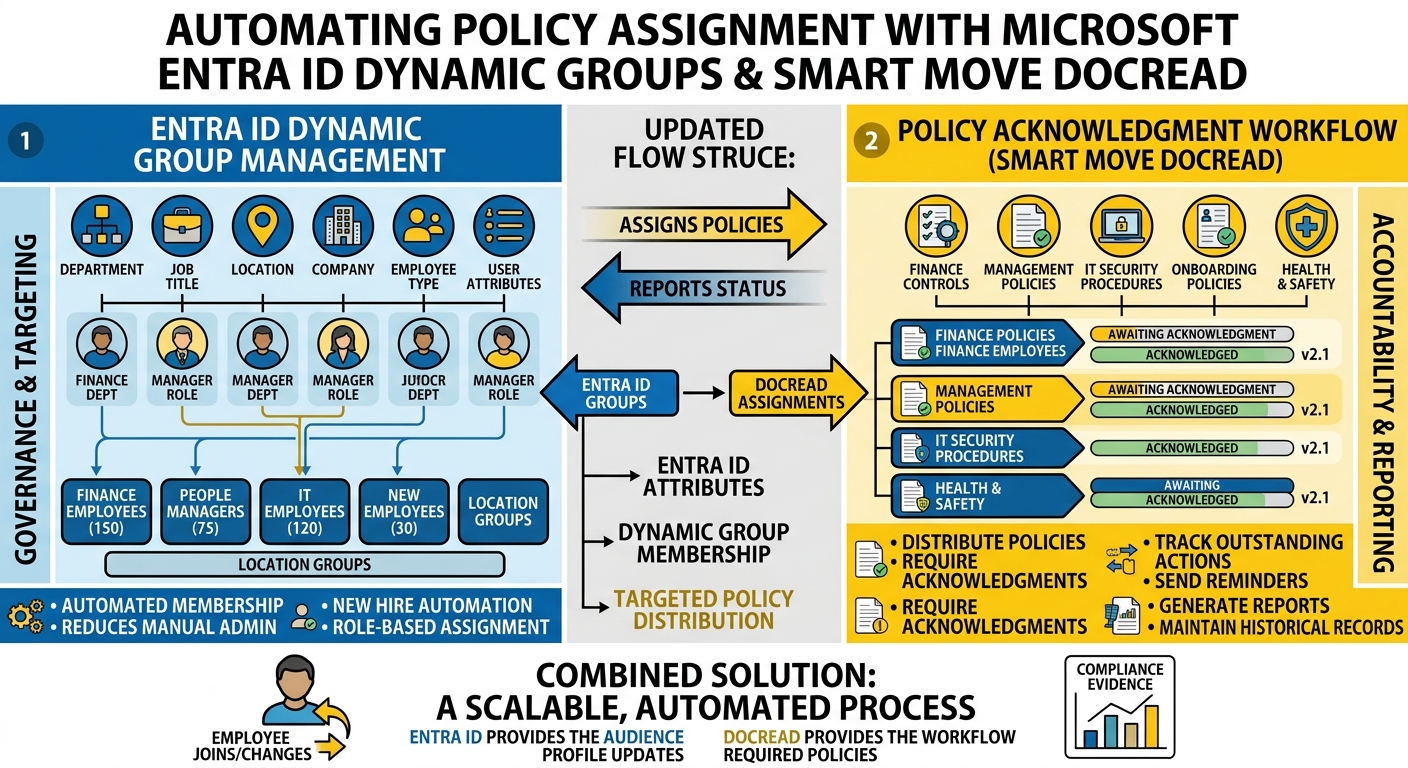
For example, an organization might establish groups such as:
Finance Employees For financial controls, expense procedures, and finance-specific requirements.
People Managers For management, employee relations, and leadership policies.
IT Employees For technical security procedures and IT-specific policies.
New Employees For policies that form part of the onboarding process.
Employees in a Specific Location For location-specific procedures and health and safety requirements.
The important point is that the policy does not have to be distributed to everyone.
It can be targeted according to the group that represents the employees who need it.
Automate Policy Assignment When Employees Join
Dynamic groups can also support new hire policy automation.
Imagine a new employee joining the organization.
Their Entra ID profile is created with information such as their department, role, location, and employee type.
Those attributes can determine which dynamic groups they belong to.
Instead of an administrator manually creating a list of policies for the new employee, group membership can become the starting point for their required policy assignments.
This creates a more consistent approach to Entra ID onboarding automation.
The onboarding process can therefore move from:
New employee → administrator checks a spreadsheet → policies are manually assigned
to:
New employee → Entra ID attributes → dynamic group membership → relevant policies are assigned
The exact workflow will depend on the organization's configuration and policy management solution, but the underlying principle is the same: use existing employee information to reduce manual targeting.
Automated Policy Assignment Requires More Than a Group
A dynamic group solves one important problem:
Who belongs in the audience?
It doesn't automatically solve every part of policy management.
Organizations still need to determine:
- Which policies are assigned to each group
- Whether employees have acknowledged those policies
- Which policy version they received
- Who has outstanding requirements
- When reminders should be sent
- How compliance should be reported
This distinction is important.
Dynamic groups can provide the targeting mechanism, while a dedicated policy management solution can provide the workflow for distributing and tracking the policies.
Microsoft 365 Group-Based Policy Delivery
This approach can also support Microsoft 365 group-based policy delivery.
Instead of treating every policy as a one-off distribution exercise, organizations can establish a relationship between groups and policy requirements.
For example:
- Finance group → Finance policies
- Managers group → Management policies
- New hires group → Onboarding policies
- Location group → Location-specific policies
When employee group membership changes, the relevant audience can change as well.
This can make policy distribution easier to maintain as the organization grows.
Targeted Policy Distribution Reduces Noise
Sending every policy to every employee might seem like the safest approach.
But it can create another problem: information overload.
Employees who receive policies that have nothing to do with their responsibilities may become less attentive to policy communications.
Targeted policy distribution helps organizations focus employees' attention on the requirements that actually apply to them.
Instead of asking employees to sort through a large collection of policies, organizations can deliver requirements based on their role, department, location, or other relevant attributes.
This can make policy communication more manageable for both employees and administrators.
Keep Policy Changes Connected to the Right Groups
Policies change over time.
A Finance policy may be updated while a general employee policy remains unchanged.
If the Finance policy is associated with the Finance employee group, the organization can update the policy requirement for that audience without manually rebuilding an organization-wide recipient list.
This also makes it easier to identify which employees need to take action when a policy changes.
The important consideration is to maintain a clear connection between:
The policy → the relevant group → the employees → the acknowledgment
That connection creates a more reliable policy management process.
Dynamic Groups Can Reduce Manual Administration
Without automated groups, policy administrators may rely on spreadsheets, email lists, or manually maintained security groups.
These approaches can work at a small scale.
But employee populations change constantly.
People join.
People leave.
Employees change departments.
Job responsibilities change.
Locations change.
Manually updating policy recipient lists every time one of these changes occurs creates opportunities for mistakes.
Dynamic groups can reduce some of this administrative work by using employee attributes as the basis for group membership.
Smart Move DocRead Into the Process
For organizations using SharePoint and Microsoft 365, Smart Move DocRead can help connect Entra ID group-based targeting with policy management.
DocRead is designed to extend SharePoint with capabilities for policy distribution, acknowledgments, compliance monitoring, reminders, and reporting.
This means organizations can continue using SharePoint as the home for their policies while using group-based targeting to determine who needs to receive and acknowledge them.
The basic process can look like this:
1. Define employee attributes
Use information such as department, role, location, or employee type.
2. Create Entra ID dynamic groups
Build groups based on the attributes that determine policy requirements.
3. Connect groups to policy requirements
Determine which policies apply to each group.
4. Distribute the policies
Send the relevant policies to the employees who belong to those groups.
5. Track acknowledgments
Monitor who has completed the required policy actions.
6. Follow up automatically
Use reminders to address outstanding acknowledgments.
7. Report on compliance
Give policy owners visibility into completed and outstanding requirements.
This creates a more structured approach to automated policy assignment without requiring administrators to manually build new recipient lists for every policy.
What Happens When Someone Changes Roles?
This is one of the advantages of using employee attributes to drive group membership.
Suppose an employee moves from Sales to Finance.
Their Entra ID information is updated.
Their dynamic group membership can then change based on the organization's rules.
That change can be reflected in the policies they are expected to receive.
This creates a more dynamic approach to policy management than maintaining static lists.
However, organizations should define their rules carefully.
Not every policy should necessarily be removed simply because an employee changes departments. Historical acknowledgment records may still need to be retained for audit purposes, even when a policy is no longer part of the employee's current requirements.
Don't Forget Exceptions
Automating policy assignment doesn't mean every employee will fit neatly into a predefined group.
There may be situations where someone needs an additional policy because of a temporary project, special responsibility, or other business requirement.
Organizations should therefore treat dynamic groups as part of the policy management process—not the entire process.
A structured policy management system should still provide ways to manage individual requirements, policy changes, exceptions, and historical records.
Build Policy Assignment Around Existing Microsoft 365 Data
One of the biggest advantages of using Entra ID dynamic groups is that organizations can build policy targeting around information they are already maintaining.
Rather than creating a separate database of policy recipients, organizations can use existing employee attributes as the basis for distribution.
This can help connect identity management with policy management.
The result is a process where employee information helps determine policy requirements, while policy management tools handle the communication, acknowledgment, and compliance evidence.
Making Policy Distribution More Scalable
As organizations grow, manually assigning policies becomes increasingly difficult.
The number of employees increases.
The number of policies increases.
Roles and departments change.
New locations are added.
And policies are updated.
A group-based approach can make this easier to manage.
Entra ID dynamic groups can automatically organize employees based on defined attributes.
Automated policy assignment can use those groups to determine who should receive particular policies.
Policy acknowledgment software can then help track whether employees have completed the required actions.
Together, these capabilities can create a more scalable approach to policy management within Microsoft 365.
The Goal: The Right Policy to the Right Person
Effective policy management isn't about sending more documents.
It's about sending the right policies to the right people and being able to demonstrate that those requirements were communicated.
Entra ID dynamic groups can provide the foundation for that targeting.
With the right rules, organizations can automate group membership, support new hire policy automation, and reduce the manual work involved in maintaining policy audiences.
When combined with a solution such as DocRead, organizations can take the next step: connecting those groups to policy distribution, acknowledgments, reminders, and compliance reporting.
The result is a more structured process for managing policies across Microsoft 365—without relying on spreadsheets and manually maintained distribution lists every time something changes.
Are your policies read on time and by the right people?
DocRead makes compliance simple
Get your free Standard Operating Procedures guide
Creating Standard Operating Procedures for your organisation doesn't have to be complicated. This guide will introduce you to the whole lifecycle from creation to training and distribution.
You may also like:
October 16, 2026
October 9, 2026
The Equifax Catastrophe: How One Missed Update Became a $700M Fine In most workplaces, ...
October 2, 2026
The Equifax Catastrophe: How One Missed Update Became a $700M Fine In most workplaces, ...
September 18, 2026
How to Manage Policy Exceptions in Microsoft 365 Without Losing Audit ControlPolicies are designed ...
September 11, 2026
Contractor Policy Acknowledgment: How to Track Compliance for Third PartiesOrganizations often rely on contractors, ...
August 28, 2026
How Do You Migrate Legacy Policies into a Policy Management System?For a lot of ...