
The Equifax Catastrophe: How One Missed Update Became a $700M Fine In most workplaces, ...
What Challenges Do Organizations Face When Managing Policies in SharePoint?
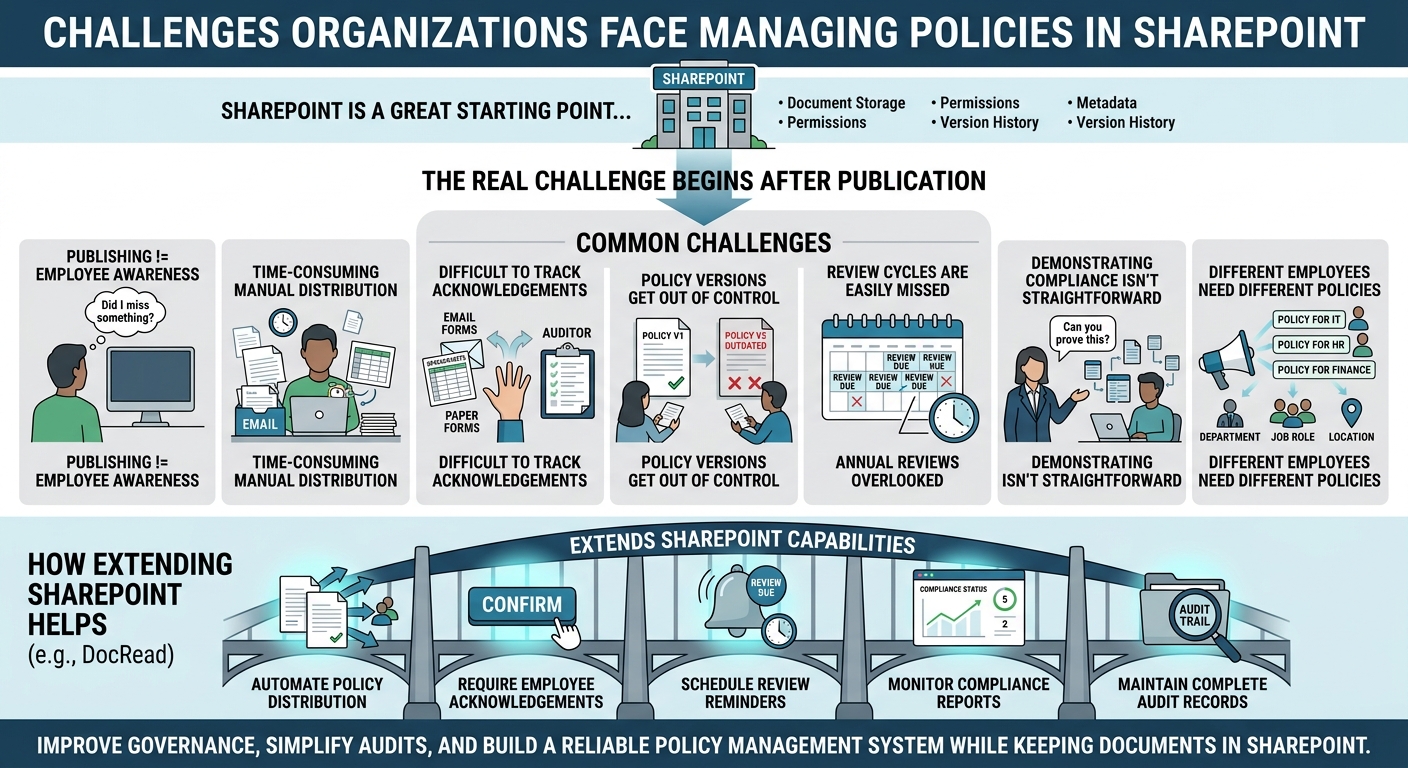
SharePoint is the natural home for storing policies and procedures for many. It's already part of Microsoft 365, familiar to employees, and provides robust document management capabilities such as version history, permissions, metadata, and search.
However, storing policies is only one aspect of policy management. The real challenge begins after a document has been published. Organizations need to ensure employees receive the right policies, understand their responsibilities, acknowledge important updates, and provide evidence of policy compliance when required.
Without dedicated tools and processes, these tasks often become manual, time-consuming, and difficult to monitor. Here are some of the most common challenges organizations face when managing policies and procedures in SharePoint.
Tired of reminding staff to read your company policies?
DocRead makes compliance simple
Publishing Doesn't Guarantee Employees Have Read a Policy
One of the biggest misconceptions is that uploading a document to SharePoint means it has been effectively communicated.
In reality, employees may never visit the document library, may overlook an important update, or simply assume someone else has informed them about changes. As a result, organizations often have no reliable way of knowing whether critical policies have actually been read.
This creates a significant gap in the policy management process, particularly for organizations operating in regulated industries where proving communication is just as important as publishing the document itself.
Manual Policy Distribution Takes Too Much Time
Many organizations still rely on email to distribute updated policies. While this may work for occasional announcements, it becomes increasingly difficult to manage as policy libraries grow and workforces become larger.
Administrators often spend considerable time deciding who should receive each document, following up with employees, and maintaining spreadsheets to track responses. These manual processes not only increase administrative effort but also introduce opportunities for human error.
Effective management of policies and procedures requires automation that ensures the right employees receive the right documents at the right time.
Tracking Employee Acknowledgements Can Be Difficult
Even when organizations ask employees to confirm they've read a policy, the process is frequently managed through emails, paper forms, Microsoft Forms, or spreadsheets.
These approaches create fragmented records that can be difficult to maintain over time. If an auditor requests evidence showing who acknowledged a specific version of a policy several months earlier, gathering that information may require significant manual effort.
A mature policy management system should automatically capture acknowledgements and maintain a complete history for every published policy.
Keeping Policy Versions Under Control
Policies are rarely static documents. Regulatory requirements change, internal procedures evolve, and organizations regularly update guidance to reflect new business practices.
Without structured version management, employees may continue referring to outdated copies stored locally or shared through previous email attachments. Multiple versions circulating throughout the organization create confusion and increase the risk of employees following obsolete procedures.
Maintaining a single, authoritative version is essential for effective policy and procedure management.
Review Cycles Are Easy to Miss
Many organizations establish annual or periodic review schedules for their policies, but monitoring those dates manually is rarely sustainable.
As policy libraries expand, review deadlines can easily be overlooked, resulting in outdated documents remaining active longer than intended. This creates unnecessary compliance risks, particularly where regulations require policies to be reviewed on a regular basis.
Automated review reminders help ensure policies remain accurate, relevant, and aligned with current regulatory and business requirements.
Demonstrating Policy Compliance Isn't Always Straightforward
Meeting internal governance requirements or external regulatory obligations often requires more than simply showing where policies are stored.
Organizations may need to demonstrate when a policy was published, who received it, whether employees acknowledged it, and whether updated versions were communicated appropriately.
READ: How to Pass a SharePoint Compliance Audit
Without centralized reporting, compiling this evidence can involve searching multiple systems, reviewing emails, and manually assembling audit records. This makes demonstrating compliance with policies and procedures more time-consuming than it needs to be.
Different Employees Need Different Policies
Not every policy applies to every employee.
Distributing every policy across the entire organization can overwhelm staff with unnecessary notifications while increasing the likelihood that important updates are overlooked. At the same time, manually selecting recipients for each policy can quickly become difficult to manage.
A more effective approach is to distribute policies based on department, location, job role, or Microsoft Entra ID security groups, ensuring employees receive only the documents relevant to their responsibilities.
SharePoint as the Foundation
SharePoint is an excellent platform for document management, but it wasn't designed to manage every aspect of organizational policies and procedures.
While it provides secure storage, permissions, and collaboration features, organizations often need additional capabilities to automate policy distribution, collect acknowledgements, monitor compliance, schedule reviews, and generate audit-ready reports.
This is why many organizations choose policies and procedures management software that extends SharePoint rather than replacing it.
How DocRead Helps Address These Challenges
DocRead is designed specifically for Microsoft 365 and SharePoint, allowing organizations to strengthen their policy management processes without moving documents into another repository.
Policies remain in existing SharePoint libraries while DocRead adds the governance capabilities needed to manage them effectively. Organizations can automate policy distribution, require employee acknowledgements, schedule review reminders, monitor compliance through centralized reporting, and maintain complete audit records—all while employees continue accessing policies through the SharePoint environment they already know.
Because it works within Microsoft 365, organizations can improve governance without introducing another standalone application or disrupting existing workflows.
Strengthening Policy Management in SharePoint
SharePoint provides an excellent starting point for storing organizational documents, but effective policy management requires much more than document storage alone.
Organizations need confidence that policies are reaching the right people, that employees understand their responsibilities, and that compliance can be demonstrated whenever required. Achieving this consistently through manual processes becomes increasingly difficult as organizations grow.
By extending SharePoint with dedicated policy and procedure management software, organizations can automate routine administration, strengthen governance, simplify audits, and build a more reliable policy management system.
Instead of replacing SharePoint, solutions such as DocRead enhance it, transforming a document repository into a comprehensive platform for managing policies and procedures across the entire organization.
Are your policies read on time and by the right people?
DocRead makes compliance simple

Get your free Standard Operating Procedures guide
Creating Standard Operating Procedures for your organisation doesn't have to be complicated. This guide will introduce you to the whole lifecycle from creation to training and distribution.
You may also like:
October 16, 2026
October 9, 2026
The Equifax Catastrophe: How One Missed Update Became a $700M Fine In most workplaces, ...
October 2, 2026
The Equifax Catastrophe: How One Missed Update Became a $700M Fine In most workplaces, ...
September 18, 2026
How to Manage Policy Exceptions in Microsoft 365 Without Losing Audit ControlPolicies are designed ...
September 11, 2026
Contractor Policy Acknowledgment: How to Track Compliance for Third PartiesOrganizations often rely on contractors, ...
August 28, 2026
How Do You Migrate Legacy Policies into a Policy Management System?For a lot of ...