
The Equifax Catastrophe: How One Missed Update Became a $700M Fine In most workplaces, ...
Microsoft Purview vs Policy Acknowledgment Software: What Each Tool Does (and Doesn’t) Do
Microsoft 365 gives organizations a lot of compliance tools. But not every compliance problem is the same.
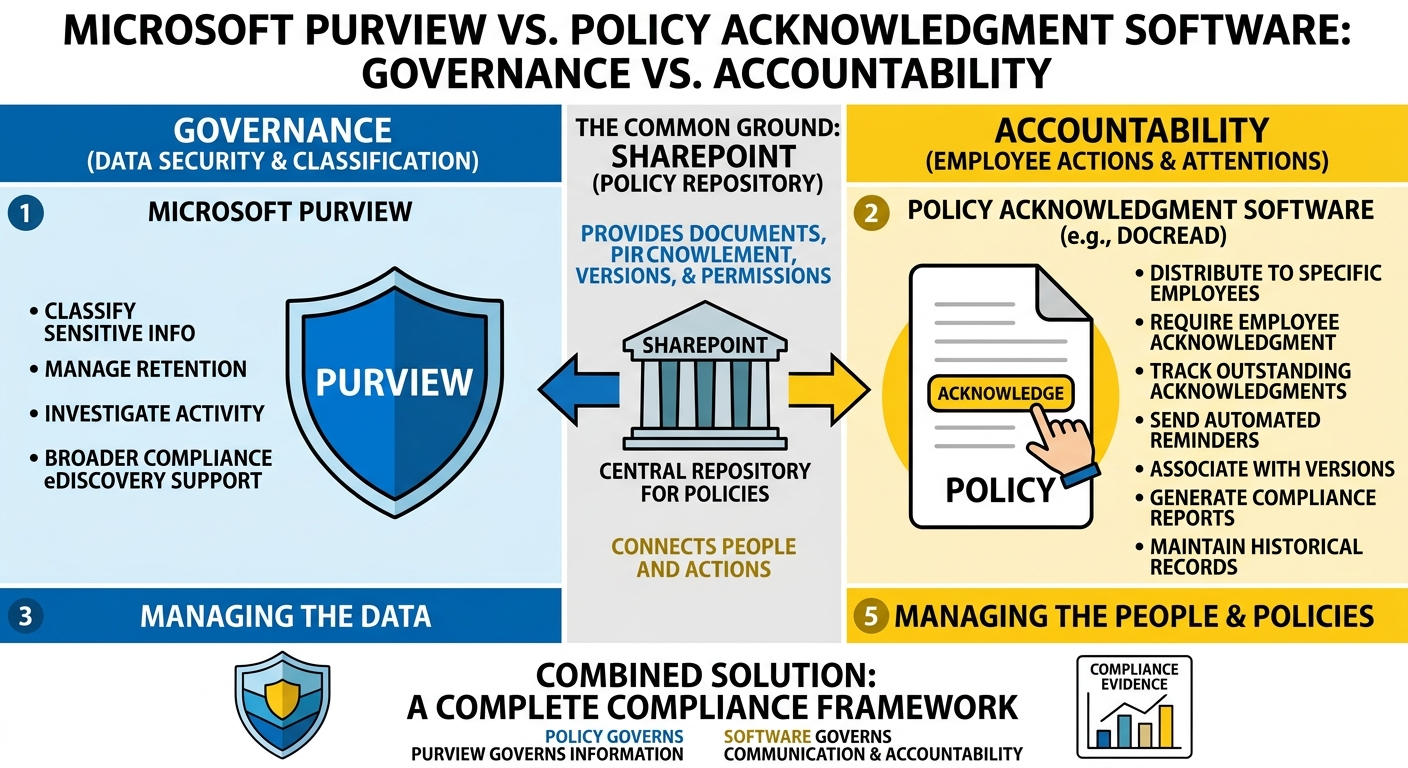
Microsoft Purview can help organizations classify sensitive information, manage retention, investigate activity, and meet broader regulatory and compliance requirements.
But what happens when the question is much simpler?
Tired of reminding staff to read your company policies?
DocRead makes compliance simple
Did every employee who needed to read the policy actually acknowledge it?
That is where organizations can find a gap between Microsoft Purview compliance capabilities and dedicated policy acknowledgment software.
The two aren't necessarily competing solutions. They address different parts of the compliance process.
Microsoft Purview: Built for Broader Compliance
Microsoft Purview provides a broad set of capabilities for data security, governance, and compliance across Microsoft 365.
Organizations can use Purview to support areas such as:
- Data classification and sensitivity labeling
- Data retention and records management
- eDiscovery and investigations
- Compliance assessments
- Auditing and activity monitoring
- Information protection
These capabilities are important for understanding how organizational data should be protected and governed.
For example, sensitivity labels can help organizations classify information and apply protection settings to sensitive content.
Purview is therefore an important part of a broader Microsoft 365 compliance tools strategy.
But managing internal policies involves another question.
Where Policy Acknowledgment Comes In
Consider a company's information security policy.
The policy might be stored in SharePoint.
Purview might help protect the information contained within the organization's Microsoft 365 environment.
But the organization may still need to answer:
- Who was required to read the policy?
- Who acknowledged it?
- Which version did they acknowledge?
- Who hasn't completed the requirement?
- When should they receive a reminder?
These are policy communication and acknowledgment questions.
They aren't necessarily solved simply by storing a policy or applying data governance controls.
Publishing a Policy Isn't the Same as Getting an Acknowledgment
One of the most common policy management problems is assuming that making a document available means employees have received and understood it.
It doesn't.
An employee might never open the SharePoint library, they might miss an email containing the updated policy, or they might acknowledge an email without creating a reliable record of which policy version they reviewed.
This is where policy acknowledgment in Microsoft 365 becomes important.
A structured process can connect the employee, the policy, the acknowledgment, and the relevant policy version.
Instead of asking whether the document exists, organizations can ask whether the required action has actually been completed.
What Policy Acknowledgment Software Does
Dedicated policy acknowledgment software focuses on the operational side of policy compliance.
It can help organizations:
- Distribute policies to specific employees or groups
- Require employees to acknowledge policies
- Track outstanding acknowledgments
- Send automated reminders
- Associate acknowledgments with policy versions
- Generate compliance reports
- Maintain historical records
This provides something that a document repository alone doesn't necessarily provide: visibility into employee action.
For organizations managing hundreds or thousands of employees, that visibility can become difficult to maintain through spreadsheets and email alone.
Policy Read Receipt Tracking Adds Another Layer
There is also an important difference between access and acknowledgment.
An employee may have permission to access a document without ever opening it. They may open a document without confirming that they have reviewed it. And they may acknowledge a policy without the organization having a clear record of which version they acknowledged.
Policy read receipt tracking and acknowledgment workflows can provide a more structured record of these interactions. This becomes particularly useful when an updated policy requires employees to take action again.
What Microsoft Purview Doesn't Replace
This is where comparisons between Microsoft Purview vs DocRead can become confusing.
Purview is designed to address broad data security, governance, and compliance requirements.
DocRead, by contrast, extends SharePoint and Microsoft 365 with capabilities focused on policy distribution, acknowledgment tracking, compliance monitoring, reminders, and reporting.
The distinction is essentially that Purview helps govern information, while Policy acknowledgment software helps govern policy communication and employee accountability.
These functions can work alongside one another – it doesn’t necessarily have to be one versus the other.
SharePoint Is Still Part of the Picture
For many organizations, SharePoint is already the central repository for policies and procedures.
It provides document libraries, permissions, metadata, search, and version history.
But storing a policy is only the starting point.
Organizations may still need a way to determine:
- Who should receive the policy
- Who has acknowledged it
- Who hasn't
- Which version was acknowledged
- When reminders should be sent
- What evidence should be available during an audit
This is where SharePoint policy tracking becomes more than document management.
The goal is to connect the policy stored in SharePoint with the people and actions associated with it.
Employee Attestation Can Strengthen Evidence
Some policies require more than simply opening a document. Employees may need to actively confirm that they have read, understood, or agree to comply with a requirement.
That's where employee attestation software can provide another layer of accountability.
For example, an organization might require employees to acknowledge an updated code of conduct or information security policy. Instead of relying on an email response, the organization can maintain a structured record of the attestation.
This can make policy compliance easier to monitor and demonstrate.
Policy Compliance Reporting Matters
Tracking acknowledgments is only useful if administrators can understand the results.
A strong policy compliance reporting process should make it easy to see:
- Who has completed the requirement.
- Who hasn't.
- Which policies are outstanding.
- Which policy versions were acknowledged.
- Where compliance gaps remain.
This can significantly reduce the effort involved in preparing for audits or internal compliance reviews.
Rather than searching through emails and spreadsheets, administrators can work from a centralized view of policy activity.
Don't Forget Policy Versions
Policies change. If an organization only records that the employee "acknowledged the policy," it may not know whether the employee has actually reviewed the current requirements.
Connecting acknowledgments to specific policy versions solves this problem, because it also creates a more useful historical record.
That distinction can become especially important when an auditor asks what requirements an employee had been given at a particular point in time.
Automation Reduces the Administrative Burden
Managing policy acknowledgments manually can quickly become a full-time administrative exercise.
Someone has to:
- identify recipients
- distribute the policy
- monitor responses
- send reminders
- update the spreadsheet
- turn all of that information into an audit report.
Automation can reduce much of this manual work.
The source material highlights targeted policy distribution, employee acknowledgments, compliance monitoring, automated reminders, and reporting as capabilities that can strengthen policy governance within Microsoft 365.
The result is a more consistent process with less dependence on individual administrators remembering who needs to do what.
So, Which Tool Do You Need?
It depends on the problem you're trying to solve.
If your organization needs to:
- Classify and protect sensitive information
- Manage retention
- Investigate activity
- Support eDiscovery
- Manage broader regulatory compliance
Microsoft Purview may be the appropriate toolset.
If your organization needs to:
- Distribute internal policies
- Require employee acknowledgments
- Track who has completed them
- Send reminders
- Track policy versions
- Generate acknowledgment reports
Dedicated policy acknowledgment software may be the better fit.
And for many organizations, the answer isn't one or the other.
Purview and Policy Acknowledgment Software Can Complement Each Other
The most useful way to think about Purview vs DocRead is not necessarily as a choice between two competing platforms.
They solve different problems.
Microsoft Purview provides capabilities for data security, governance, and broader compliance.
SharePoint provides a central home for policies and procedures.
Policy acknowledgment software can add the workflow needed to distribute those policies, collect acknowledgments, monitor completion, and maintain evidence.
Together, they can address different layers of the organization's compliance framework.
Building a More Complete Compliance Process
Microsoft Purview and policy acknowledgment software aren't necessarily alternatives.
They address different parts of the compliance process.
- Microsoft Purview: Best suited for data security, information governance, retention, auditing, eDiscovery, and broader compliance requirements.
- SharePoint: Provides a central location for storing policies, procedures, and related documents.
- Policy acknowledgment software: Helps organizations distribute policies, collect acknowledgments, track outstanding requirements, send reminders, and maintain evidence of completion.
At the end of the day, the focus should be on using each tool for the job it’s designed to do.
A strong policy management process should ultimately give organizations a clear answer to one question:
Can we prove that the right people received, reviewed, and acknowledged the right policies at the right time?
If the answer is no, there may be a gap between having compliance tools and actually managing policy compliance.
Are your policies read on time and by the right people?
DocRead makes compliance simple
Get your free Standard Operating Procedures guide
Creating Standard Operating Procedures for your organisation doesn't have to be complicated. This guide will introduce you to the whole lifecycle from creation to training and distribution.
You may also like:
October 9, 2026
October 2, 2026
The Equifax Catastrophe: How One Missed Update Became a $700M Fine In most workplaces, ...
September 18, 2026
How to Manage Policy Exceptions in Microsoft 365 Without Losing Audit ControlPolicies are designed ...
September 11, 2026
Contractor Policy Acknowledgment: How to Track Compliance for Third PartiesOrganizations often rely on contractors, ...
August 28, 2026
How Do You Migrate Legacy Policies into a Policy Management System?For a lot of ...
August 28, 2026
What Features Should You Look for in Policy Management Software for SharePoint?Choosing policy management ...