
The Difference Between Governance Infrastructure and Governance Theater Most organizations don’t lack governance. They ...
How Can Organizations Prove Policy Compliance During Audits in Microsoft 365?
In the golden age of technology, policy compliance is now easier than ever. Yet, there are still many people who take it for granted—or worse, don’t even know what it really means.
For those who aren’t yet aware, policy compliance refers to an organization’s ability to ensure that its employees follow its rules, procedures, and regulations. Protecting customer data privacy or conducting anti-harassment training are examples of demonstrating compliance.
This falls under the compliance management definition and the broader idea of policy compliance management, where organizations structure their policy management process to ensure consistent enforcement of rules, policies, and procedures.
Most often, the strength of a company’s compliance is evaluated during audits, which are formal reviews that assess whether policies and procedures are being followed, records are accurate and complete, and risks are properly controlled.
There are five types of workplace audits:
Internal: Conducted by the company’s audit team and done to catch issues early on.
External: Done by independent auditors and often required by law or stakeholders.
Compliance: Checks if the company is following laws, regulations, and internal policies, such as labor laws and tax compliance.
Operational: Looks at process efficiency and performance.
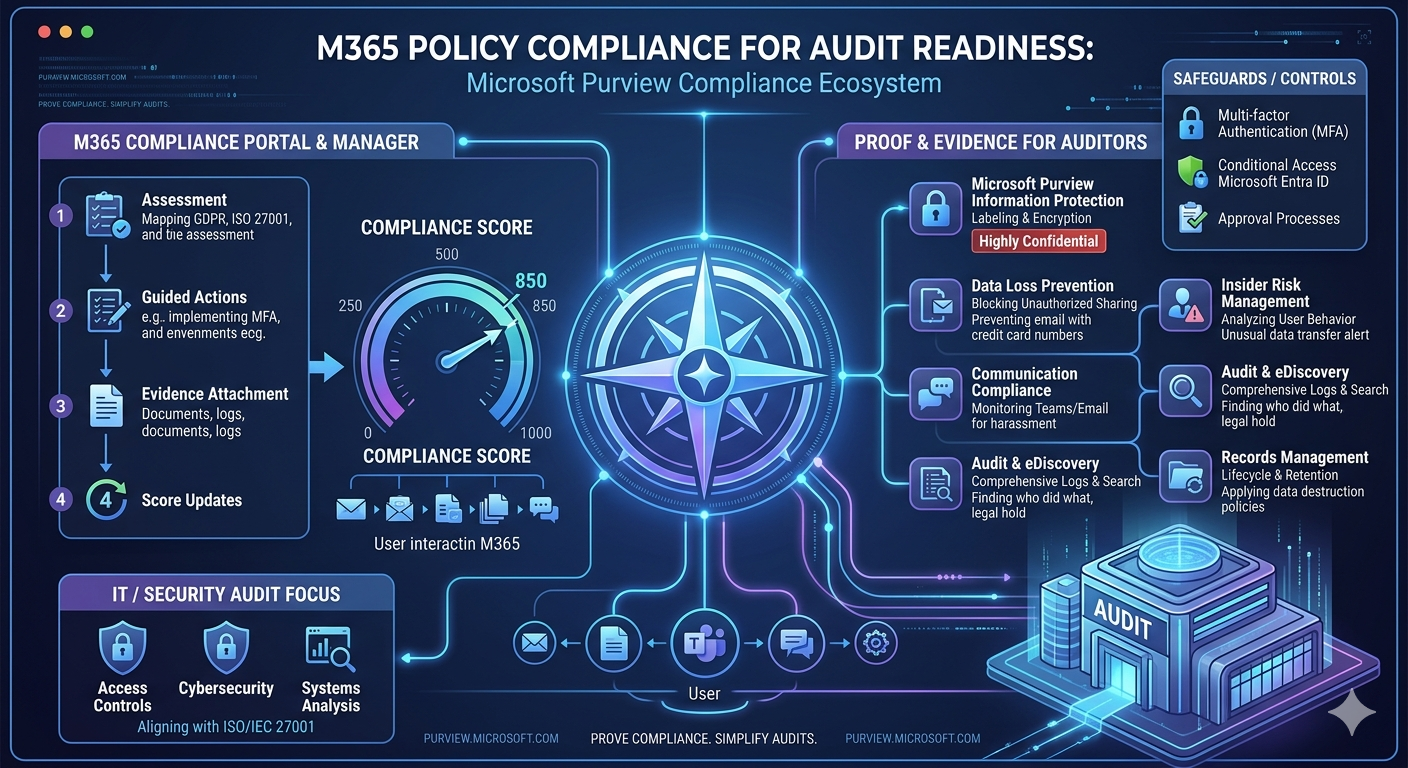
IT / Security: Analyzes access controls, cybersecurity, and systems, often in alignment with ISO/IEC 27001, the standard for information security management systems (ISMS).
Tired of reminding staff to read your company policies?
DocRead makes compliance simple
Auditors focus on:
- Documentation: Making sure that policies, SOPs, reports, receipts, and logs are complete, accurate, and up to date.
- Evidence: Ensuring tasks have been completed, such as through approvals, timestamps, and records.
- Safeguards / Controls: Measures that prevent mistakes and/or fraud from happening, such as approval processes and access restrictions.
In the modern day, many companies use Microsoft 365, a cloud-powered subscription service that includes apps like Word, Excel, PowerPoint, and Outlook, combined with cloud services, security, and storage. With advances in AI, Microsoft 365 now includes built-in tools that support policy compliance and audit readiness.
The main Microsoft 365 tools for policy compliance include Microsoft Purview Compliance Manager, Microsoft Purview Data Loss Prevention, Microsoft Purview Audit, Microsoft Entra ID, and Microsoft Purview Records Management. These tools form part of the Microsoft Purview compliance ecosystem and help organizations maintain continuous compliance visibility and audit-ready evidence.
Microsoft Purview Compliance Portal
This portal is the central hub for managing compliance across Microsoft 365. It provides a unified view of policies, risks, assessments, and audit readiness by consolidating data across services.
It supports policy management, compliance tracking, risk monitoring, and reporting through dashboards that update as organizational changes occur. It also helps teams manage compliance workflows and maintain audit-ready evidence across systems.
Organizations use it to manage policies, review compliance status, and track remediation actions to strengthen overall compliance of policies and procedures.
Microsoft Purview Compliance Manager
This tool helps organizations assess and manage compliance across cloud environments by mapping Microsoft 365 configurations to standards like GDPR and ISO 27001.
It provides pre-built or custom assessments, guided improvement actions, workflow tracking, and a risk-based compliance score. These controls are grouped into structured frameworks, with responsibilities split between Microsoft and the organization.
The compliance score is calculated based on completed controls, weighted by risk, and updates continuously as actions are implemented. Higher-risk actions have greater impact on the score.
Organizations can improve their score by implementing security controls, managing access, enforcing data protection policies, and attaching audit-ready evidence such as configuration and policy documentation.
Are your policies read on time and by the right people?
DocRead makes compliance simple
Microsoft Purview Information Protection
This protects sensitive data by classifying and labeling information across Microsoft 365 and connected environments.
It applies sensitivity labels that enforce encryption, access restrictions, and usage controls. For example, “Highly Confidential” data can be restricted to specific users only.
This ensures sensitive information is consistently protected and provides clear audit evidence of how data is classified and secured.
Microsoft Purview Communication Compliance
This monitors communications across Microsoft 365 such as email and Teams to detect policy violations like harassment or unauthorized sharing of sensitive data.
It uses policy-based scanning and detection rules to flag or escalate messages for review when violations are suspected.
This helps enforce communication standards, reduce policy breaches, and provides documented evidence that communication channels are governed and monitored for compliance.
Microsoft Purview Insider Risk Management
This identifies potential internal risks by analyzing user behavior across Microsoft 365.
It detects unusual activities such as large file downloads, abnormal data transfers, or access outside typical work patterns, and can trigger alerts or investigations.
It helps organizations detect insider threats early, reduce data loss risk, and maintain stronger security governance supported by audit requirements.
Microsoft Purview Data Loss Prevention
This prevents unauthorized sharing or leakage of sensitive data across Microsoft 365, devices, browsers, and cloud services.
It scans content using predefined policies and sensitive information types, then enforces actions such as blocking, encryption, alerts, or access restrictions. For example, it can prevent emails containing credit card data from being sent.
It helps reduce data leaks and ensures that policy violations are detected and controlled with clear audit evidence of enforcement actions.
Microsoft Purview Audit
This records user and administrative activity across Microsoft 365, creating a detailed log of actions for compliance, forensic, and legal use.
It allows organizations to review who did what, when, and where during investigations or audits.
It supports security monitoring, incident investigation, and compliance reporting through comprehensive activity tracking.
Microsoft Purview eDiscovery
This allows organizations to search, preserve, and export Microsoft 365 data for legal and compliance investigations.
Users can search content using keywords, filters, and time ranges, and place relevant data on legal hold for review or export.
It helps organizations respond to investigations and legal requests by ensuring relevant data is quickly accessible and preserved.
Microsoft Purview Data Lifecycle Management
This manages how long data is retained and when it is deleted across Microsoft 365.
Retention policies and labels ensure data is kept only as long as required for compliance, then automatically deleted when no longer needed.
It helps reduce data clutter, enforce retention requirements, and ensure consistent lifecycle governance across the organization.
Microsoft Purview Data Security Posture Management (DSPM) for AI
This provides visibility into how AI tools like Microsoft 365 Copilot interact with organizational data.
It identifies where sensitive data may be exposed through AI interactions and highlights potential governance gaps in AI usage.
It helps organizations safely adopt AI while reducing the risk of unintended data exposure through generative AI systems.
Microsoft Entra ID
This manages identity and access across Microsoft 365, ensuring only authorized users can access company resources.
It enforces security controls such as multi-factor authentication, conditional access, and identity protection based on risk signals like device compliance or location.
It strengthens identity security and ensures consistent, controlled access across all systems.
Microsoft Purview Records Management
This governs official business records by applying retention, protection, and lifecycle rules to regulated content.
It includes record labeling, retention schedules, immutable locking, and disposition review to ensure records are properly preserved and controlled.
It helps organizations meet regulatory requirements and ensures critical records remain intact and audit-ready.
To access these tools, visit the Microsoft Purview portal at purview.microsoft.com.
Modern tools like Microsoft 365 automate compliance, strengthen monitoring, and generate audit-ready evidence, ensuring policies are actively enforced and supported with documentation.
Ultimately, policy compliance transforms audits from a stressful process into a structured and manageable one. With proper compliance, both organizations and employees remain protected and audit-ready.
Why worry about the quarterly audit, after all, when everything is already properly controlled?
Get your free Standard Operating Procedures guide
Creating Standard Operating Procedures for your organisation doesn't have to be complicated. This guide will introduce you to the whole lifecycle from creation to training and distribution.
You may also like:
September 11, 2026
August 28, 2026
The Difference Between Governance Infrastructure and Governance Theater Most organizations don’t lack governance. They ...
August 28, 2026
The Difference Between Governance Infrastructure and Governance Theater Most organizations don’t lack governance. They ...
July 10, 2026
The Difference Between Governance Infrastructure and Governance Theater Most organizations don’t lack governance. They ...
July 3, 2026
The Difference Between Governance Infrastructure and Governance Theater Most organizations don’t lack governance. They ...
June 19, 2026
The Difference Between Governance Infrastructure and Governance Theater Most organizations don’t lack governance. They ...