
Which Departments Benefit from Policy Management Software in Microsoft 365? Many organizations view policy ...
Free Policy Template for Microsoft Word
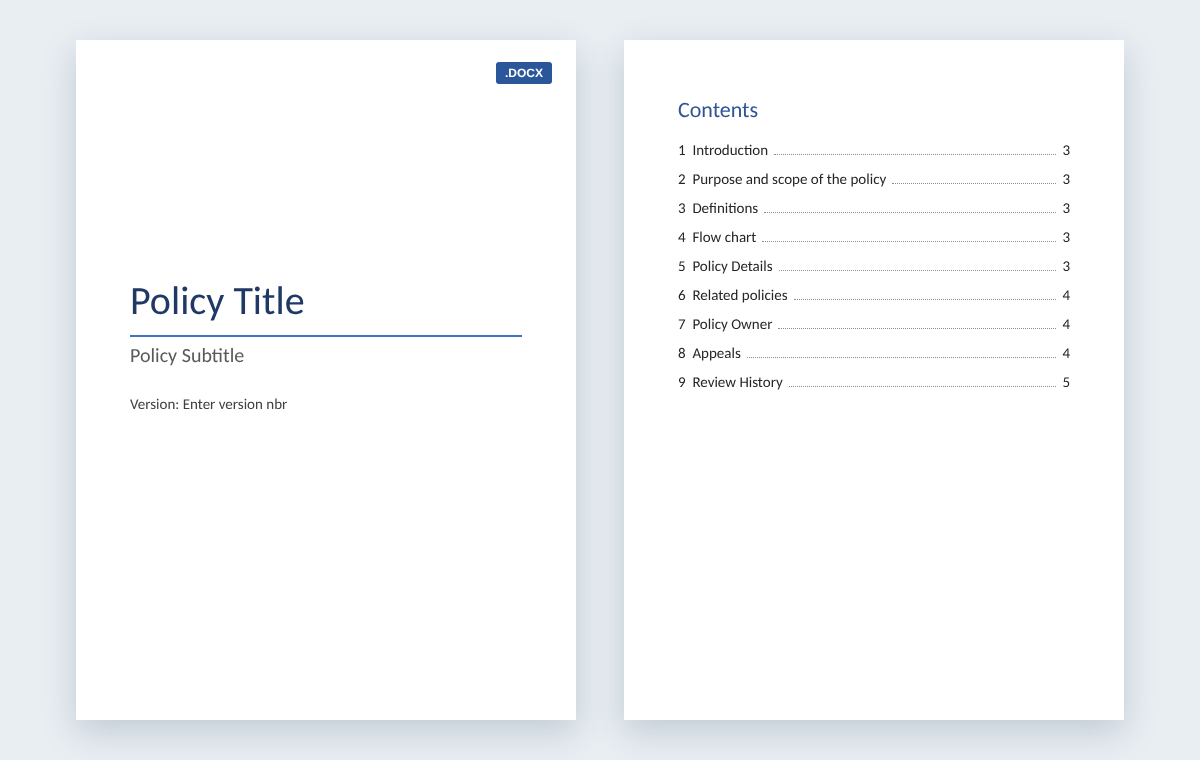
A free policy template for Word is an editable .docx file that gives every policy the same structure: a title page with version number, a table of contents and nine sections from Introduction to Review History, each with guidance notes to replace. Download it free, with no sign-up, then customize, publish and track it.
By Hugo Esperanca, Director and Co-Founder, Collaboris · Updated October 19, 2026
Download the free policy template
Microsoft Word (.docx), 34 KB. No sign-up needed. Prefer to start from a finished example? Download the HR absence policy written with the same template.
Download the policy template (.docx) Download the HR policy example (.docx)
What's in the free policy template
Using one template for every policy gives your policies a consistent layout, so employees know where to find the purpose, the rules and the owner in any policy they open. The template includes:
- A title page with the policy title, a subtitle and a version number.
- A table of contents built from Word's heading styles, so it updates when you change the headings.
- Nine sections, each with a guidance note telling you what to write.
- A review history table with columns for version, date, author and purpose of each change.
| Section | What to write |
|---|---|
| 1. Introduction | What the policy provides, for example guidance on the informal and formal steps for managing sickness absence. |
| 2. Purpose and scope | The aim of the policy and who it applies to. |
| 3. Definitions | Any terms used in the policy that need a fixed meaning. |
| 4. Flow chart | A diagram of the process, showing the people involved, the steps and the decision points. |
| 5. Policy details | The rules that apply, written so that employees can easily understand them. |
| 6. Related policies | Other policies this one depends on or connects to. |
| 7. Policy owner | The departments or people responsible for maintaining the policy. |
| 8. Appeals | How an appeal is handled, who hears it, who can accompany the employee and how the decision is confirmed in writing. |
| 9. Review history | A record of each version: what changed, when, who changed it and why. |
See it filled in: HR absence policy example
The free HR policy example is an Absence Policy, version 1.0, written with the same nine sections. Use it to see how much detail goes into each section before you write your own.
How to customize the template in Word
- Replace the title page text. Type your policy name over “Policy Title”, add a subtitle if you need one, and enter the version number, such as 1.0.
- Write each section. Replace each guidance note with your own text. Delete any section that doesn't apply, such as Appeals in a policy that has no appeal route.
- Add your flow chart. Draw the process as a simple diagram showing who does what and where decisions are made.
- Update the table of contents. On the References tab, select Update Table, then choose Update entire table so new or renamed headings appear.
- Record the change. Add a row to the review history table with the version, date, author and purpose of the change.
- Save a reusable copy. Once you've added your logo and house style, save the file as a Word Template (.dotx) so every new policy starts from the same layout.
How to publish and track your policy
A finished policy only works if people can find the current version and you can show who has read it.
Publish it in SharePoint
- Use a document library with versioning on. SharePoint shows when each file was changed and who changed it, and numbers each version automatically.
- Turn on content approval. Drafts stay hidden from readers until an approver approves them.
- Make the template the library default. With Full Control permission, set the library's document template in Library settings, under Advanced settings, so new policies start from your template.
- Show key details as columns. Display policy metadata in SharePoint library columns, such as the owner and review date, so the library works as your policy register.
Track who has read it
For a small team, the free policy template pack adds an Excel acknowledgment log and a review schedule to this template. When you need to prove who read which version across a whole organization, DocRead does this inside SharePoint: it assigns each policy to Microsoft Entra ID or SharePoint groups, sends reminders, escalates overdue tasks to managers and records a time-stamped acknowledgment of the exact version each person read. See policy management software for SharePoint.
Free policy template FAQ
Is the policy template really free?
Yes. The template and the HR absence policy example are free Word downloads, with no sign-up or email address needed.
What format is the template?
It is a Microsoft Word document (.docx). You can edit it in Word, and once it's customized you can save it as a Word Template (.dotx) for reuse.
What sections does the policy template include?
A title page with version number, a table of contents and nine sections: Introduction, Purpose and scope, Definitions, Flow chart, Policy details, Related policies, Policy owner, Appeals and Review history.
Can I use the template for procedures as well as policies?
Yes. The purpose, scope, definitions, flow chart and details sections suit a procedure as well as a policy. Delete the sections a procedure doesn't need, such as Appeals.
How do I keep track of policy versions?
Add a row to the template's review history table each time you change the policy, and keep the policy in a SharePoint library with versioning turned on, so you can see who changed it and when.
What is the difference between this template and the policy template pack?
This page gives you the single Word policy template and an HR policy example. The policy template pack includes the same Word template plus an Excel review schedule and an Excel acknowledgment log.
Are your policies read on time and by the right people?
DocRead makes compliance simple
Our DocRead software helps organizations simplify and improve their compliance processes. So, if you want to take your policy management processes to the next level, then please get in touch and we will be happy to help.
Collaboris has helped guide and advise companies for over 15 years and is committed to continue to do so. We are passionate about helping organizations improve their policy, procedure and SOP processes. Our DocRead software helps organizations simplify and improve their compliance processes. Also, our free guides and resources can help whether you are looking to revolutionize your policy creation process, improve your internal communications or purchase policy management software.
You may also like:
October 23, 2026
October 16, 2026
The Equifax Catastrophe: How One Missed Update Became a $700M Fine In most workplaces, ...
October 9, 2026
The Equifax Catastrophe: How One Missed Update Became a $700M Fine In most workplaces, ...
October 2, 2026
The Equifax Catastrophe: How One Missed Update Became a $700M Fine In most workplaces, ...
September 18, 2026
How to Manage Policy Exceptions in Microsoft 365 Without Losing Audit ControlPolicies are designed ...
September 11, 2026
Contractor Policy Acknowledgment: How to Track Compliance for Third PartiesOrganizations often rely on contractors, ...