
How to Assign Required Policies with Microsoft Entra ID Dynamic Groups Not every employee ...
Microsoft Purview Compliance and Audit: How to Prove Policy Compliance in Microsoft 365
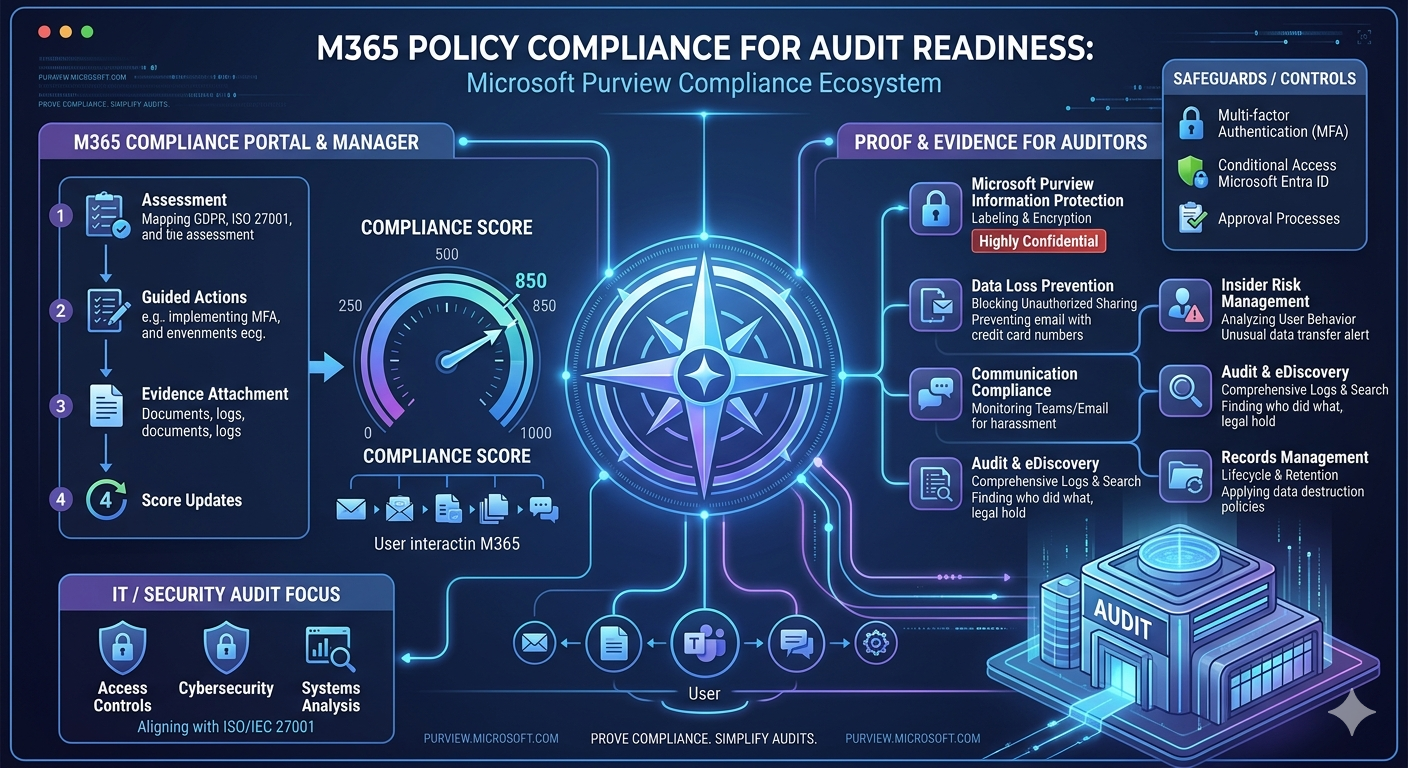
To prove policy compliance in a Microsoft 365 audit, you need three kinds of evidence: the approved policy itself, proof that technical controls were in place, and proof that the right people read and accepted the policy. Microsoft Purview, Microsoft's compliance portal for Microsoft 365, covers the first two well. Purview Audit records who did what and when, Compliance Manager tracks controls against standards such as ISO 27001, and retention and records management keep documents for as long as the rules require. What Purview doesn't do is ask staff to read a policy and record that each person accepted the current version.
This guide explains what each Microsoft Purview compliance tool does, what evidence it produces for auditors, how long Purview Audit keeps records, and how to close the policy sign-off gap.
What auditors ask for in a policy compliance audit
Whether the audit is internal, external, regulatory or an IT and security review against a standard like ISO 27001, auditors usually test three things:
- Documentation. Policies and procedures exist, are approved, are current and have an owner and a review date.
- Controls. Safeguards such as access restrictions, data loss prevention and retention are configured and working.
- Evidence of operation. Records show the controls ran and people followed the rules: logs, approvals, time stamps and acknowledgments.
If you handle protected health information, use our HIPAA compliance audit checklist. For service organizations, see the SOC 2 policy management checklist for Microsoft 365.
Policy and compliance management on Microsoft 365: the Microsoft Purview toolset
Microsoft Purview brings Microsoft 365's data security, governance and compliance tools together in one portal at purview.microsoft.com (Microsoft Learn). Here is what each tool contributes to an audit, and where it stops.
| Purview tool | What it does | Audit evidence it gives you | What it doesn't prove |
|---|---|---|---|
| Purview Audit | Logs user and admin activity across Microsoft 365 | Who accessed, changed or shared a file, and when | That a person read and accepted a policy |
| Compliance Manager | Maps controls to regulations and standards and tracks improvement actions | Assessments, completed actions and attached evidence | That your controls are effective. Microsoft says the score isn't a guarantee of compliance |
| Data Lifecycle Management and Records Management | Retention policies and labels, record declaration and disposition review | Proof that documents and records were kept for the required period | Who was told about a policy |
| Information Protection | Sensitivity labels with encryption and access restrictions | How sensitive data was classified and protected | Staff awareness of the data handling policy |
| Data Loss Prevention | Detects and blocks risky sharing of sensitive information | Policy matches, blocks and alerts | That people were trained on the rule |
| Communication Compliance | Flags policy violations in email and Teams for review | Detected violations and reviewer actions | That the code of conduct was distributed |
| eDiscovery | Searches, holds and exports content for investigations | Preserved content for legal and regulatory requests | Ongoing policy compliance |
| Microsoft Entra ID | Identity, groups, multifactor authentication and conditional access | Sign-in logs and access policies | Policy acknowledgment |
Together these tools show that Microsoft 365 is configured and monitored. The last column is the part most audits still ask about: did the people a policy applies to receive it, read it and accept it?
Tired of reminding staff to read your company policies?
DocRead makes compliance simple
Microsoft Purview Audit: what it records and how long it keeps it
Microsoft Purview Audit records user and admin activity across Exchange, SharePoint, OneDrive, Teams, Microsoft Entra ID and other services in a unified audit log. Microsoft offers two tiers (Microsoft Learn: auditing solutions; Search the audit log):
| Audit (Standard) | Audit (Premium) | |
|---|---|---|
| Default retention | 180 days | One year for Exchange, SharePoint, OneDrive and Microsoft Entra records |
| Longer retention | Not available | Up to 10 years with an add-on license |
| Export from search | Up to 50,000 rows | Up to 1,000,000 rows |
| Who can search | Users with the Audit Logs or View-Only Audit Logs role in the Microsoft Purview portal | |
| How quickly events appear | Typically 60 to 90 minutes after the event for core services such as SharePoint and Teams. Microsoft doesn't guarantee a time | |
How to search the Purview audit log for policy evidence
- In the Microsoft Purview portal, open Audit. You need the Audit Logs or View-Only Audit Logs role.
- Set the date range, and choose the activities you need, such as file accessed, file modified or sharing activities.
- Filter by user or by the SharePoint file or folder that holds the policy.
- Run the search, review the results and export them to a .csv file for your audit evidence.
Two limits matter for policy audits. First, a "file accessed" event shows that someone opened a document, not that they read or understood it, or agreed to follow it. Second, if your audit looks back further than the retention period, the records are gone. HIPAA, for example, requires security policy documentation to be kept for six years (45 CFR 164.316(b)(2)).
Microsoft Purview Compliance Manager: scores, assessments and improvement actions
Compliance Manager helps you track how Microsoft 365 is configured against regulations and standards. You pick an assessment, such as ISO 27001 or GDPR, and Compliance Manager lists the controls, splits them between Microsoft's responsibilities and yours, and gives you improvement actions to complete (Microsoft Learn: Compliance Manager).
- Compliance score. The score measures your progress in completing recommended improvement actions. Actions carry different weights depending on the risk they address.
- Improvement actions. Each action explains what to configure, and many can be tested automatically. You can assign actions to people and attach documentation as evidence.
- Assessments. Templates group controls by regulation, so you can show an auditor where you stand against a specific framework.
Microsoft is clear about the limits: Compliance Manager's recommendations "should not be interpreted as a guarantee of compliance" (Compliance Manager scoring). Many controls, such as communicating security policies to staff, are procedural. Compliance Manager can record that you did them, but you still need the underlying evidence.
Are your policies read on time and by the right people?
DocRead makes compliance simple
The gap: proving people read and accepted your policies
Most frameworks expect staff to know the policies that apply to them. ISO 27001 controls and SOC 2 criteria, for instance, ask organizations to communicate policies to relevant personnel, and auditors typically sample employees and ask for proof. Microsoft Purview doesn't assign a policy to a group, set a deadline, chase late readers or record who accepted which version. You can build part of that with SharePoint lists and Power Automate, but then you have to maintain and evidence the build yourself. For a side-by-side view, read Microsoft Purview vs policy acknowledgment software.
DocRead, policy acknowledgment software for Microsoft 365, fills that gap inside SharePoint. It assigns each policy to SharePoint or Microsoft Entra ID groups (see how to assign required policies with Entra ID dynamic groups), sets a reading deadline, sends reminders and escalates overdue readers to managers. It then keeps a time-stamped acknowledgment of the exact version each person read. Reports export for auditors, and the DocSurvey add-on adds a quiz with a pass mark where you need proof of understanding.
How to build a Microsoft 365 audit evidence pack in seven steps
- List the requirements. Start from the regulation or standard being audited and list the policies and controls in scope.
- Run the Compliance Manager assessment. Use the matching template, complete improvement actions and attach documentation.
- Check retention. Confirm that retention policies, labels and your audit log tier cover the period the auditor will look back over.
- Export Purview Audit evidence. Search the audit log for the activities and documents in scope and export the results.
- Collect policy documents. Show the approved version of each policy from SharePoint version history, with its owner and review date. Our guide to the policy review process covers review records.
- Export acknowledgment records. Show who was assigned each policy, when they accepted it and which version, plus anyone still outstanding.
- Add DLP, sensitivity label and Communication Compliance reports where the audit covers data protection or conduct.
Moving from SharePoint Server? See how to preserve policy compliance records during migration, and compare options in our guide to policy and procedure management software for SharePoint.
Microsoft Purview audit and compliance FAQ
What is Microsoft Purview compliance?
Microsoft Purview is Microsoft's family of data security, governance and compliance tools for Microsoft 365, including Audit, Compliance Manager, Data Lifecycle Management, Records Management, Information Protection, Data Loss Prevention, Communication Compliance and eDiscovery.
What does Microsoft Purview Audit record?
It records user and admin activity across Microsoft 365 services, such as files accessed, modified or shared in SharePoint and OneDrive, mailbox activity and admin changes, in a searchable unified audit log.
How long does Microsoft Purview Audit keep records?
Audit (Standard) keeps records for 180 days. Audit (Premium) keeps Exchange, SharePoint, OneDrive and Microsoft Entra records for one year by default, and up to 10 years with an add-on license.
Can Microsoft Purview prove employees read a policy?
Not on its own. The audit log can show that a file was opened, but not that the person read, understood or accepted the policy. Policy acknowledgment software such as DocRead records that.
Does a high Compliance Manager score mean we're compliant?
No. Microsoft states that Compliance Manager recommendations shouldn't be taken as a guarantee of compliance. The score tracks completed improvement actions, and you still need to validate your controls.
Where do I find the Microsoft Purview portal?
At purview.microsoft.com. Access to each solution depends on your Microsoft 365 licenses and the roles you're assigned.
Close the policy evidence gap
Purview shows auditors how Microsoft 365 is controlled. DocRead shows them that your people received, read and accepted the current version of each policy, without leaving SharePoint. Book a demo, request a quote or start the 30-day SharePoint Server trial.
Get your free Standard Operating Procedures guide
Creating Standard Operating Procedures for your organisation doesn't have to be complicated. This guide will introduce you to the whole lifecycle from creation to training and distribution.
You may also like:
November 13, 2026
November 9, 2026
Published: November 9, 2026 A policy review is a scheduled check that a policy ...
November 9, 2026
Published: November 9, 2026 To write a policy, confirm a policy is needed, name ...
November 9, 2026
A HIPAA compliance audit checks whether a covered entity or business associate meets the ...
November 6, 2026
How Do You Migrate Legacy Policies into a Policy Management System? For a lot ...
November 2, 2026
A policy and procedure manual is one controlled set of documents that holds an ...