
The Difference Between Governance Infrastructure and Governance Theater Most organizations don’t lack governance. They ...
How to delete a Survey
Note: This content applies to the on-premise version of DocRead only. For the Office 365 version have a look here.
To delete a survey you first need ensure that it is not attached to any document or else the users will receive an error if they try to complete it via the document (i.e. when they select “Complete Survey” on the document library Ribbon or when they try to complete a DocRead task assigned to a document that has the Survey attached).
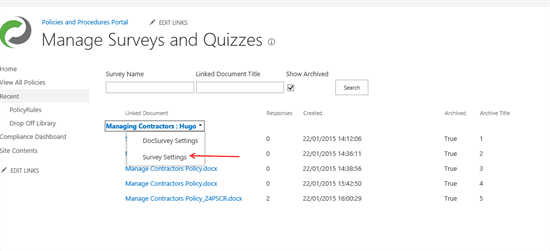
To delete the actual survey, go to the DocRead “Manage Survey” page (in site settings) and select the “Survey Settings” option from the survey drop-down menu.
 From the settings page select the “Delete this Survey” option.
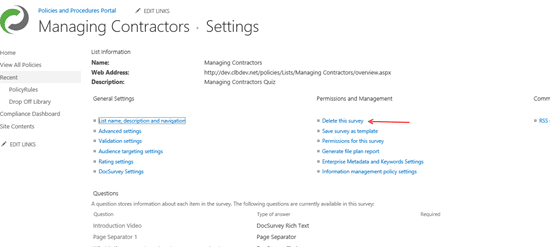
This will delete the survey but it will not delete the statistical information for that Survey.
The statistical information for a survey cannot be deleted, it can only be archived via the “Archive Statistics” option.
You may also be interested in:
The Difference Between Governance Infrastructure and Governance Theater Most organizations don’t lack governance. They ...
The key human resource management policies every organization needs cover conduct, equal opportunity, harassment, ...
The biggest advantages of knowledge management are simple to describe: people stop hunting for ...
The Difference Between Governance Infrastructure and Governance Theater Most organizations don’t lack governance. They ...
The Difference Between Governance Infrastructure and Governance Theater Most organizations don’t lack governance. They ...