
Which Departments Benefit from Policy Management Software in Microsoft 365? Many organizations view policy ...
Announcing the new DocRead 365 Analytics Module

We are thrilled to announce the release of our brand-new DocRead Analytics Module add-on! This powerful new feature gives our DocRead 365 customers the ability to create their own employee compliance reports using Power BI, adding a level of flexibility and customisation that many of our customers have been asking for.
Out of the box, DocRead already provides a real-time dashboard that offers a high-level overview of an organization's employee compliance status. This dashboard is great for quick insights but also allows administrators to drill down into specific details such as documents, users, groups, or libraries to get a more granular view of compliance. While this built-in reporting is valuable, we recognize that not every organization has the same reporting needs. Some customers require more in-depth, customizable reporting capabilities to meet their unique compliance requirements.
This is exactly why we built the DocRead Analytics Module.
Some of the key benefits of the DocRead 365 Analytics module:
Created with performance in mind:
The new module goes beyond just adding a few extra reports. It creates a completely separate analytical data store for each customer. This data store can be queried and reported on independently of DocRead’s transactional database, meaning there’s no impact on the performance of the day-to-day use of DocRead. This separation ensures that all compliance data is readily available for deep analysis without affecting the regular workflow within the organisation.
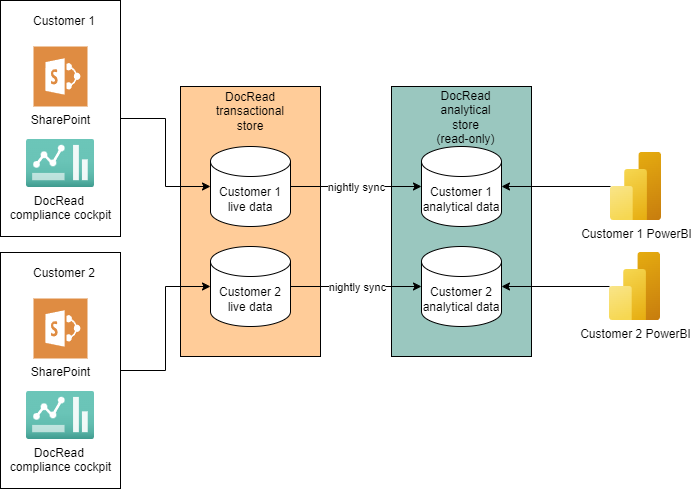
Quick Start with Pre-Built Power BI Templates
To help our customers get started right away, the module also comes with a Power BI template that includes several pre-built reports. These serve as examples of how the data can be used and can be easily customised to fit the specific needs of each organisation. With these templates, customers can immediately start exploring their compliance data while also learning how to create their own powerful reports.
Whether our customers need to build custom reports for management, audit trails for compliance teams, or just want more insight into how documents are being read across the organisation, the new Analytics Module is designed to help achieve that. And with the added power of Power BI, the possibilities for customising and visualising this data are virtually limitless.
Looking ahead
We’re really excited to see how this new functionality helps our customers get even more value from DocRead. As always, we’re committed to evolving our product based on customer feedback, and we believe this new module is a huge step forward in helping our customers tailor their compliance reporting to their specific needs.
Want Power BI dashboards built around your own teams and policies? See our Power BI compliance reporting page.
We have been developing policy compliance solutions for SharePoint for over 12 years.
We understand how Compliance Managers struggle to ensure all employees have acknowledged critical documents like policies or procedures.
That's why we created DocRead, a tool that allows you to distribute policies, procedures, and important documents to employees and track acknowledgments, ensuring employee compliance and accountability.
All without leaving SharePoint.
Want to see how we can save you time and automate your employee compliance?
DocRead has enabled us to see a massive efficiency improvement... we are now saving 2 to 3 weeks per policy on administration alone.
Nick Ferguson
Peregrine Pharmaceuticals
Feedback for the on-premises version of DocRead.
You may also like:
October 23, 2026
October 16, 2026
The Equifax Catastrophe: How One Missed Update Became a $700M Fine In most workplaces, ...
October 9, 2026
The Equifax Catastrophe: How One Missed Update Became a $700M Fine In most workplaces, ...
October 2, 2026
The Equifax Catastrophe: How One Missed Update Became a $700M Fine In most workplaces, ...
September 18, 2026
How to Manage Policy Exceptions in Microsoft 365 Without Losing Audit ControlPolicies are designed ...
September 11, 2026
Contractor Policy Acknowledgment: How to Track Compliance for Third PartiesOrganizations often rely on contractors, ...