
The Difference Between Governance Infrastructure and Governance Theater Most organizations don’t lack governance. They ...
How to delete a SharePoint Survey in 4 steps
This blog post will explain the steps needed to remove/delete a survey from SharePoint. It does not matter whether the survey was created in SharePoint or with DocSurvey, the steps required to remove it are the same.
1) Navigate to the site containing the survey and then select ‘Site Settings’
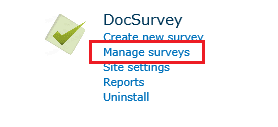
2) From the DocSurvey menu select ‘Manage surveys’
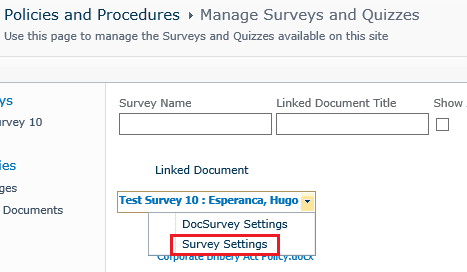
3) Select the ‘down arrow’ next to the survey you wish to delete and select ‘Survey Settings’
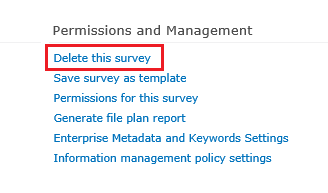
4) Then select ‘Delete this survey’.
That’s all there is to it!
You may also be interested in:
The key human resource management policies every organization needs cover conduct, equal opportunity, harassment, ...
The biggest advantages of knowledge management are simple to describe: people stop hunting for ...
The Difference Between Governance Infrastructure and Governance Theater Most organizations don’t lack governance. They ...
The Difference Between Governance Infrastructure and Governance Theater Most organizations don’t lack governance. They ...
The Difference Between Governance Infrastructure and Governance Theater Most organizations don’t lack governance. They ...