
Which Departments Benefit from Policy Management Software in Microsoft 365? Many organizations view policy ...
Policy Management for Frontline Workers: Reaching Employees Without Desks or Email
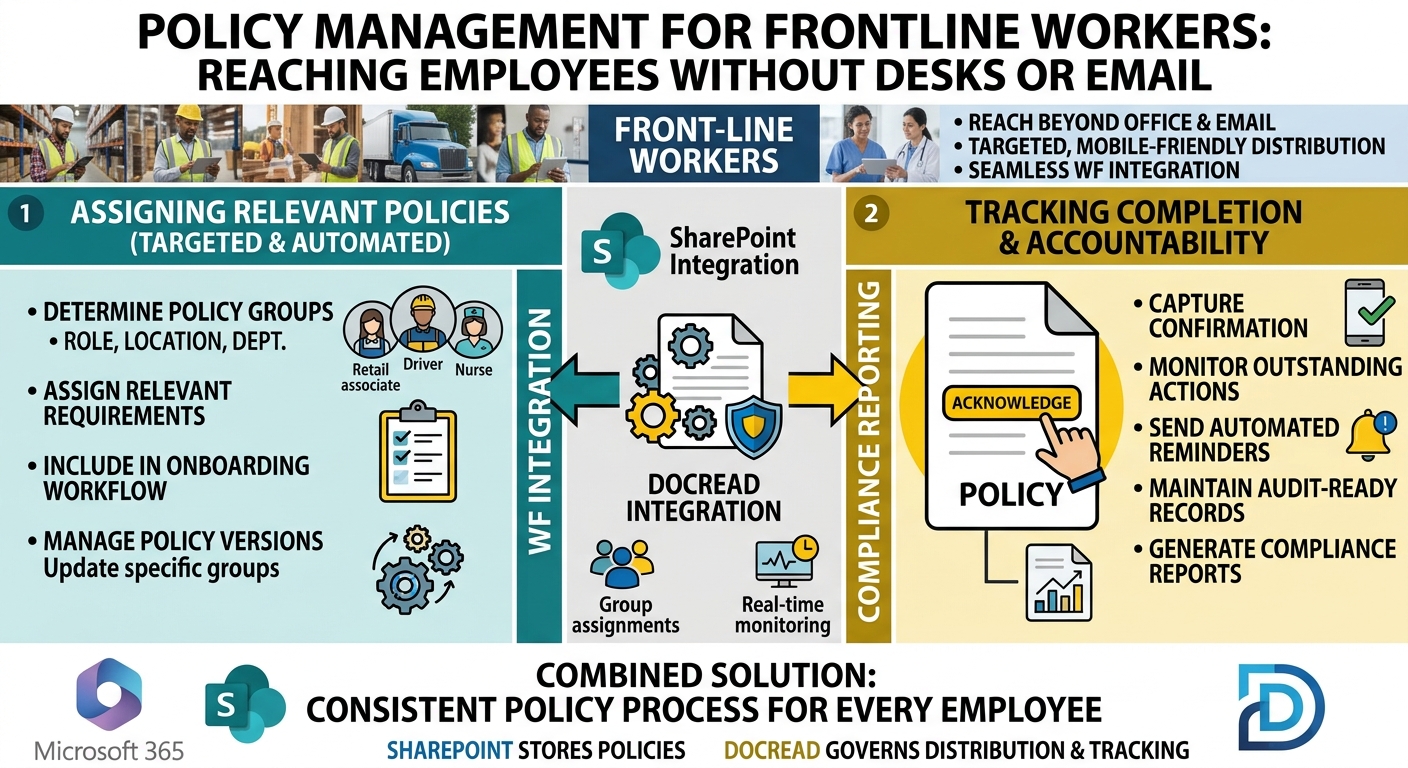
For many organizations, policy communication is built around an assumption that doesn't apply to everyone: employees have a desk, a company computer, and a work email address.
That may be true for office-based employees, but frontline workers often operate differently.
Retail associates, warehouse workers, drivers, healthcare staff, field technicians, manufacturing employees, and hospitality teams may spend most of their working day away from a desk. Some may share devices, work across different locations, or have limited access to corporate email.
This creates a different policy management challenge. Organizations need a reliable way to make sure frontline employees receive the policies relevant to their work, complete required acknowledgments, and remain up to date when policies change.
Why Frontline Policy Management Requires a Different Approach
Email may be effective for office-based employees, but it isn't always practical for workers who spend most of their time on the shop floor, at customer sites, in warehouses, or on the road.
Organizations therefore need to consider how policies fit into the employee's actual workflow.
This is particularly important for policies covering:
- Health and safety
- Workplace conduct
- Information security
- Data protection
- Emergency procedures
- Operational processes
- Regulatory requirements
The goal isn't simply to make these documents available. It's to establish a consistent process for assigning and tracking the policies each employee is expected to follow.
Tired of reminding staff to read your company policies?
DocRead makes compliance simple
Not Every Frontline Worker Needs the Same Policies
A frontline workforce can include employees with very different responsibilities.
A manufacturing employee may require specific safety procedures. A delivery driver may need vehicle and road safety policies. A retail employee may need cash handling and store-specific procedures.
Sending every policy to everyone can create unnecessary administrative work and overwhelm employees with information that doesn't apply to them.
A better approach is to assign policies according to factors such as:
- Department
- Job role
- Location
- Employee type
- Group membership
This allows organizations to create more targeted policy distribution and ensures that employees receive requirements relevant to their responsibilities.
Make Policy Assignment Part of Onboarding
Frontline organizations may also have frequent hiring and employee turnover, making onboarding an important part of policy management.
New employees may need to complete several mandatory policies before starting work. If these requirements are assigned manually, there is a greater risk of something being missed.
Automating policy assignments based on employee information can create a more consistent process.
For example, a new warehouse employee could automatically receive the policies associated with their role and location, while a new driver receives a different set of requirements.
This makes policy management part of the onboarding process rather than a separate administrative task.
Are your policies read on time and by the right people?
DocRead makes compliance simple
Track Acknowledgments, Not Just Distribution
Sending a policy doesn't necessarily provide evidence that an employee completed the requirement.
This is where policy acknowledgment becomes important.
Organizations may need to know:
- Who was required to acknowledge the policy
- Who completed the acknowledgment
- Who still has an outstanding requirement
- When the acknowledgment was completed
- Which policy version was acknowledged
Without centralized tracking, this information can end up scattered across spreadsheets, email responses, paper forms, or other systems.
A structured acknowledgment process gives policy owners a clearer view of compliance across the workforce.
Keep Policy Updates Connected to Employees
Policy management doesn't end when an employee completes an initial acknowledgment.
Policies change as regulations, procedures, and business requirements evolve.
When a new version is published, organizations need to identify which employees are affected and whether they need to acknowledge the updated requirements.
Connecting policy assignments to specific employee groups makes this easier to manage.
It also helps prevent an old acknowledgment from being treated as evidence that an employee has reviewed a newer version.
Use Reminders to Manage Outstanding Requirements
Not every employee will complete an acknowledgment immediately.
Manually tracking outstanding actions and contacting employees individually can become difficult, particularly across large frontline workforces.
Automated reminders can help policy owners follow up with employees who have not completed their required actions.
Instead of maintaining separate lists of outstanding employees, administrators can monitor completion through a centralized policy management process and allow reminders to handle routine follow-up.
Maintain an Audit-Ready Record
When an organization needs to demonstrate policy compliance, having the policy document itself may not be enough.
The organization may also need to show:
- Which employees were assigned the policy
- Which version they received
- When it was distributed
- Whether acknowledgment was completed
- When the acknowledgment occurred
- Which requirements remain outstanding
Maintaining these records provides a clearer audit trail and makes it easier to identify compliance gaps.
It also gives policy owners historical evidence of what employees were required to acknowledge at a particular point in time.
SharePoint Can Remain the Policy Repository
Organizations using Microsoft 365 can continue to use SharePoint as the central location for their policies and procedures.
SharePoint provides document libraries, permissions, search, metadata, and version history that can support the underlying policy library.
The additional challenge is managing the process around those documents: assigning policies, collecting acknowledgments, sending reminders, and reporting on completion.
This is where dedicated policy management software can extend the capabilities already available in Microsoft 365.
How DocRead Can Support Frontline Policy Management
DocRead is designed for SharePoint and Microsoft 365 and adds policy management capabilities around existing policy documents.
Organizations can use it to distribute policies to specific employees or groups, require acknowledgments, monitor completion, send reminders, and generate compliance reports.
For frontline teams, this can support:
- Targeted Policy Distribution: Assign policies according to department, role, location, or group.
- Employee Acknowledgments: Capture confirmation that required policies have been reviewed.
- Automated Reminders: Follow up on outstanding acknowledgments.
- Policy Version Tracking: Maintain records associated with the relevant policy versions.
- Compliance Reporting: Monitor completed and outstanding policy requirements.
- Employee Onboarding: Include mandatory policies as part of the onboarding process.
Building a Consistent Policy Process for Every Employee
Frontline workers shouldn't require a completely separate policy management system simply because their working environment differs from that of office employees.
What they need is a policy process that accounts for how they work.
Organizations can use employee information to determine which policies apply, automate assignments, track acknowledgments, follow up on outstanding requirements, and maintain evidence of compliance.
For organizations using Microsoft 365, SharePoint can remain the foundation for storing policies while dedicated policy management capabilities provide the distribution, tracking, and reporting needed to manage requirements across the entire workforce.
The goal is simple: make sure every employee is assigned the policies relevant to their role, and give the organization a reliable record of what happened next.
Get your free Standard Operating Procedures guide
Creating Standard Operating Procedures for your organisation doesn't have to be complicated. This guide will introduce you to the whole lifecycle from creation to training and distribution.
You may also like:
October 23, 2026
October 16, 2026
The Equifax Catastrophe: How One Missed Update Became a $700M Fine In most workplaces, ...
October 9, 2026
The Equifax Catastrophe: How One Missed Update Became a $700M Fine In most workplaces, ...
October 2, 2026
The Equifax Catastrophe: How One Missed Update Became a $700M Fine In most workplaces, ...
September 18, 2026
How to Manage Policy Exceptions in Microsoft 365 Without Losing Audit ControlPolicies are designed ...
September 11, 2026
Contractor Policy Acknowledgment: How to Track Compliance for Third PartiesOrganizations often rely on contractors, ...