
Which Departments Benefit from Policy Management Software in Microsoft 365? Many organizations view policy ...
What Features Should You Look for in Policy Management Software for SharePoint?
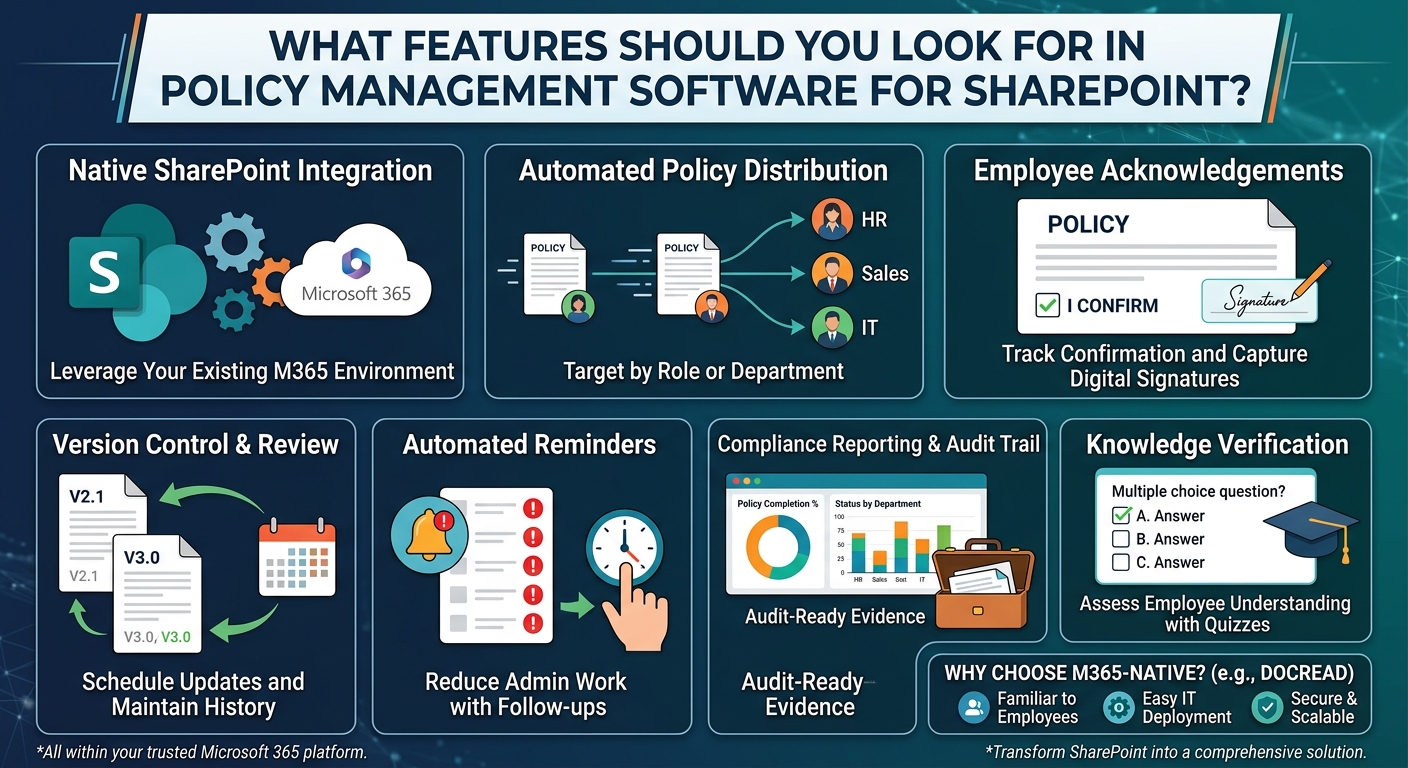
Choosing policy management software isn't just about finding a place to store documents, as most organizations already have that with SharePoint.
The real challenge is making sure policies reach the right people, employees confirm they've read them, compliance can be monitored, and auditors have the evidence they need, all without creating unnecessary administrative work.
With so many solutions available, it can be difficult to know which features actually make a difference. Rather than focusing on the longest feature list, organizations should look for capabilities that improve governance while fitting naturally into their existing Microsoft 365 environment.
Native SharePoint Integration
If your organization already uses SharePoint, your policy management software should work with it instead of around it.
Solutions built specifically for Microsoft 365 allow policies to remain in existing SharePoint libraries while adding the governance capabilities needed to manage them effectively. This eliminates the need for duplicate document repositories or migrating policies into a separate application.
Keeping policies where employees already work also improves adoption and minimizes the amount of training required. To see how this works in practice, read about DocRead, our policy management software for SharePoint.
Automated Policy Distribution
As organizations grow, manually emailing policies quickly becomes difficult to manage and nearly impossible to track.
A strong policy management solution should automatically distribute policies to employees based on criteria such as department, role, location, or Microsoft Entra ID security groups.
This ensures employees receive the documents relevant to their responsibilities while reducing the administrative burden on HR, compliance, and IT teams.
READ: Manage Policies and Procedures in SharePoint
Employee Acknowledgements
Publishing a policy doesn't mean employees have actually read it.
One of the most valuable capabilities is the ability to require acknowledgements. Employees should be able to confirm they have received, read, and understood a policy, with every acknowledgement automatically recorded.
This creates a clear audit trail and provides evidence that policies have been communicated across the organization.
Version Control and Review Management
Policies are living documents. As regulations change and business processes evolve, they need to be reviewed and updated regularly.
Policy management software should make it easy to publish new versions, notify employees when updates are made, and request fresh acknowledgements where necessary.
It should also support scheduled review cycles to help ensure outdated policies don't remain in circulation.
Automated Reminders
Following up with employees who haven't acknowledged a policy can consume valuable time.
Automated reminders keep policy distribution moving without requiring administrators to send repeated emails or maintain manual tracking spreadsheets.
The result is higher completion rates, less administrative effort, and a more consistent compliance process.
Compliance Reporting
Without visibility, it's difficult to know whether your policy management process is actually working.
Look for software that provides real-time reporting on policy distribution, employee acknowledgements, outstanding actions, and compliance across departments or business units.
Centralized reporting allows administrators to identify gaps quickly instead of gathering information from multiple systems.
Audit-Ready Records
For many organizations, particularly those operating in regulated industries, maintaining accurate records is just as important as distributing policies.
A policy management solution should automatically record policy versions, publication dates, acknowledgements, reminder history, and administrative actions.
Having a complete audit trail readily available can simplify both internal reviews and external audits while reducing the time spent gathering evidence.
Knowledge Verification
Some policies require more than a simple acknowledgement.
Critical procedures, safety requirements, or regulatory obligations may require employees to demonstrate they understand the content before carrying out certain responsibilities.
Knowledge assessments or quizzes provide additional assurance that employees have understood key policies rather than simply confirming they opened the document.
Why Microsoft 365-Native Solutions Have an Advantage
Organizations already invested in Microsoft 365 often benefit most from solutions designed specifically for that environment.
Rather than introducing another application, Microsoft 365-native solutions build on existing SharePoint infrastructure, permissions, and document libraries. Employees continue accessing policies from a familiar location, while administrators benefit from simpler deployment and easier long-term management.
This approach also avoids the complexity of maintaining multiple systems for storing and governing organizational policies.
How DocRead Supports Policy Management
DocRead extends SharePoint and Microsoft 365 with dedicated policy management capabilities without requiring organizations to move policies into another repository.
Instead, policies remain in SharePoint while administrators gain features such as:
- Automated policy distribution
- Employee acknowledgements
- Version tracking
- Scheduled review reminders
- Real-time compliance reporting
- Audit-ready records
- Role-based policy targeting
- Knowledge assessments
By building directly on SharePoint, DocRead strengthens governance while allowing employees to continue accessing policies through the platform they already use every day.
Software That Supports Long-Term Governance
The best policy management software should do more than organize documents. It should help organizations communicate policies consistently, monitor compliance, reduce administrative effort, and provide clear evidence that policies have been received and understood.
For organizations already using Microsoft 365, solutions that work natively with SharePoint often provide the most practical approach. Rather than replacing existing systems, they extend them with the governance, automation, and reporting capabilities needed for effective policy management.
DocRead is one example of this approach. By combining automated policy distribution, acknowledgements, compliance reporting, and audit-ready tracking within SharePoint, it enables organizations to transform a document repository into a comprehensive policy management solution while keeping employees in the Microsoft 365 environment they already know.
Tired of reminding staff to read your company policies?
DocRead makes compliance simple
Are your policies read on time and by the right people?
DocRead makes compliance simple
Get your free Standard Operating Procedures guide
Creating Standard Operating Procedures for your organisation doesn't have to be complicated. This guide will introduce you to the whole lifecycle from creation to training and distribution.
You may also like:
October 23, 2026
October 16, 2026
The Equifax Catastrophe: How One Missed Update Became a $700M Fine In most workplaces, ...
October 9, 2026
The Equifax Catastrophe: How One Missed Update Became a $700M Fine In most workplaces, ...
October 2, 2026
The Equifax Catastrophe: How One Missed Update Became a $700M Fine In most workplaces, ...
September 18, 2026
How to Manage Policy Exceptions in Microsoft 365 Without Losing Audit ControlPolicies are designed ...
September 11, 2026
Contractor Policy Acknowledgment: How to Track Compliance for Third PartiesOrganizations often rely on contractors, ...