
DocRead for Microsoft 365
DocRead: Policy Acknowledgment Software for Microsoft 365
DocRead for Microsoft 365 is policy acknowledgment software that runs in SharePoint Online. You assign a policy from your existing library to Microsoft Entra ID or SharePoint groups and set a deadline. DocRead reminds each reader, escalates overdue tasks to managers and records a time-stamped receipt of the exact version each person read.
On SharePoint Server 2019 or 2016? Download the 30-day free trial of DocRead for SharePoint Server. Compare both DocRead editions.
★★★★★ 5.0 from 12 reviews on Capterra · Used by Colonial Pipeline, North Wales Police, Fiji Airways, Wipro and Enstar Group
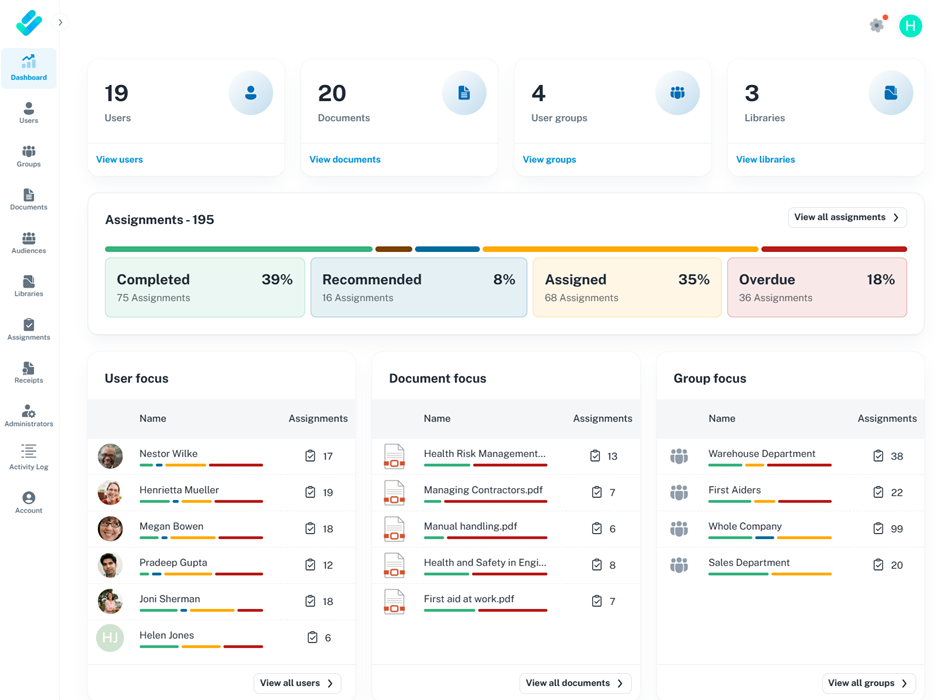
What DocRead covers, from assignment to audit
DocRead runs the whole read-and-acknowledge process for a policy, not only the click at the end. Each stage below happens inside SharePoint Online, against the documents you already keep there.
| Stage | What DocRead does | What you can show an auditor |
|---|---|---|
| Assign | Assigns a policy to Microsoft Entra ID groups, SharePoint groups or named people. When group membership changes, assignments update, so new joiners get the policies for their group. | Who was required to read each policy, and from when |
| Deadline | Sets a reading deadline on each assignment. | Which tasks were completed on time and which ran late |
| Notify and remind | Emails each reader, then sends reminders until the task is done. | That staff were told, not just that a file was published |
| Escalate | Escalates overdue reading tasks to the reader's manager. | How overdue acknowledgments were followed up |
| Read, then confirm | Readers must open the document before they can confirm they have read it. | That each confirmation followed an open, not a blind click |
| Receipt | Records a time-stamped acknowledgment of the exact document version each person read. | Which version a person confirmed, and when |
| Check understanding | Adds an optional quiz with a pass mark through DocSurvey, so the task completes only when the reader passes. | Proof of understanding for safety, security and other high-risk rules |
| Report | Dashboards show completion by person, group and document. Records can be exported, and you can build Power BI compliance reports from DocRead data. | Who is complete and who is outstanding, on any date |
| Keep | Keeps leavers' records until an administrator archives them. | Evidence for people who have since left |
How it works in SharePoint Online
DocRead adds the reading task and the record on top of the SharePoint Online libraries, permissions and groups you already manage. Policies do not move to a second system.
Pick the policy in your library
Choose a document that already lives in a SharePoint Online library. It keeps the permissions and version history you have today.
Assign it to the people it applies to
Select Microsoft Entra ID groups, SharePoint groups or individual people, and set a reading deadline.
Readers open and confirm
Each reader gets an email, opens the document and confirms they have read it. DocRead stores a time-stamped receipt against that version.
Reminders and escalation run themselves
DocRead reminds anyone who has not finished and escalates overdue tasks to their manager.
Add a quiz where a click is not enough
Link a DocSurvey quiz with a pass mark to a safety procedure or security rule, so the task completes only when the reader passes.
Report and export
Check completion by person, group or document, and export the records when an auditor asks.
DocRead vs Microsoft Purview vs a Power Automate build
Microsoft 365 already includes compliance tools, so a common question is whether you need policy acknowledgment software at all. Purview governs and audits data. Power Automate can run approval flows you design. DocRead is built to assign policies and prove who read which version.
| DocRead for Microsoft 365 | Microsoft Purview | Power Automate build | |
|---|---|---|---|
| Main job | Assign policies and prove each person read the current version | Data security, governance, retention, auditing and eDiscovery across Microsoft 365 | Automate sign-off requests and other workflows you design |
| Required reading by group | Built inTo Entra ID or SharePoint groups | Not includedNot a Purview feature | Build itYou build the triggers, lists and logic |
| Deadlines, reminders and manager escalation | Built inSet per assignment | Not includedNot a Purview feature | Build itYou build and maintain each flow |
| Proof a person confirmed a version | Built inTime-stamped receipt per person and version | Not includedThe audit log records file activity, such as a file being accessed, not a confirmation | Build itOnly if your flow stores the person, version and time |
| How long records last | Until an administrator archives them | Audit (Standard) keeps records for 180 days; audit log retention policies can keep them for up to 10 years | Wherever your flow writes them, such as a SharePoint list |
| Quiz with a pass mark | OptionalWith DocSurvey | Not includedNot a Purview feature | Build itBuilt separately |
| Who maintains it | Collaboris maintains the product; you configure it | Microsoft | Your own team |
Sources: Microsoft Learn, “Learn about auditing solutions in Microsoft Purview”, “Manage audit log retention policies” and “Get started with Power Automate approvals”, checked October 19, 2026.
Purview and DocRead do different jobs and work side by side. Read the full comparison: Microsoft Purview vs policy acknowledgment software. Comparing vendors instead? See DocRead vs PowerDMS and DocRead vs Xoralia vs ConvergePoint.
Entra ID groups, Teams, data location and licensing
Microsoft Entra ID groups
Assign policies to the Entra ID groups you already use. If those groups have dynamic membership rules based on attributes such as department or job title, Entra ID adds and removes members as people change roles, and DocRead's assignments follow. See how to assign policies to Entra ID dynamic groups.
Access from Microsoft Teams
Your policies stay in a normal SharePoint Online document library. Microsoft Teams lets you add a SharePoint document library or page as a tab in a channel, so staff can open the policy library from Teams. Reading tasks reach each person by email.
Where your data stays
DocRead does not copy policies into another system. Documents stay in your SharePoint Online libraries, with the permissions and version history you already manage, and the document, the reading task and the acknowledgment record stay inside Microsoft 365. Microsoft stores your SharePoint Online content in your tenant's data location.
Licensing
DocRead is licensed per user, and only people who receive reading assignments count. One person needs one license however many policies they receive. Nobody else in your tenant counts. See DocRead pricing and licensing or request a quote for Microsoft 365 pricing.
Who uses DocRead for Microsoft 365
DocRead is built for teams that must show who read which policy, and when.
Compliance and risk managers
Answer auditors and regulators with a time-stamped record of who read each policy.
HR teams
Roll out the employee handbook, code of conduct and onboarding policies to the right people.
Quality managers
Run ISO 9001 or GxP document control with proof that staff read the current version.
SharePoint and Microsoft 365 owners
Add policy tracking without another platform to run or another login for staff.
It is used in regulated sectors such as healthcare, financial services, law enforcement and public sector, and manufacturing and life sciences. Read the DocRead case studies, including Check Your Security, which replaced policies emailed as PDF attachments with DocRead for Microsoft 365.
“We are now saving 2 to 3 weeks per policy on administration alone.”Nick Ferguson, Peregrine Pharmaceuticals (DocRead for SharePoint Server)
Moving from SharePoint Server to SharePoint Online?
Microsoft's extended support for SharePoint Server 2016 and SharePoint Server 2019 ended on July 14, 2026. If you are moving your policies to SharePoint Online, DocRead for Microsoft 365 runs there natively. If you are staying on premises, see DocRead for SharePoint Server.
For the wider picture of running policies in SharePoint and Microsoft 365, read our guide to policy management software for SharePoint.
DocRead for Microsoft 365 FAQ
What is DocRead for Microsoft 365?
DocRead for Microsoft 365 is policy acknowledgment software that runs in SharePoint Online. It assigns policies to Microsoft Entra ID or SharePoint groups, sets reading deadlines, sends reminders, escalates overdue tasks to managers and records a time-stamped acknowledgment of the exact version each person read.
Is DocRead only an acknowledgment tool?
No. DocRead covers the whole reading process: assigning policies to groups, deadlines, email reminders, escalation to managers, version-specific receipts, optional quizzes through DocSurvey, and dashboards and exports for audits. Readers must open a document before they can confirm it.
Can DocRead assign policies to Microsoft Entra ID groups?
Yes. You can assign a policy to Microsoft Entra ID groups or SharePoint groups, or add individual people. When group membership changes, DocRead updates the assignments, so new joiners receive the policies for their group. If your Entra ID groups use dynamic membership rules based on department or job title, membership stays current as people change roles.
How is DocRead different from Microsoft Purview?
Microsoft Purview protects and governs data across Microsoft 365, and its audit log records activity such as file access. Audit (Standard) keeps those records for 180 days by default. Purview does not assign required reading or record that a person confirmed a policy version. DocRead does that, and the two work side by side.
Can I build policy acknowledgment with Power Automate instead?
You can build a sign-off flow with Power Automate approvals, but your team then designs and maintains the assignments, reminders, escalation, version capture and reporting. DocRead provides those steps as a product inside SharePoint Online, so there is no flow to maintain.
Can DocRead check that people understood a policy?
Yes. Add a quiz with DocSurvey, the Collaboris add-on for quizzes, surveys and forms linked to documents. You set a pass mark, and the reading task is complete only when the reader passes. Use it where a click is not enough proof, such as safety procedures or information security rules.
Can I export acknowledgment records for an audit?
Yes. Every assignment and acknowledgment is time-stamped, and each reading receipt records the user, the document version and the time. Dashboards show who is complete and who is outstanding, and you can export the records for auditors or build Power BI reports from DocRead data.
What is the difference between DocRead for Microsoft 365 and DocRead for SharePoint Server?
DocRead for Microsoft 365 runs in SharePoint Online inside your Microsoft 365 tenant. DocRead for SharePoint Server is installed on your own SharePoint Server 2019 or 2016 farm. Both editions assign policies to groups, send reminders and keep acknowledgment records. Microsoft's extended support for SharePoint Server 2016 and 2019 ended on July 14, 2026.
How is DocRead for Microsoft 365 licensed?
DocRead is licensed per user, and only employees who receive reading assignments count. A person who receives five policies needs one license, not five. People in your tenant who never receive a reading task are not counted. For Microsoft 365 pricing, request a quote.
See DocRead in your own Microsoft 365 tenant
Book a 30-minute demo and we will show you assignments, reminders and acknowledgment reports running in SharePoint Online.