
Automate Internal Communications with DocRead & SharePoint
Keeping internal communications organised shouldn’t feel like herding cats. DocRead helps organisations automate internal communications directly within SharePoint, transforming how policies, announcements, employee newsletters, and corporate communications are delivered and confirmed. Instead of relying on manual emails and hoping staff have read critical updates, DocRead adds structured targeting, mandatory acknowledgment, and full compliance tracking.
As internal communication software for business, it ensures every message—whether a policy update, training document, or company-wide newsletter—is assigned, acknowledged, and tracked inside SharePoint, strengthening accountability without disrupting everyday workflows.
Automate Your Internal Communications With Docread In 3 Simple Steps
Target any content stored in SharePoint or on the web to individual users or groups. DocRead will automatically create assignments, requiring users to read and confirm they have reviewed the content.
1 - Target
Target any content stored in SharePoint or on the web to individual users or groups. DocRead automatically creates assignments, requiring users to read and confirm they have reviewed the content.
This structured targeting ensures that important policies, training materials, internal newsletter updates, and corporate newsletter announcements reach the right people at the right time.
By integrating internal communication software for business directly into SharePoint, DocRead removes guesswork from distribution. Whether you are sending a holding statement during a critical update or rolling out employee newsletter examples as templates for managers, targeting remains precise and secure.
2 - Acknowledge
Email alerts are sent when new assignments are created, completed, or become overdue. Users can complete their assignments directly from the email or within SharePoint.
This functionality enhances traditional internal comms email software by adding confirmation and auditability. Instead of wondering whether a corporate newsletter or compliance update has been read, administrators gain clear acknowledgment records.
Completing The Assignment From The Email
Users receive automated notifications prompting them to review assigned content. From within the message, they can open the document, confirm review, and complete the task, making it easy to stay compliant without navigating away from their workflow.
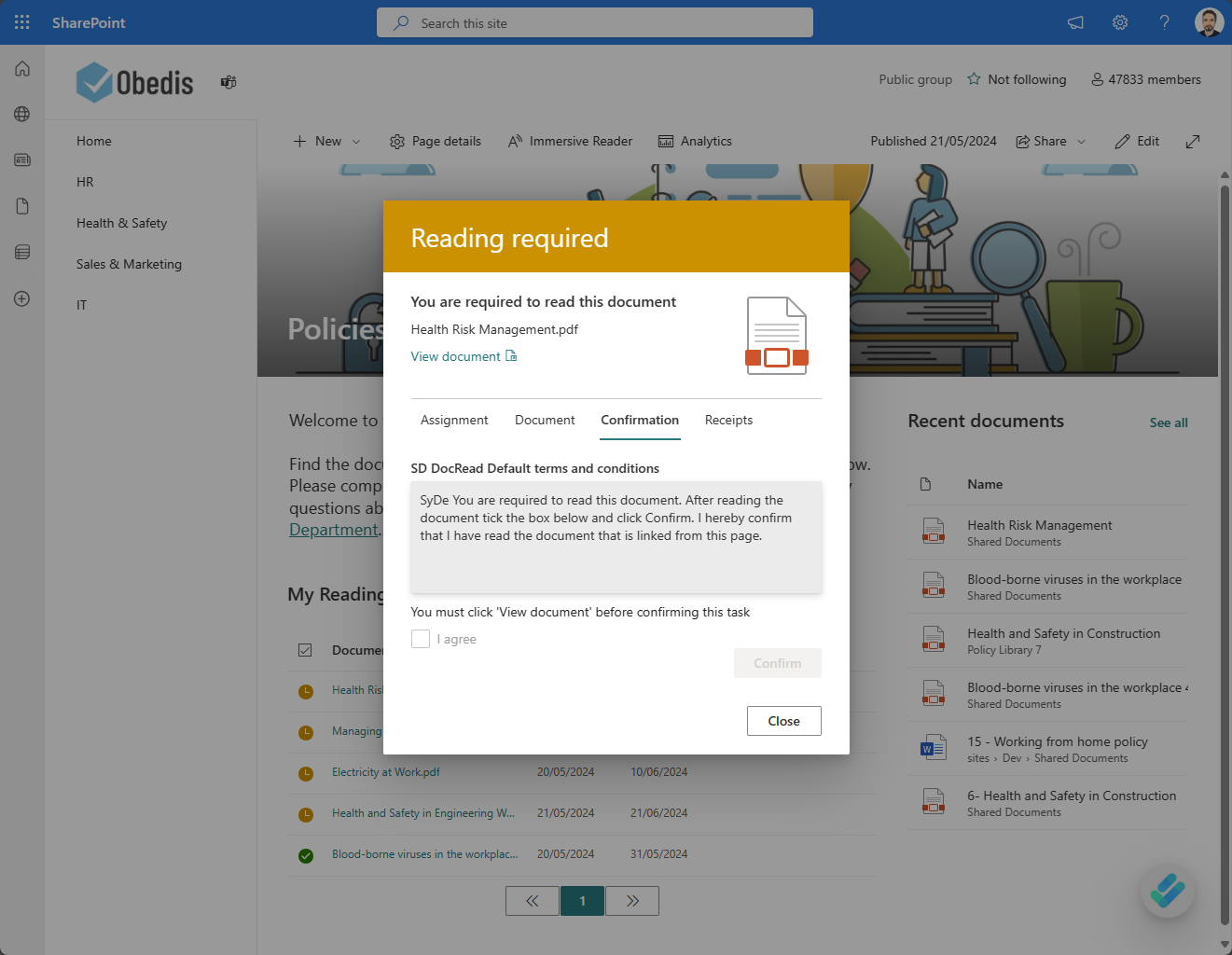
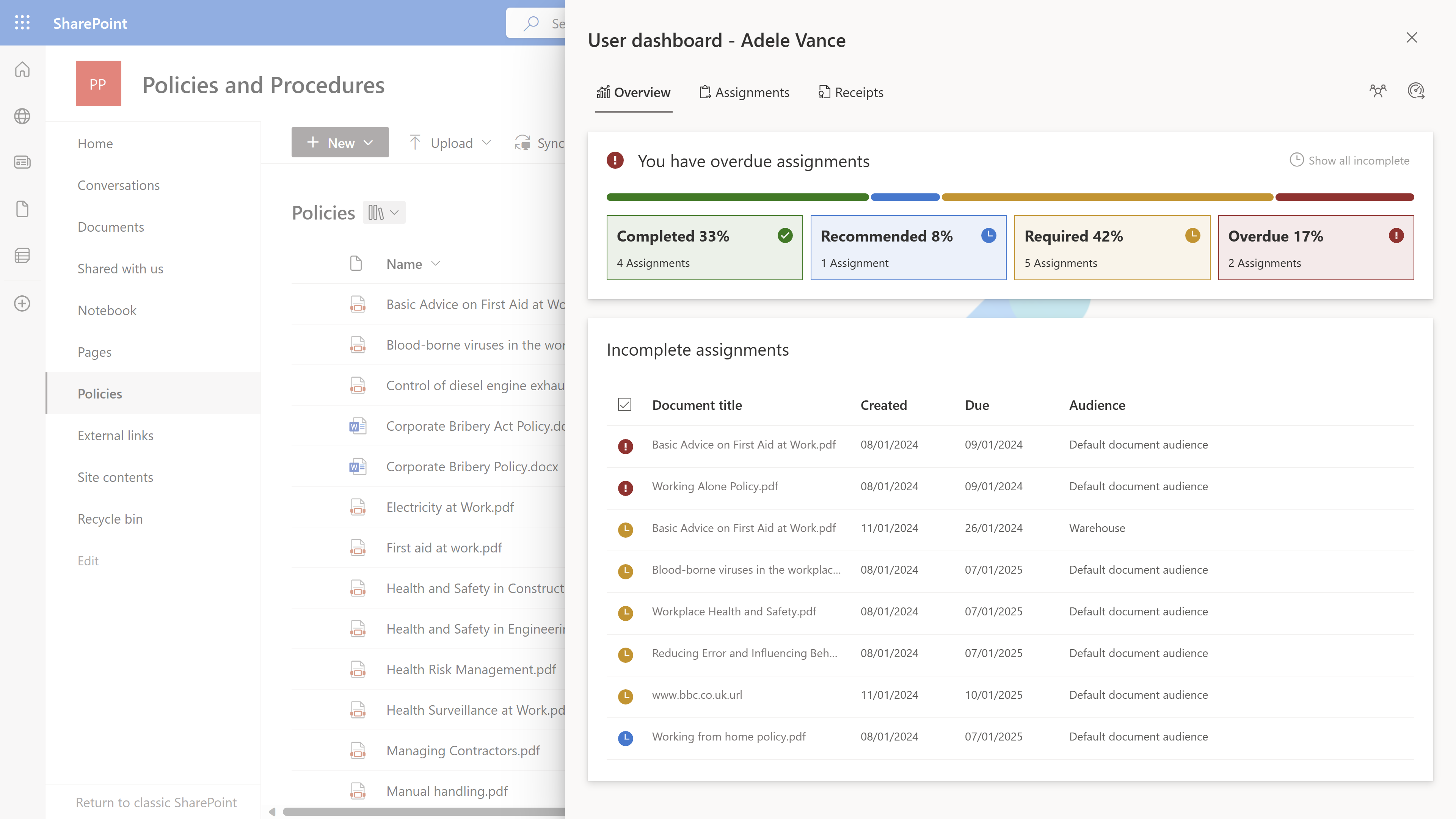
Completing The Assignment From The Docread User Dashboard In SharePoint
Alternatively, users can log into their DocRead dashboard within SharePoint to view all assigned reading, training, and newsletters for company communications in one place. This centralised view supports ongoing awareness and improves visibility across departments.
For organisations that depend on structured team newsletter communications or formal internal newsletter cycles, this approach ensures every update is delivered, acknowledged, and tracked. Important announcements, compliance notices, and corporate newsletter messages are never overlooked or left unread.
3 - Track
DocRead dashboards provide administrators with quick and easy tracking of progress. They offer comprehensive statistical information on reading assignments, with detailed drill-down options for specific documents, users, audiences, libraries, and groups. This tracking transforms internal communication software for business from a distribution tool into a measurable compliance solution.
Clear dashboards remove uncertainty and deliver reliable, evidence-based reporting that supports governance, strengthens compliance oversight, and provides full visibility into engagement, progress, and accountability across policies, communications, and organisational requirements.
Why Businesses Choose Automated Internal Communications
Modern workforces require consistent, trackable communication across hybrid and remote environments. Simply sending an employee newsletter or internal newsletter is no longer sufficient. Businesses must ensure that information is delivered, read, and acknowledged.
DocRead supports this need by enabling organisations to:
By embedding automation directly into SharePoint, organisations streamline internal communications, reduce manual processes, and improve accountability—without introducing extra systems, disrupting workflows, or adding unnecessary complexity for employees or administrators.
Technologies That Power DocRead for SharePoint
Microsoft SharePoint & Microsoft 365
DocRead operates directly within SharePoint, ensuring seamless adoption without disrupting user workflows. Employees continue using familiar tools while benefiting from structured internal communication software for business.
Email & Notification Automation
Automated alerts ensure assignments are acknowledged, completed, or escalated when overdue. This enhances traditional internal comms email software by embedding accountability into every message.
Dashboards & Reporting
Administrators gain full visibility into compliance, progress, and engagement. Detailed dashboards support auditing of employee newsletter confirmations, tracking of corporate newsletter readership, and monitoring of time-sensitive holding statement distribution.
Secure, Permission-Based Access
Assignments respect SharePoint permissions, ensuring secure and accurate targeting. Only the intended audience receives each internal newsletter or team newsletter communication, aligning with governance and data security standards.
Frequently Asked Questions
DocRead automates internal communications by transforming SharePoint content into structured reading or training assignments. Administrators select documents, policies, newsletters, or announcements and assign them to specific users or groups. The system automatically sends notifications, requires acknowledgment, and tracks completion. Instead of relying on manual email distribution, every message becomes part of a controlled workflow. This ensures that important updates are not only delivered but also confirmed, recorded, and reportable within SharePoint.
Yes. DocRead tracks employee newsletter acknowledgments in real time. When a newsletter or corporate update is assigned, users must confirm they have reviewed the content. Administrators can then monitor acknowledgment rates through dashboards and detailed reports. This removes uncertainty around readership and provides clear evidence that communications have been received and reviewed—particularly important for compliance-sensitive updates or structured internal newsletter cycles.
DocRead operates directly within Microsoft SharePoint and integrates seamlessly with Microsoft 365 environments. Employees continue using familiar tools without switching platforms or learning a new system. Because it works inside SharePoint, permissions, document libraries, and user groups remain consistent. This native integration ensures smooth adoption, minimal disruption, and secure targeting across the organisation.
DocRead creates a verifiable audit trail for all assigned communications. Administrators can generate detailed reports showing who received, opened, and acknowledged specific documents. Overdue assignments can be identified quickly, and reminders can be issued automatically. This structured tracking supports governance requirements, strengthens policy management processes, and provides clear documentation during internal or external audits.
Yes. In addition to SharePoint content, DocRead can assign external training materials such as web pages, online courses, or hosted videos. These external resources are converted into structured assignments, requiring acknowledgment just like internal documents. This ensures consistent tracking and accountability, even when content is hosted outside SharePoint.
See How Docread Can Help
Discover how DocRead can Automate Internal Communications by booking a personalised discovery session and demo with one of our experts. During the call, your requirements will be discussed, questions answered, and practical demonstrations provided to show how DocRead enhances your employee newsletter strategy, strengthens your communications flow chart, and supports secure internal communication software for business.
DocRead has enabled us to see a massive efficiency improvement... we are now saving 2 to 3 weeks per policy on administration alone.
Nick Ferguson
Peregrine Pharmaceuticals
Feedback for the on-premises version of DocRead.